1. Java 入门
1.1 Java 简介
Java 是由 Sun Microsystems 公司于 1995 年 5 月推出的 Java 面向对象程序设计语言和 Java 平台的总称。由 James Gosling和同事们共同研发,并在 1995 年正式推出。
后来 Sun 公司被 Oracle (甲骨文)公司收购,Java 也随之成为 Oracle 公司的产品。
Java分为三个体系:
- JavaSE(J2SE)(Java2 Platform Standard Edition,java平台标准版)
- JavaEE(J2EE)(Java 2 Platform,Enterprise Edition,java平台企业版)
- JavaME(J2ME)(Java 2 Platform Micro Edition,java平台微型版)。
2005 年 6 月,JavaOne 大会召开,SUN 公司公开 Java SE 6。此时,Java 的各种版本已经更名,以取消其中的数字 "2":J2EE 更名为 Java EE,J2SE 更名为Java SE,J2ME 更名为 Java ME。
主要特性
-
Java 语言是简单的:
Java 语言的语法与 C 语言和 C++ 语言很接近,使得大多数程序员很容易学习和使用。另一方面,Java 丢弃了 C++ 中很少使用的、很难理解的、令人迷惑的那些特性,如操作符重载、多继承、自动的强制类型转换。特别地,Java 语言不使用指针,而是引用。并提供了自动分配和回收内存空间,使得程序员不必为内存管理而担忧。
-
Java 语言是面向对象的:
Java 语言提供类、接口和继承等面向对象的特性,为了简单起见,只支持类之间的单继承,但支持接口之间的多继承,并支持类与接口之间的实现机制(关键字为 implements)。Java 语言全面支持动态绑定,而 C++语言只对虚函数使用动态绑定。总之,Java语言是一个纯的面向对象程序设计语言。
-
Java语言是分布式的:
Java 语言支持 Internet 应用的开发,在基本的 Java 应用编程接口中有一个网络应用编程接口(java net),它提供了用于网络应用编程的类库,包括 URL、URLConnection、Socket、ServerSocket 等。Java 的 RMI(远程方法激活)机制也是开发分布式应用的重要手段。
-
Java 语言是健壮的:
Java 的强类型机制、异常处理、垃圾的自动收集等是 Java 程序健壮性的重要保证。对指针的丢弃是 Java 的明智选择。Java 的安全检查机制使得 Java 更具健壮性。
-
Java语言是安全的:
Java通常被用在网络环境中,为此,Java 提供了一个安全机制以防恶意代码的攻击。除了Java 语言具有的许多安全特性以外,Java 对通过网络下载的类具有一个安全防范机制(类 ClassLoader),如分配不同的名字空间以防替代本地的同名类、字节代码检查,并提供安全管理机制(类 SecurityManager)让 Java 应用设置安全哨兵。
-
Java 语言是体系结构中立的:
Java 程序(后缀为 java 的文件)在 Java 平台上被编译为体系结构中立的字节码格式(后缀为 class 的文件),然后可以在实现这个 Java 平台的任何系统中运行。这种途径适合于异构的网络环境和软件的分发。
-
Java 语言是可移植的:
这种可移植性来源于体系结构中立性,另外,Java 还严格规定了各个基本数据类型的长度。Java 系统本身也具有很强的可移植性,Java 编译器是用 Java 实现的,Java 的运行环境是用 ANSI C 实现的。
-
Java 语言是解释型的:
如前所述,Java 程序在 Java 平台上被编译为字节码格式,然后可以在实现这个 Java 平台的任何系统中运行。在运行时,Java 平台中的 Java 解释器对这些字节码进行解释执行,执行过程中需要的类在联接阶段被载入到运行环境中。
-
Java 是高性能的:
与那些解释型的高级脚本语言相比,Java 的确是高性能的。事实上,Java 的运行速度随着 JIT(Just-In-Time)编译器技术的发展越来越接近于 C++。
-
Java 语言是多线程的:
在 Java 语言中,线程是一种特殊的对象,它必须由 Thread 类或其子(孙)类来创建。通常有两种方法来创建线程:其一,使用型构为 Thread(Runnable) 的构造子类将一个实现了 Runnable 接口的对象包装成一个线程,其二,从 Thread 类派生出子类并重写 run 方法,使用该子类创建的对象即为线程。值得注意的是 Thread 类已经实现了 Runnable 接口,因此,任何一个线程均有它的 run 方法,而 run 方法中包含了线程所要运行的代码。线程的活动由一组方法来控制。Java 语言支持多个线程的同时执行,并提供多线程之间的同步机制(关键字为 synchronized)。
-
Java 语言是动态的:
Java 语言的设计目标之一是适应于动态变化的环境。Java 程序需要的类能够动态地被载入到运行环境,也可以通过网络来载入所需要的类。这也有利于软件的升级。另外,Java 中的类有一个运行时刻的表示,能进行运行时刻的类型检查。
发展历史
- 1995 年 5 月 23 日,Java 语言诞生
- 1996 年 1 月,第一个 JDK-JDK1.0 诞生
- 1996 年 4 月,10 个最主要的操作系统供应商申明将在其产品中嵌入 JAVA 技术
- 1996 年 9 月,约 8.3 万个网页应用了 JAVA 技术来制作
- 1997 年 2 月 18 日,JDK1.1 发布
- 1997 年 4 月 2 日,JavaOne 会议召开,参与者逾一万人,创当时全球同类会议规模之纪录
- 1997 年 9 月,JavaDeveloperConnection 社区成员超过十万
- 1998 年 2 月,JDK1.1 被下载超过 2,000,000次
- 1998 年 12 月 8 日,JAVA2 企业平台 J2EE 发布
- 1999 年 6月,SUN 公司发布 Java 的三个版本:标准版(JavaSE, 以前是 J2SE)、企业版(JavaEE 以前是 J2EE)和微型版(JavaME,以前是 J2ME)
- 2000 年 5 月 8 日,JDK1.3 发布
- 2000 年 5 月 29 日,JDK1.4 发布
- 2001 年 6 月 5 日,NOKIA 宣布,到 2003 年将出售 1 亿部支持 Java 的手机
- 2001 年 9 月 24 日,J2EE1.3 发布
- 2002 年 2 月 26 日,J2SE1.4 发布,自此 Java 的计算能力有了大幅提升
- 2004 年 9 月 30 日 18:00PM,J2SE1.5 发布,成为 Java 语言发展史上的又一里程碑。为了表示该版本的重要性,J2SE1.5 更名为 Java SE 5.0
- 2005 年 6 月,JavaOne 大会召开,SUN 公司公开 Java SE 6。此时,Java 的各种版本已经更名,以取消其中的数字 "2":J2EE 更名为 Java EE,J2SE 更名为 Java SE,J2ME 更名为 Java ME
- 2006 年 12 月,SUN 公司发布 JRE6.0
- 2009 年 04 月 20 日,甲骨文 74 亿美元收购 Sun,取得 Java 的版权。
- 2010 年 11 月,由于甲骨文对于 Java 社区的不友善,因此 Apache 扬言将退出 JCP。
- 2011 年 7 月 28 日,甲骨文发布 Java7.0 的正式版。
- 2014 年 3 月 18 日,Oracle 公司发表 Java SE 8。
- 2017 年 9 月 21 日,Oracle 公司发表 Java SE 9
- 2018 年 3 月 21 日,Oracle 公司发表 Java SE 10
- 2018 年 9 月 25 日,Java SE 11 发布
- 2019 年 3 月 20 日,Java SE 12 发布
Java 开发工具
Java 语言尽量保证系统内存在 1G 以上,其他工具如下所示:
- Linux 系统、Mac OS 系统、Windows 95/98/2000/XP,WIN 7/8系统。
- Java JDK 7、8……
- vscode 编辑器或者其他编辑器。
- IDE:Eclipse、 IntelliJ IDEA、NetBeans 等。
1.2 开发环境搭建
window系统安装java
下载JDK
首先我们需要下载 java 开发工具包 JDK,下载地址:https://www.oracle.com/java/technologies/downloads/,在下载页面中根据自己的系统选择对应的版本,本文以 Window 64位系统为例:
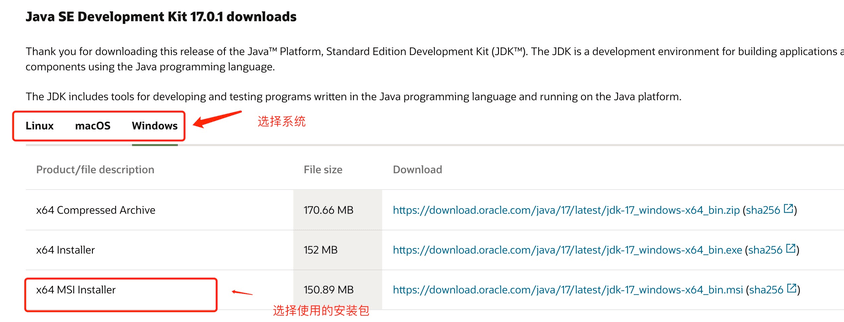
下载后 JDK 的安装根据提示进行,还有安装 JDK 的时候也会安装 JRE,一并安装就可以了。
安装JDK,安装过程中可以自定义安装目录等信息,例如我们选择安装目录为 C:\Program Files (x86)\Java\jdk1.8.0_91。
配置环境变量
1.安装完成后,右击"我的电脑",点击"属性",选择"高级系统设置";
2.选择"高级"选项卡,点击"环境变量";
在 "系统变量" 中设置 3 项属性,JAVA_HOME、PATH、CLASSPATH(大小写无所谓),若已存在则点击"编辑",不存在则点击"新建"。
**注意:**如果使用 1.5 以上版本的 JDK,不用设置 CLASSPATH 环境变量,也可以正常编译和运行 Java 程序。
变量设置参数如下:
-
变量名:JAVA_HOME
-
变量值:C:\Program Files (x86)\Java\jdk1.8.0_91 // 要根据自己的实际路径配置
-
变量名:CLASSPATH
-
变量值:.;%JAVA_HOME%\lib\dt.jar;%JAVA_HOME%\lib\tools.jar; //记得前面有个"."
-
变量名:Path
-
变量值:%JAVA_HOME%\bin;%JAVA_HOME%\jre\bin;
JAVA_HOME 设置
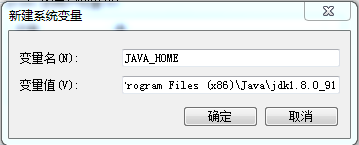
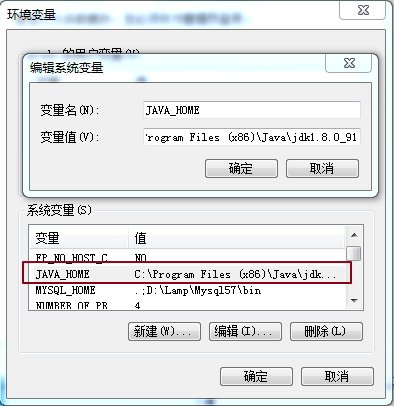
PATH设置
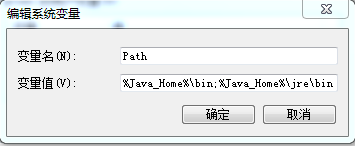
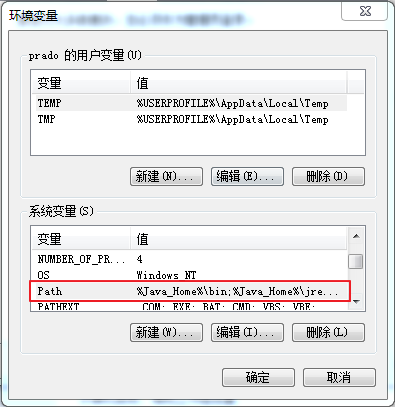
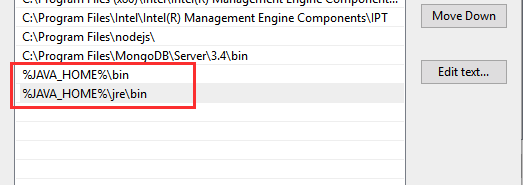
**注意:**在 Windows10 中,Path 变量里是分条显示的,我们需要将 %JAVA_HOME%\bin;%JAVA_HOME%\jre\bin; 分开添加,否则无法识别:
%JAVA_HOME%\bin; %JAVA_HOME%\jre\bin;
更多内容可参考:Windows 10 配置Java 环境变量
CLASSPATH 设置
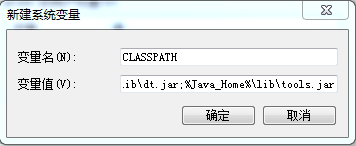
这是 Java 的环境配置,配置完成后,你可以启动 Eclipse 来编写代码,它会自动完成java环境的配置。
测试JDK是否安装成功
1、"开始"->"运行",键入"cmd";
2、键入命令: java -version、java、javac 几个命令,出现以下信息,说明环境变量配置成功;

Linux,UNIX,Solaris,FreeBSD环境变量设置
环境变量PATH应该设定为指向Java二进制文件安装的位置。如果设置遇到困难,请参考shell文档。
例如,假设你使用bash作为shell,你可以把下面的内容添加到你的 .bashrc文件结尾: export PATH=/path/to/java:$PATH
流行 Java 开发工具
正所谓工欲善其事必先利其器,我们在开发 Java 语言过程中同样需要一款不错的开发工具,目前市场上的 IDE 很多,本文为大家推荐以下下几款 Java 开发工具:
-
JetBrains 的 IDEA, 现在很多人开始使用了,功能很强大,下载地址:https://www.jetbrains.com/idea/download/

-
VSCode : VSCode(全称:Visual Studio Code)是一款由微软开发且跨平台的免费源代码编辑器。
下载地址:https://code.visualstudio.com/
安装教程: https://www.runoob.com/w3cnote/vscode-tutorial.html
-
**Netbeans:**开源免费的 Java IDE,下载地址: https://www.netbeans.org/index.html

-
**Eclipse:**另一个免费开源的 Java IDE,下载地址: https://www.eclipse.org/downloads/packages/
选择 Eclipse IDE for Java Developers:

1.3 第一个Java程序
public class HelloWorld { /* 第一个Java程序 * 它将输出字符串 Hello World */
public static void main(String[] args) {
System.out.println("Hello World"); // 输出 Hello World } }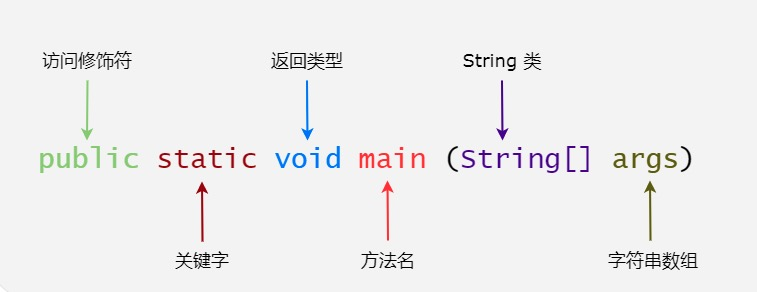 下面将逐步介绍如何保存、编译以及运行这个程序:
- 打开代码编辑器,把上面的代码添加进去;
- 把文件名保存为:HelloWorld.java;
- 打开 cmd 命令窗口,进入目标文件所在的位置,假设是 C:\
- 在命令行窗口输入 javac HelloWorld.java 按下回车键编译代码。如果代码没有错误,cmd 命令提示符会进入下一行(假设环境变量都设置好了)。
- 再键输入 java HelloWorld 按下回车键就可以运行程序了
2. 基础语法
2.1 注释(Comment)
Java 中有三种注释方式:
单行注释(Single-line Comment)
// 这是单行注释
int age = 25; // 也可以写在代码后面
多行注释(Multi-line Comment)
/*
 * 这是多行注释
 * 可以写多行内容
 * 用于较长的说明
 */
int count = 0;

/* 也可以写成一行 */
文档注释(Documentation Comment)
/**
 * 这是文档注释,用于生成 API 文档
 * @author 张三
 * @version 1.0
 * @param name 用户名
 * @return 返回值说明
 */
public String getUserInfo(String name) {
    return "User: " + name;
}注意:
- 注释不会被编译和执行
- 文档注释可以通过 javadoc 工具生成 HTML 文档
- 良好的注释习惯能提高代码可读性
2.2 标识符与关键字
命名规则(Naming Rules)
标识符(Identifier)是给类、方法、变量等起的名字,必须遵守以下规则:
- 只能包含:字母、数字、下划线(_)、美元符号($)
- 不能以数字开头
- 不能使用 Java 关键字
- 区分大小写
// 合法的标识符
int age;
int _count;
int $price;
int user123;
int userName;

// 非法的标识符
int 123user;    // 不能以数字开头
int class;      // 不能使用关键字
int user-name;  // 不能包含连字符
命名规范(Naming Conventions)
虽然不是强制要求,但遵循规范能让代码更易读:
| 类型 | 规范 | 示例 |
|---|---|---|
| 类名(Class) | 大驼峰命名法(PascalCase) | UserService, StudentInfo |
| 方法名(Method) | 小驼峰命名法(camelCase) | getUserName(), calculateTotal() |
| 变量名(Variable) | 小驼峰命名法 | userName, totalPrice |
| 常量名(Constant) | 全大写,下划线分隔 | MAX_VALUE, DEFAULT_SIZE |
| 包名(Package) | 全小写 | com.example.project |
// 命名规范示例
public class UserService {                    // 类名:大驼峰
    private static final int MAX_COUNT = 100; // 常量:全大写
    private String userName;                  // 变量:小驼峰

    public void getUserInfo() {               // 方法:小驼峰
        int totalCount = 0;                   // 局部变量:小驼峰
    }
}
Java 关键字(Keywords)
Java 保留了一些特殊用途的单词,不能用作标识符:
访问控制(Access Control)
public protected private类、方法、变量修饰符(Modifiers)
abstract    static      final       synchronized
native      transient   volatile    strictfp
类相关(Class-related)
class       interface   enum        extends
implements  package     import
流程控制(Control Flow)
if          else        switch      case
default     for         while       do
break       continue    return
异常处理(Exception Handling)
try         catch       finally     throw
throws      assert
基本数据类型(Primitive Types)
byte        short       int         long
float       double      char        boolean
其他(Others)
new         this        super       void
null        true        false       instanceof
保留字(Reserved but not used)
goto const2.3 数据类型(Data Type)
Java 是强类型语言,所有变量必须先声明类型才能使用。
基本数据类型(Primitive Data Type)
Java 有 8 种基本数据类型:
整数类型(Integer Types)
| 类型 | 字节数 | 取值范围 | 默认值 |
|---|---|---|---|
byte | 1 字节 | -128 ~ 127 | 0 |
short | 2 字节 | -32,768 ~ 32,767 | 0 |
int | 4 字节 | -2³¹ ~ 2³¹-1(约 ±21 亿) | 0 |
long | 8 字节 | -2⁶³ ~ 2⁶³-1 | 0L |
byte b = 100;
short s = 30000;
int i = 1000000;
long l = 9999999999L;  // long 类型需要加 L 或 l 后缀

// 不同进制表示
int decimal = 100;      // 十进制
int binary = 0b1100100; // 二进制(0b 开头)
int octal = 0144;       // 八进制(0 开头)
int hex = 0x64;         // 十六进制(0x 开头)
浮点类型(Floating-point Types)
| 类型 | 字节数 | 取值范围 | 默认值 | 精度 |
|---|---|---|---|---|
float | 4 字节 | ±3.4E+38 | 0.0f | 约 6-7 位有效数字 |
double | 8 字节 | ±1.7E+308 | 0.0d | 约 15 位有效数字 |
float f = 3.14f;        // float 类型需要加 F 或 f 后缀
double d = 3.14159;     // double 是默认的浮点类型
double d2 = 3.14d;      // 也可以加 D 或 d 后缀

// 科学计数法
double d3 = 3.14e2;     // 314.0
double d4 = 3.14e-2;    // 0.0314

// 注意:浮点数不精确
System.out.println(0.1 + 0.2);  // 0.30000000000000004
字符类型(Character Type)
| 类型 | 字节数 | 取值范围 | 默认值 |
|---|---|---|---|
char | 2 字节 | 0 ~ 65535(Unicode) | '\u0000' |
char c1 = 'A';          // 单个字符
char c2 = '中';         // 中文字符
char c3 = 65;           // ASCII 码(A)
char c4 = '\u0041';     // Unicode 编码(A)

// 转义字符
char newline = '\n';    // 换行
char tab = '\t';        // 制表符
char backslash = '\\';  // 反斜杠
char quote = '\'';      // 单引号
char doubleQuote = '\"';// 双引号
布尔类型(Boolean Type)
| 类型 | 字节数 | 取值范围 | 默认值 |
|---|---|---|---|
boolean | 1 字节 | true / false | false |
boolean isActive = true;
boolean hasPermission = false;

// 常用于条件判断
if (isActive) {
    System.out.println("激活状态");
}
引用数据类型(Reference Data Type)
除了基本数据类型,其他都是引用类型:
类(Class)
String name = "张三";           // String 是类
Scanner scanner = new Scanner(System.in);
Integer num = 100;              // 包装类
接口(Interface)
List<String> list = new ArrayList<>(); // List 是接口数组(Array)
int[] numbers = {1, 2, 3, 4, 5};
String[] names = new String[10];
基本类型 vs 引用类型:
| 特性 | 基本类型 | 引用类型 |
|---|---|---|
| 存储位置 | 栈内存(Stack) | 堆内存(Heap) |
| 存储内容 | 实际值 | 对象地址(引用) |
| 默认值 | 0、false、'\u0000' | null |
| 比较方式 | 值比较(==) | 地址比较(==)或内容比较(equals) |
// 基本类型
int a = 10;
int b = 10;
System.out.println(a == b);  // true(值相等)

// 引用类型
String s1 = new String("hello");
String s2 = new String("hello");
System.out.println(s1 == s2);       // false(地址不同)
System.out.println(s1.equals(s2));  // true(内容相同)
类型转换(Type Conversion)
自动类型转换(Implicit Conversion / Widening)
小范围类型自动转换为大范围类型(无数据丢失):
转换路径:
byte → short → int → long → float → double
       char  → int
// 自动类型转换
byte b = 10;
int i = b; // byte → int(自动)
long l = i; // int → long(自动)
float f = l; // long → float(自动)
double d = f; // float → double(自动)
// 运算中的自动转换
int x = 10;
double y = 3.5;
double result = x + y; // int 自动转为 double,结果为 13.5
// char 与 int
char c = 'A';
int code = c; // char → int(65)
System.out.println(code); // 65
// byte/short/char 运算时自动提升为 int
byte b1 = 10;
byte b2 = 20;
int sum = b1 + b2; // 结果是 int 类型
// byte b3 = b1 + b2; // 编译错误!需要强制转换强制类型转换(Explicit Conversion / Narrowing)
大范围类型转换为小范围类型(可能丢失精度):
语法:(目标类型) 变量
// 强制类型转换
double d = 3.14;
int i = (int) d;        // 3(小数部分丢失)

long l = 100L;
int i2 = (int) l;       // 100

// 可能溢出
int bigNum = 130;
byte b = (byte) bigNum; // -126(超出 byte 范围,发生溢出)

// 运算中的强制转换
int x = 10;
int y = 3;
double result = (double) x / y;  // 3.3333...
// 如果不转换:int result = x / y;  // 结果是 3

// 修正 byte/short 运算
byte b1 = 10;
byte b2 = 20;
byte b3 = (byte) (b1 + b2);  // 需要强制转换

// char 与数字
int code = 65;
char c = (char) code; // 'A'注意事项:
- boolean 类型不能与其他类型转换
- 强制转换可能导致精度丢失或溢出
- 多个数据混合运算时,先统一为最大类型再运算
// 混合运算示例
byte b = 10;
short s = 20;
int i = 30;
long l = 40L;
float f = 50.0f;
double d = 60.0;

// 结果类型为 double(最大类型)
double result = b + s + i + l + f + d;
2.4 变量与常量
变量声明与初始化(Variable Declaration and Initialization)
变量是内存中的一块存储空间,用于存储数据。
语法:
数据类型 变量名;              // 声明
数据类型 变量名 = 初始值;     // 声明并初始化
// 声明变量
int age;
String name;
// 初始化变量
age = 25;
name = "张三";
// 声明并初始化
int count = 0;
double price = 99.99;
boolean isActive = true;
// 同时声明多个变量
int a, b, c;
int x = 1, y = 2, z = 3;
// 变量必须先赋值才能使用
int num;
// System.out.println(num); // 编译错误!局部变量未初始化变量作用域(Variable Scope)
变量的作用域决定了变量的可见范围和生命周期。
局部变量(Local Variable)
public class Demo {
    public void method() {
        int localVar = 10;  // 局部变量
        // 作用域:方法内部
        // 生命周期:方法调用时创建,方法结束时销毁
        // 必须初始化才能使用
    }

    public void test() {
        // System.out.println(localVar);  // 错误!无法访问
    }
}
成员变量(Member Variable / Instance Variable)
public class Student {
    String name;        // 成员变量
    int age;            // 成员变量

    // 作用域:整个类
    // 生命周期:对象创建时创建,对象销毁时销毁
    // 有默认值(数值型为 0,boolean 为 false,引用型为 null)

    public void showInfo() {
        System.out.println(name);  // 可以访问
        System.out.println(age);   // 可以访问
    }
}
静态变量(Static Variable / Class Variable)
public class Counter {
    static int count = 0;  // 静态变量

    // 作用域:整个类
    // 生命周期:类加载时创建,程序结束时销毁
    // 所有对象共享同一个静态变量

    public Counter() {
        count++;
    }
}

// 使用
Counter c1 = new Counter();
Counter c2 = new Counter();
System.out.println(Counter.count); // 2变量作用域对比:
| 类型 | 声明位置 | 作用域 | 生命周期 | 默认值 |
|---|---|---|---|---|
| 局部变量 | 方法内 | 方法内 | 方法调用期间 | 无(必须初始化) |
| 成员变量 | 类中方法外 | 整个类 | 对象存在期间 | 有 |
| 静态变量 | 类中方法外(static) | 整个类 | 类加载到程序结束 | 有 |
public class ScopeDemo {
    int memberVar = 10;         // 成员变量
    static int staticVar = 20;  // 静态变量

    public void method(int param) {  // param 是参数(局部变量)
        int localVar = 30;           // 局部变量

        System.out.println(memberVar);  // 10
        System.out.println(staticVar);  // 20
        System.out.println(localVar);   // 30
        System.out.println(param);      // 参数值

        if (true) {
            int blockVar = 40;          // 块级作用域
            System.out.println(blockVar);  // 40
        }
        // System.out.println(blockVar);  // 错误!超出作用域
    }
}
常量(Constant)
常量是值不能改变的量,使用 final 关键字声明。
语法:
final 数据类型 常量名 = 值;// 常量声明
final int MAX_COUNT = 100;
final double PI = 3.14159;
final String APP_NAME = "MyApp";
// 常量必须初始化
// final int NUM; // 错误!常量必须赋值
// 常量不能修改
// MAX_COUNT = 200; // 错误!常量不能重新赋值
// 常量命名规范:全大写,下划线分隔
final int MAX_SIZE = 1024;
final String DEFAULT_COLOR = "red";常量的优点:
- 提高代码可读性
- 便于维护(修改一处即可)
- 防止意外修改
// 不使用常量
if (status == 1) {  // 1 是什么意思?
    // ...
}

// 使用常量
final int STATUS_ACTIVE = 1;
if (status == STATUS_ACTIVE) {  // 清晰易懂
    // ...
}
静态常量(Static Constant):
public class Config {
    // 静态常量:类级别的常量,所有对象共享
    public static final int MAX_USERS = 1000;
    public static final String VERSION = "1.0.0";
}

// 使用
System.out.println(Config.MAX_USERS);
System.out.println(Config.VERSION);
2.5 运算符(Operator)
运算符用于对变量和值进行操作。
算术运算符(Arithmetic Operator)
| 运算符 | 说明 | 示例 | 结果 |
|---|---|---|---|
+ | 加法 | 5 + 3 | 8 |
- | 减法 | 5 - 3 | 2 |
* | 乘法 | 5 * 3 | 15 |
/ | 除法 | 5 / 3 | 1(整数除法) |
% | 取模(取余) | 5 % 3 | 2 |
++ | 自增 | i++ 或 ++i | i = i + 1 |
-- | 自减 | i-- 或 --i | i = i - 1 |
int a = 10, b = 3;

// 基本运算
System.out.println(a + b);  // 13
System.out.println(a - b);  // 7
System.out```java
System.out.println(a * b);  // 30
System.out.println(a / b);  // 3(整数除法,舍弃小数部分)
System.out.println(a % b);  // 1(10 除以 3 余 1)

// 浮点数除法
double x = 10.0;
double y = 3.0;
System.out.println(x / y);  // 3.3333333333333335

// 整数除法注意事项
System.out.println(5 / 2);      // 2(不是 2.5)
System.out.println(5.0 / 2);    // 2.5
System.out.println(5 / 2.0);    // 2.5
System.out.println((double) 5 / 2);  // 2.5

// 取模运算
System.out.println(10 % 3);     // 1
System.out.println(-10 % 3);    // -1(结果符号与被除数相同)
System.out.println(10 % -3);    // 1

// 自增自减
int i = 5;
i++;            // i = 6(后自增)
++i;            // i = 7(前自增)
i--;            // i = 6(后自减)
--i;            // i = 5(前自减)

// 前缀 vs 后缀
int m = 5;
int n = m++;    // n = 5, m = 6(先赋值,后自增)
System.out.println("m=" + m + ", n=" + n);  // m=6, n=5

int p = 5;
int q = ++p;    // q = 6, p = 6(先自增,后赋值)
System.out.println("p=" + p + ", q=" + q);  // p=6, q=6

// 字符串连接(+ 的特殊用法)
String str = "Hello" + "World";     // "HelloWorld"
String result = "Count: " + 10;     // "Count: 10"
System.out.println(1 + 2 + "3");    // "33"(1+2=3,然后 3+"3"="33")
System.out.println("1" + 2 + 3);    // "123"(从左到右连接)
赋值运算符(Assignment Operator)
| 运算符 | 说明 | 示例 | 等价于 |
|---|---|---|---|
= | 赋值 | a = 5 | - |
+= | 加后赋值 | a += 5 | a = a + 5 |
-= | 减后赋值 | a -= 5 | a = a - 5 |
*= | 乘后赋值 | a *= 5 | a = a * 5 |
/= | 除后赋值 | a /= 5 | a = a / 5 |
%= | 取模后赋值 | a %= 5 | a = a % 5 |
int a = 10;

// 基本赋值
a = 20;         // a = 20

// 复合赋值
a += 5;         // a = a + 5 = 25
a -= 3;         // a = a - 3 = 22
a *= 2;         // a = a * 2 = 44
a /= 4;         // a = a / 4 = 11
a %= 3;         // a = a % 3 = 2

// 复合赋值的类型转换
byte b = 10;
// b = b + 5;   // 错误!b + 5 结果是 int 类型
b += 5;         // 正确!复合赋值自动强制转换
System.out.println(b);  // 15

// 连续赋值
int x, y, z;
x = y = z = 100;  // 从右到左执行
System.out.println(x + ", " + y + ", " + z);  // 100, 100, 100
比较运算符(Comparison Operator / Relational Operator)
比较运算符用于比较两个值,返回 boolean 类型结果。
| 运算符 | 说明 | 示例 | 结果 |
|---|---|---|---|
== | 等于 | 5 == 3 | false |
!= | 不等于 | 5 != 3 | true |
> | 大于 | 5 > 3 | true |
< | 小于 | 5 < 3 | false |
>= | 大于等于 | 5 >= 5 | true |
<= | 小于等于 | 5 <= 3 | false |
int a = 10, b = 20;

// 比较运算
System.out.println(a == b);  // false
System.out.println(a != b);  // true
System.out.println(a > b);   // false
System.out.println(a < b);   // true
System.out.println(a >= 10); // true
System.out.println(a <= 10); // true

// 常用于条件判断
if (a < b) {
    System.out.println("a 小于 b");
}

// 注意:基本类型比较值,引用类型比较地址
int x = 100;
int y = 100;
System.out.println(x == y);  // true(值相等)

String s1 = new String("hello");
String s2 = new String("hello");
System.out.println(s1 == s2);       // false(地址不同)
System.out.println(s1.equals(s2));  // true(内容相同)

// 字符比较(比较 ASCII 码)
char c1 = 'A';  // 65
char c2 = 'B';  // 66
System.out.println(c1 < c2);  // true
逻辑运算符(Logical Operator)
逻辑运算符用于连接多个布尔表达式。
| 运算符 | 说明 | 示例 | 结果 |
|---|---|---|---|
&& | 逻辑与(AND) | true && false | false |
| ` | ` | 逻辑或(OR) | |
! | 逻辑非(NOT) | !true | false |
& | 按位与(非短路) | true & false | false |
| ` | ` | 按位或(非短路) | `true |
逻辑与(&&):两个条件都为 true 时结果才为 true
int age = 25;
boolean hasLicense = true;

// 逻辑与
if (age >= 18 && hasLicense) {
    System.out.println("可以开车");
}

// 真值表
System.out.println(true && true);   // true
System.out.println(true && false);  // false
System.out.println(false && true);  // false
System.out.println(false && false); // false逻辑或(||):只要有一个条件为 true,结果就为 true
boolean isWeekend = false;
boolean isHoliday = true;

// 逻辑或
if (isWeekend || isHoliday) {
    System.out.println("可以休息");
}

// 真值表
System.out.println(true || true);   // true
System.out.println(true || false);  // true
System.out.println(false || true);  // true
System.out.println(false || false); // false逻辑非(!):取反
boolean isRaining = false;

// 逻辑非
if (!isRaining) {
    System.out.println("不下雨,可以出门");
}

System.out.println(!true);   // false
System.out.println(!false);  // true
短路特性(Short-circuit Evaluation):
int a = 10, b = 20;

// && 短路:左边为 false,右边不执行
if (a > 20 && ++b > 20) {  // a > 20 为 false,++b 不执行
    System.out.println("条件成立");
}
System.out.println(b);  // 20(b 没有自增)

// || 短路:左边为 true,右边不执行
if (a < 20 || ++b > 20) {  // a < 20 为 true,++b 不执行
    System.out.println("条件成立");
}
System.out.println(b);  // 20(b 没有自增)

// & 和 | 不短路:两边都会执行
int x = 10, y = 20;
if (x > 20 & ++y > 20) {  // 两边都执行
    System.out.println("条件成立");
}
System.out.println(y); // 21(y 自增了)复杂逻辑表达式:
int score = 85;
boolean isVIP = true;

// 复杂条件
if ((score >= 80 && score < 90) || isVIP) {
    System.out.println("享受优惠");
}

// 德摩根定律(De Morgan's Laws)
// !(A && B) 等价于 !A || !B
// !(A || B) 等价于 !A && !B
boolean A = true, B = false;
System.out.println(!(A && B));        // true
System.out.println(!A || !B);         // true(等价)

System.out.println(!(A || B));        // false
System.out.println(!A && !B);         // false(等价)
位运算符(Bitwise Operator)
位运算符对整数的二进制位进行操作。
| 运算符 | 说明 | 示例 | 结果 | ||
|---|---|---|---|---|---|
& | 按位与 | 5 & 3 | 1 | ||
| | 按位或 | 0111 | 1 | ||
^ | 按位异或 | 5 ^ 3 | 6 | ||
~ | 按位取反 | ~5 | -6 | ||
<< | 左移 | 5 << 1 | 10 | ||
>> | 右移(算术右移) | 5 >> 1 | 2 | ||
>>> | 无符号右移(逻辑右移) | -5 >>> 1 | 2147483645 |
// 按位与(&):两位都为 1 时结果为 1
int a = 5;   // 0101
int b = 3;   // 0011
System.out.println(a & b);  // 0001 = 1

// 按位或(|):有一位为 1 时结果为 1
System.out.println(a | b);  // 0111 = 7

// 按位异或(^):两位不同时结果为 1
System.out.println(a ^ b);  // 0110 = 6

// 按位取反(~):0 变 1,1 变 0
System.out.println(~a);     // -6(补码表示)

// 左移(<<):向左移动 n 位,右边补 0(相当于乘以 2^n)
System.out.println(5 << 1);  // 1010 = 10(5 * 2)
System.out.println(5 << 2);  // 10100 = 20(5 * 4)

// 右移(>>):向右移动 n 位,左边补符号位(相当于除以 2^n)
System.out.println(20 >> 1); // 10(20 / 2)
System.out.println(20 >> 2); // 5(20 / 4)
System.out.println(-20 >> 1);// -10(负数右移,左边补 1)

// 无符号右移(>>>):向右移动 n 位,左边补 0
System.out.println(20 >>> 1);  // 10
System.out.println(-20 >>> 1); // 2147483638(左边补 0)

// 位运算的应用
// 1. 判断奇偶
int num = 7;
if ((num & 1) == 0) {
    System.out.println("偶数");
} else {
    System.out.println("奇数");  // 输出
}

// 2. 交换两个数(不使用临时变量)
int x = 10, y = 20;
x = x ^ y;
y = x ^ y;  // y = x
x = x ^ y;  // x = y
System.out.println("x=" + x + ", y=" + y);  // x=20, y=10

// 3. 快速计算 2 的幂
int power = 1 << 10;  // 2^10 = 1024
System.out.println(power);
三元运算符(Ternary Operator / Conditional Operator)
三元运算符是 if-else 的简化形式。
语法:
条件表达式 ? 值1 : 值2如果条件为 true,返回值1;否则返回值2。
int a = 10, b = 20;

// 基本用法
int max = (a > b) ? a : b;
System.out.println("最大值: " + max);  // 20

// 等价于
int max2;
if (a > b) {
    max2 = a;
} else {
    max2 = b;
}

// 判断奇偶
int num = 7;
String result = (num % 2 == 0) ? "偶数" : "奇数";
System.out.println(result);  // "奇数"

// 嵌套三元运算符(不推荐,可读性差)
int score = 85;
String grade = (score >= 90) ? "A" :
               (score >= 80) ? "B" :
               (score >= 70) ? "C" :
               (score >= 60) ? "D" : "F";
System.out.println(grade);  // "B"

// 三元运算符的类型
int x = 10;
double y = 20.5;
// 结果类型为两个值中范围更大的类型
double result2 = (x > 5) ? x : y;  // 结果类型为 double

// 实际应用
int age = 17;
String message = (age >= 18) ? "成年人" : "未成年人";
System.out.println(message);

// 设置默认值
String username = null;
String displayName = (username != null) ? username : "游客";
System.out.println(displayName);  // "游客"
运算符优先级(Operator Precedence)
当表达式中有多个运算符时,按优先级顺序执行。
| 优先级 | 运算符 | 说明 | ||
|---|---|---|---|---|
| 1(最高) | (), [], . | 括号、数组下标、成员访问 | ||
| 2 | ++, --, !, ~ | 一元运算符 | ||
| 3 | *, /, % | 乘法、除法、取模 | ||
| 4 | +, - | 加法、减法 | ||
| 5 | <<, >>, >>> | 位移运算符 | ||
| 6 | <, <=, >, >= | 关系运算符 | ||
| 7 | ==, != | 相等运算符 | ||
| 8 | & | 按位与 | ||
| 9 | ^ | 按位异或 | ||
| 10 | | | 按位或 | ||
| 11 | && | 逻辑与 | ||
| 12 | || | 逻辑或 | ||
| 13 | ?: | 三元运算符 | ||
| 14(最低) | =, +=, -=, *=, /=, %= | 赋值运算符 |
// 优先级示例
int result1 = 2 + 3 * 4;        // 14(先乘后加)
int result2 = (2 + 3) * 4;      // 20(括号优先)

boolean b1 = 5 > 3 && 10 < 20;  // true(先比较后逻辑)
boolean b2 = 5 > 3 || 10 > 20 && 15 < 20;  // true(&& 优先于 ||)

int x = 10;
int y = x++ + ++x;  // y = 10 + 12 = 22, x = 12

// 复杂表达式
int a = 5, b = 10, c = 15;
int result3 = a + b * c / 5 - 2;  // 5 + 10*15/5 - 2 = 5 + 30 - 2 = 33

// 建议:复杂表达式使用括号提高可读性
int result4 = a + ((b * c) / 5) - 2;  // 更清晰

// 逻辑运算符优先级
boolean result5 = true || false && false;  // true(&& 优先于 ||)
// 等价于
boolean result6 = true || (false && false);  // true

// 赋值运算符优先级最低
int m = 5;
int n = m = m + 10; // n = 15, m = 15(先计算 m + 10,再赋值)最佳实践:
- 不确定优先级时,使用括号明确顺序
- 避免在一个表达式中使用过多运算符
- 复杂逻辑拆分成多个语句,提高可读性
// 不推荐:难以理解
int result = a++ + ++b * c-- / 2 > 10 ? a : b;

// 推荐:清晰易懂
int temp1 = a++;
int temp2 = ++b * c--;
int temp3 = temp2 / 2;
int result = (temp1 + temp3 > 10) ? a : b;本节总结:
- 注释:单行(//)、多行(/* /)、文档(/* */)
- 标识符:命名规则(字母数字下划线$)、命名规范(驼峰命名)
- 数据类型:8种基本类型 + 引用类型,类型转换(自动/强制)
- 变量:声明、初始化、作用域(局部/成员/静态)
- 常量:final 关键字,不可修改
- 运算符:算术、赋值、比较、逻辑、位运算、三元、优先级
3. 流程控制(Control Flow)
流程控制用于控制程序的执行顺序,Java 提供了三种基本结构:顺序结构、分支结构、循环结构。
3.1 顺序结构(Sequential Structure)
顺序结构是最基本的程序结构,代码按照从上到下的顺序依次执行。
public class SequentialDemo {
    public static void main(String[] args) {
        // 语句按顺序执行
        System.out.println("第一步");
        System.out.println("第二步");
        System.out.println("第三步");

        // 示例:计算圆的面积
        double radius = 5.0;                    // 1. 定义半径
        double pi = 3.14159;                    // 2. 定义圆周率
        double area = pi * radius * radius;     // 3. 计算面积
        System.out.println("圆的面积: " + area); // 4. 输出结果
    }
}特点:
- 代码从上到下依次执行
- 每条语句只执行一次
- 是最简单、最常用的结构
3.2 分支结构(Branching Structure / Selection Structure)
分支结构根据条件判断选择不同的执行路径。
if 语句
语法:
if (条件表达式) {
    // 条件为 true 时执行的代码
}
// 基本 if 语句
int age = 20;
if (age >= 18) {
System.out.println("已成年");
}
// 单行语句可以省略大括号(不推荐)
if (age >= 18)
System.out.println("已成年");
// 推荐:始终使用大括号,提高可读性
if (age >= 18) {
System.out.println("已成年");
}
// 示例:判断正数
int num = 10;
if (num > 0) {
System.out.println(num + " 是正数");
}
// 示例:判断闰年
int year = 2024;
if ((year % 4 == 0 && year % 100 != 0) || (year % 400 == 0)) {
System.out.println(year + " 是闰年");
}if-else 语句
语法:
if (条件表达式) {
    // 条件为 true 时执行
} else {
    // 条件为 false 时执行
}
// 基本 if-else
int age = 15;
if (age >= 18) {
System.out.println("已成年");
} else {
System.out.println("未成年");
}
// 示例:判断奇偶
int num = 7;
if (num % 2 == 0) {
System.out.println(num + " 是偶数");
} else {
System.out.println(num + " 是奇数");
}
// 示例:比较两个数
int a = 10, b = 20;
if (a > b) {
System.out.println("最大值: " + a);
} else {
System.out.println("最大值: " + b);
}
// 示例:登录验证
String username = "admin";
String password = "123456";
if (username.equals("admin") && password.equals("123456")) {
System.out.println("登录成功");
} else {
System.out.println("用户名或密码错误");
}if-else if-else 语句
语法:
if (条件1) {
    // 条件1为 true 时执行
} else if (条件2) {
    // 条件2为 true 时执行
} else if (条件3) {
    // 条件3为 true 时执行
} else {
    // 所有条件都为 false 时执行
}
// 基本 if-else if-else
int score = 85;
if (score >= 90) {
System.out.println("优秀");
} else if (score >= 80) {
System.out.println("良好");
} else if (score >= 70) {
System.out.println("中等");
} else if (score >= 60) {
System.out.println("及格");
} else {
System.out.println("不及格");
}
// 示例:判断季节
int month = 8;
if (month >= 3 && month <= 5) {
System.out.println("春季");
} else if (month >= 6 && month <= 8) {
System.out.println("夏季");
} else if (month >= 9 && month <= 11) {
System.out.println("秋季");
} else if (month == 12 || month == 1 || month == 2) {
System.out.println("冬季");
} else {
System.out.println("月份输入错误");
}
// 示例:BMI 计算
double height = 1.75; // 米
double weight = 70; // 千克
double bmi = weight / (height * height);
if (bmi < 18.5) {
System.out.println("体重过轻");
} else if (bmi < 24) {
System.out.println("正常体重");
} else if (bmi < 28) {
System.out.println("超重");
} else {
System.out.println("肥胖");
}
// 嵌套 if 语句
int age = 25;
boolean hasLicense = true;
if (age >= 18) {
if (hasLicense) {
System.out.println("可以开车");
} else {
System.out.println("需要考驾照");
}
} else {
System.out.println("年龄不够");
}switch 语句
语法:
switch (表达式) {
    case 值1:
        // 代码块1
        break;
    case 值2:
        // 代码块2
        break;
    case 值3:
        // 代码块3
        break;
    default:
        // 默认代码块
        break;
}支持的数据类型:
- 基本类型:byte, short, int, char
- 包装类:Byte, Short, Integer, Character
- 枚举类型(Enum)
- String(Java 7+)
// 基本 switch 语句
int day = 3;
switch (day) {
    case 1:
        System.out.println("星期一");
        break;
    case 2:
        System.out.println("星期二");
        break;
    case 3:
        System.out.println("星期三");
        break;
    case 4:
        System.out.println("星期四");
        break;
    case 5:
        System.out.println("星期五");
        break;
    case 6:
        System.out.println("星期六");
        break;
    case 7:
        System.out.println("星期日");
        break;
    default:
        System.out.println("输入错误");
        break;
}

// case 穿透(fall-through):没有 break 会继续执行下一个 case
int month = 2;
int days;
switch (month) {
    case 1:
    case 3:
    case 5:
    case 7:
    case 8:
    case 10:
    case 12:
        days = 31;
        break;
    case 4:
    case 6:
    case 9:
    case 11:
        days = 30;
        break;
    case 2:
        days = 28;  // 简化处理,不考虑闰年
        break;
    default:
        days = 0;
        System.out.println("月份错误");
        break;
}
System.out.println(month + "月有 " + days + " 天");

// String 类型的 switch(Java 7+)
String grade = "B";
switch (grade) {
    case "A":
        System.out.println("优秀:90-100分");
        break;
    case "B":
        System.out.println("良好:80-89分");
        break;
    case "C":
        System.out.println("中等:70-79分");
        break;
    case "D":
        System.out.println("及格:60-69分");
        break;
    case "F":
        System.out.println("不及格:0-59分");
        break;
    default:
        System.out.println("等级错误");
        break;
}

// 示例:简单计算器
char operator = '+';
int num1 = 10, num2 = 5;
int result = 0;

switch (operator) {
    case '+':
        result = num1 + num2;
        break;
    case '-':
        result = num1 - num2;
        break;
    case '*':
        result = num1 * num2;
        break;
    case '/':
        if (num2 != 0) {
            result = num1 / num2;
        } else {
            System.out.println("除数不能为0");
        }
        break;
    default:
        System.out.println("运算符错误");
        break;
}
System.out.println("结果: " + result);

// Java 12+ 新特性:switch 表达式(预览功能)
// int days = switch (month) {
//     case 1, 3, 5, 7, 8, 10, 12 -> 31;
//     case 4, 6, 9, 11 -> 30;
//     case 2 -> 28;
//     default -> 0;
// };
if vs switch 选择建议:
| 场景 | 推荐使用 |
|---|---|
| 范围判断(如 score >= 90) | if-else if |
| 等值判断(如 day == 1) | switch |
| 复杂条件(如 age > 18 && hasLicense) | if-else |
| 多个固定值匹配 | switch |
| 布尔类型判断 | if-else |
// 适合用 if
int score = 85;
if (score >= 90) {
    System.out.println("A");
} else if (score >= 80) {
    System.out.println("B");
}

// 适合用 switch
int choice = 2;
switch (choice) {
    case 1:
        System.out.println("选项1");
        break;
    case 2:
        System.out.println("选项2");
        break;
}
3.3 循环结构(Loop Structure)
循环结构用于重复执行某段代码,直到满足退出条件。
for 循环
语法:
for (初始化; 条件判断; 更新) {
    // 循环体
}执行流程:
- 执行初始化(只执行一次)
- 判断条件,为 true 则执行循环体,为 false 则退出循环
- 执行更新
- 回到步骤 2
// 基本 for 循环
for (int i = 1; i <= 5; i++) {
    System.out.println("第 " + i + " 次循环");
}
// 输出:第 1 次循环、第 2 次循环...第 5 次循环

// 示例:计算 1 到 100 的和
int sum = 0;
for (int i = 1; i <= 100; i++) {
    sum += i;
}
System.out.println("1到100的和: " + sum);  // 5050

// 示例:打印九九乘法表
for (int i = 1; i <= 9; i++) {
    for (int j = 1; j <= i; j++) {
        System.out.print(j + "×" + i + "=" + (i * j) + "\t");
    }
    System.out.println();
}

// 示例:倒序循环
for (int i = 10; i >= 1; i--) {
    System.out.print(i + " ");
}
System.out.println();  // 10 9 8 7 6 5 4 3 2 1

// 示例:步长为 2
for (int i = 0; i <= 10; i += 2) {
    System.out.print(i + " ");
}
System.out.println();  // 0 2 4 6 8 10

// 多个变量初始化
for (int i = 0, j = 10; i < j; i++, j--) {
    System.out.println("i=" + i + ", j=" + j);
}

// 省略部分表达式
int i = 0;
for (; i < 5; ) {  // 省略初始化和更新
    System.out.println(i);
    i++;
}

// 无限循环(需要用 break 退出)
// for (;;) {
//     System.out.println("无限循环");
// }

// 示例:遍历数组
int[] numbers = {10, 20, 30, 40, 50};
for (int index = 0; index < numbers.length; index++) {
    System.out.println("numbers[" + index + "] = " + numbers[index]);
}

// 示例:查找数组中的最大值
int[] arr = {23, 45, 12, 67, 34};
int max = arr[0];
for (int k = 1; k < arr.length; k++) {
    if (arr[k] > max) {
        max = arr[k];
    }
}
System.out.println("最大值: " + max);  // 67

// 嵌套循环:打印矩形
for (int row = 1; row <= 5; row++) {
    for (int col = 1; col <= 10; col++) {
        System.out.print("* ");
    }
    System.out.println();
}
while 循环
语法:
while (条件表达式) {
    // 循环体
}执行流程:
- 判断条件,为 true 则执行循环体,为 false 则退出循环
- 执行循环体
- 回到步骤 1
特点:先判断后执行,可能一次都不执行
// 基本 while 循环
int i = 1;
while (i <= 5) {
    System.out.println("第 " + i + " 次循环");
    i++;
}

// 示例:计算 1 到 100 的和
int sum = 0;
int num = 1;
while (num <= 100) {
    sum += num;
    num++;
}
System.out.println("1到100的和: " + sum);  // 5050

// 示例:猜数字游戏
import java.util.Scanner;
Scanner scanner = new Scanner(System.in);
int target = 50;
int guess = 0;

while (guess != target) {
    System.out.print("请猜一个数字: ");
    guess = scanner.nextInt();

    if (guess > target) {
        System.out.println("太大了");
    } else if (guess < target) {
        System.out.println("太小了");
    } else {
        System.out.println("恭喜你猜对了!");
    }
}

// 示例:计算阶乘
int n = 5;
int factorial = 1;
int count = 1;
while (count <= n) {
    factorial *= count;
    count++;
}
System.out.println(n + "! = " + factorial);  // 120

// 示例:反转数字
int number = 12345;
int reversed = 0;
while (number != 0) {
    int digit = number % 10;      // 取最后一位
    reversed = reversed * 10 + digit;
    number /= 10;                 // 去掉最后一位
}
System.out.println("反转后: " + reversed);  // 54321

// 无限循环
// while (true) {
//     System.out.println("无限循环");
// }

// 条件一开始就为 false,循环体不执行
int x = 10;
while (x < 5) {
    System.out.println("不会执行");
}
do-while 循环
语法:
do {
    // 循环体
} while (条件表达式);执行流程:
- 执行循环体
- 判断条件,为 true 则回到步骤 1,为 false 则退出循环
特点:先执行后判断,至少执行一次
// 基本 do-while 循环
int i = 1;
do {
    System.out.println("第 " + i + " 次循环");
    i++;
} while (i <= 5);

// 示例:菜单系统
import java.util.Scanner;
Scanner scanner = new Scanner(System.in);
int choice;

do {
    System.out.println("\n===== 菜单 =====");
    System.out.println("1. 选项1");
    System.out.println("2. 选项2");
    System.out.println("3. 选项3");
    System.out.println("0. 退出");
    System.out.print("请选择: ");
    choice = scanner.nextInt();

    switch (choice) {
        case 1:
            System.out.println("执行选项1");
            break;
        case 2:
            System.out.println("执行选项2");
            break;
        case 3:
            System.out.println("执行选项3");
            break;
        case 0:
            System.out.println("退出程序");
            break;
        default:
            System.out.println("无效选择");
            break;
    }
} while (choice != 0);

// 示例:输入验证
Scanner input = new Scanner(System.in);
int age;
do {
    System.out.print("请输入年龄(1-120): ");
    age = input.nextInt();
    if (age < 1 || age > 120) {
        System.out.println("年龄输入错误,请重新输入");
    }
} while (age < 1 || age > 120);
System.out.printl```java
System.out.println("您的年龄是: " + age);

// while vs do-while 的区别
// while:条件为 false 时,一次都不执行
int x = 10;
while (x < 5) {
    System.out.println("while: 不会执行");
}

// do-while:至少执行一次
int y = 10;
do {
    System.out.println("do-while: 至少执行一次");
} while (y < 5);

// 示例:计算数字位数
int number = 12345;
int count = 0;
do {
    number /= 10;
    count++;
} while (number != 0);
System.out.println("位数: " + count);  // 5

// 示例:求最大公约数(辗转相除法)
int a = 48, b = 18;
int temp;
do {
    temp = a % b;
    a = b;
    b = temp;
} while (temp != 0);
System.out.println("最大公约数: " + a);  // 6
增强 for 循环(Enhanced for Loop / for-each)
语法:
for (元素类型 变量名 : 数组或集合) {
    // 循环体
}特点:
- 专门用于遍历数组或集合
- 代码简洁,不需要索引
- 只能读取元素,不能修改数组内容
- 无法获取当前索引位置
// 基本 for-each 循环
int[] numbers = {10, 20, 30, 40, 50};
for (int num : numbers) {
    System.out.println(num);
}

// 示例:计算数组元素总和
int[] arr = {5, 10, 15, 20, 25};
int sum = 0;
for (int value : arr) {
    sum += value;
}
System.out.println("总和: " + sum);  // 75

// 示例:遍历字符串数组
String[] names = {"张三", "李四", "王五"};
for (String name : names) {
    System.out.println("姓名: " + name);
}

// 示例:查找元素
int[] data = {12, 45, 23, 67, 34};
int target = 67;
boolean found = false;
for (int item : data) {
    if (item == target) {
        found = true;
        break;
    }
}
System.out.println(found ? "找到了" : "未找到");

// 注意:for-each 不能修改数组元素
int[] nums = {1, 2, 3, 4, 5};
for (int n : nums) {
    n = n * 2;  // 只修改了局部变量 n,不影响数组
}
System.out.println(Arrays.toString(nums));  // [1, 2, 3, 4, 5](未改变)

// 如果需要修改,使用普通 for 循环
for (int i = 0; i < nums.length; i++) {
    nums[i] = nums[i] * 2;
}
System.out.println(Arrays.toString(nums));  // [2, 4, 6, 8, 10]

// 遍历二维数组
int[][] matrix = {
    {1, 2, 3},
    {4, 5, 6},
    {7, 8, 9}
};
for (int[] row : matrix) {
    for (int value : row) {
        System.out.print(value + " ");
    }
    System.out.println();
}

// 遍历集合(Collection)
import java.util.ArrayList;
import java.util.List;

List<String> list = new ArrayList<>();
list.add("Java");
list.add("Python");
list.add("C++");

for (String language : list) {
    System.out.println(language);
}

// for vs for-each 选择
// 需要索引 → 使用 for
for (int i = 0; i < arr.length; i++) {
    System.out.println("索引 " + i + ": " + arr[i]);
}

// 只需遍历元素 → 使用 for-each
for (int value : arr) {
    System.out.println(value);
}
break 和 continue
break 语句
作用:立即终止当前循环,跳出循环体
// 基本 break
for (int i = 1; i <= 10; i++) {
    if (i == 5) {
        break;  // 当 i 等于 5 时,终止循环
    }
    System.out.println(i);
}
// 输出:1 2 3 4

// 示例:查找元素
int[] numbers = {12, 45, 23, 67, 34};
int target = 67;
int index = -1;

for (int i = 0; i < numbers.length; i++) {
    if (numbers[i] == target) {
        index = i;
        break;  // 找到后立即退出循环
    }
}
System.out.println(index != -1 ? "找到了,索引: " + index : "未找到");

// 示例:判断质数
int num = 17;
boolean isPrime = true;

for (int i = 2; i <= Math.sqrt(num); i++) {
    if (num % i == 0) {
        isPrime = false;
        break;  // 发现能整除的数,不是质数,退出循环
    }
}
System.out.println(num + (isPrime ? " 是质数" : " 不是质数"));

// break 在嵌套循环中只跳出当前循环
for (int i = 1; i <= 3; i++) {
    for (int j = 1; j <= 3; j++) {
        if (j == 2) {
            break;  // 只跳出内层循环
        }
        System.out.println("i=" + i + ", j=" + j);
    }
}
// 输出:i=1,j=1  i=2,j=1  i=3,j=1

// 带标签的 break(跳出外层循环)
outer:
for (int i = 1; i <= 3; i++) {
    for (int j = 1; j <= 3; j++) {
        if (j == 2) {
            break outer;  // 跳出外层循环
        }
        System.out.println("i=" + i + ", j=" + j);
    }
}
// 输出:i=1,j=1

// 示例:在矩阵中查找元素
int[][] matrix = {
    {1, 2, 3},
    {4, 5, 6},
    {7, 8, 9}
};
int searchTarget = 5;
boolean found = false;

outerLoop:
for (int i = 0; i < matrix.length; i++) {
    for (int j = 0; j < matrix[i].length; j++) {
        if (matrix[i][j] == searchTarget) {
            System.out.println("找到了,位置: [" + i + "][" + j + "]");
            found = true;
            break outerLoop;  // 跳出外层循环
        }
    }
}

// break 在 switch 中的使用
int day = 3;
switch (day) {
    case 1:
        System.out.println("星期一");
        break;  // 防止 case 穿透
    case 2:
        System.out.println("星期二");
        break;
    case 3:
        System.out.println("星期三");
        break;
    default:
        System.out.println("其他");
        break;
}
continue 语句
作用:跳过本次循环剩余代码,进入下一次循环
// 基本 continue
for (int i = 1; i <= 5; i++) {
    if (i == 3) {
        continue;  // 跳过 i=3 的循环
    }
    System.out.println(i);
}
// 输出:1 2 4 5(跳过了 3)

// 示例:只打印偶数
for (int i = 1; i <= 10; i++) {
    if (i % 2 != 0) {
        continue;  // 跳过奇数
    }
    System.out.print(i + " ");
}
System.out.println();  // 2 4 6 8 10

// 示例:跳过负数
int[] numbers = {5, -3, 8, -1, 10, -7, 15};
int sum = 0;
for (int num : numbers) {
    if (num < 0) {
        continue;  // 跳过负数
    }
    sum += num;
}
System.out.println("正数之和: " + sum);  // 38

// 示例:过滤无效数据
String[] inputs = {"10", "abc", "20", "xyz", "30"};
int total = 0;
for (String input : inputs) {
    try {
        int value = Integer.parseInt(input);
        total += value;
    } catch (NumberFormatException e) {
        continue;  // 跳过无效数据
    }
}
System.out.println("总和: " + total);  // 60

// continue 在嵌套循环中只跳过当前循环
for (int i = 1; i <= 3; i++) {
    for (int j = 1; j <= 3; j++) {
        if (j == 2) {
            continue;  // 只跳过内层循环的当前迭代
        }
        System.out.println("i=" + i + ", j=" + j);
    }
}
// 输出:i=1,j=1  i=1,j=3  i=2,j=1  i=2,j=3  i=3,j=1  i=3,j=3

// 带标签的 continue(跳到外层循环的下一次迭代)
outer:
for (int i = 1; i <= 3; i++) {
    for (int j = 1; j <= 3; j++) {
        if (j == 2) {
            continue outer;  // 跳到外层循环的下一次迭代
        }
        System.out.println("i=" + i + ", j=" + j);
    }
}
// 输出:i=1,j=1  i=2,j=1  i=3,j=1

// 示例:打印 1-100 中不能被 3 整除的数
for (int i = 1; i <= 100; i++) {
    if (i % 3 == 0) {
        continue;
    }
    System.out.print(i + " ");
}
System.out.println();

// while 循环中使用 continue
int i = 0;
while (i < 10) {
    i++;
    if (i % 2 == 0) {
        continue;  // 跳过偶数
    }
    System.out.print(i + " ");
}
System.out.println();  // 1 3 5 7 9

// do-while 循环中使用 continue
int count = 0;
do {
    count++;
    if (count == 5) {
        continue;  // 跳过 count=5
    }
    System.out.print(count + " ");
} while (count < 10);
System.out.println();  // 1 2 3 4 6 7 8 9 10
break vs continue 对比:
| 特性 | break | continue |
|---|---|---|
| 作用 | 终止循环 | 跳过本次循环 |
| 循环是否继续 | 否 | 是 |
| 后续代码 | 不执行 | 不执行(本次) |
| 适用场景 | 找到目标、满足条件退出 | 过滤、跳过特定情况 |
// 对比示例
System.out.println("=== break 示例 ===");
for (int i = 1; i <= 5; i++) {
    if (i == 3) {
        break;
    }
    System.out.print(i + " ");
}
System.out.println("\n循环结束");
// 输出:1 2
// 循环结束

System.out.println("\n=== continue 示例 ===");
for (int i = 1; i <= 5; i++) {
    if (i == 3) {
        continue;
    }
    System.out.print(i + " ");
}
System.out.println("\n循环结束");
// 输出:1 2 4 5
// 循环结束
循环结构综合示例
示例1:打印图案
// 直角三角形
for (int i = 1; i <= 5; i++) {
    for (int j = 1; j <= i; j++) {
        System.out.print("* ");
    }
    System.out.println();
}
/*
*
* *
* * *
* * * *
* * * * *
*/

// 倒直角三角形
for (int i = 5; i >= 1; i--) {
    for (int j = 1; j <= i; j++) {
        System.out.print("* ");
    }
    System.out.println();
}
/*
* * * * *
* * * *
* * *
* *
*
*/

// 等腰三角形
for (int i = 1; i <= 5; i++) {
    // 打印空格
    for (int j = 1; j <= 5 - i; j++) {
        System.out.print(" ");
    }
    // 打印星号
    for (int k = 1; k <= 2 * i - 1; k++) {
        System.out.print("*");
    }
    System.out.println();
}
/*
    *
   ***
  *****
 *******
*********
*/

// 菱形
int n = 5;
// 上半部分
for (int i = 1; i <= n; i++) {
    for (int j = 1; j <= n - i; j++) {
        System.out.print(" ");
    }
    for (int k = 1; k <= 2 * i - 1; k++) {
        System.out.print("*");
    }
    System.out.println();
}
// 下半部分
for (int i = n - 1; i >= 1; i--) {
    for (int j = 1; j <= n - i; j++) {
        System.out.print(" ");
    }
    for (int k = 1; k <= 2 * i - 1; k++) {
        System.out.print("*");
    }
    System.out.println();
}
/*
    *
   ***
  *****
 *******
*********
 *******
  *****
   ***
    *
*/
示例2:数学问题
// 计算斐波那契数列前 10 项
int a = 1, b = 1;
System.out.print(a + " " + b + " ");
for (int i = 3; i <= 10; i++) {
    int c = a + b;
    System.out.print(c + " ");
    a = b;
    b = c;
}
System.out.println();
// 输出:1 1 2 3 5 8 13 21 34 55

// 求 100 以内的所有质数
System.out.println("100以内的质数:");
for (int num = 2; num <= 100; num++) {
    boolean isPrime = true;
    for (int i = 2; i <= Math.sqrt(num); i++) {
        if (num % i == 0) {
            isPrime = false;
            break;
        }
    }
    if (isPrime) {
        System.out.print(num + " ");
    }
}
System.out.println();

// 求水仙花数(三位数,各位数字立方和等于该数本身)
System.out.println("\n水仙花数:");
for (int num = 100; num <= 999; num++) {
    int hundreds = num / 100;        // 百位
    int tens = (num / 10) % 10;      // 十位
    int ones = num % 10;             // 个位

    if (hundreds * hundreds * hundreds +
        tens * tens * tens +
        ones * ones * ones == num) {
        System.out.println(num);
    }
}
// 输出:153, 370, 371, 407

// 求最大公约数和最小公倍数
int m = 48, n = 18;
int a = m, b = n;

// 辗转相除法求最大公约数
while (b != 0) {
    int temp = a % b;
    a = b;
    b = temp;
}
int gcd = a;  // 最大公约数
int lcm = (m * n) / gcd;  // 最小公倍数

System.out.println(m + " 和 " + n + " 的最大公约数: " + gcd);
System.out.println(m + " 和 " + n + " 的最小公倍数: " + lcm);
示例3:实用程序
// 猜数字游戏(完整版)
import java.util.Random;
import java.util.Scanner;

Random random = new Random();
Scanner scanner = new Scanner(System.in);

int target = random.nextInt(100) + 1;  // 1-100 的随机数
int attempts = 0;
int maxAttempts = 7;

System.out.println("=== 猜数字游戏 ===");
System.out.println("我想了一个 1-100 之间的数字,你有 " + maxAttempts + " 次机会");

while (attempts < maxAttempts) {
    System.out.print("第 " + (attempts + 1) + " 次猜测: ");
    int guess = scanner.nextInt();
    attempts++;

    if (guess == target) {
        System.out.println("恭喜你猜对了!用了 " + attempts + " 次");
        break;
    } else if (guess > target) {
        System.out.println("太大了!");
    } else {
        System.out.println("太小了!");
    }

    if (attempts == maxAttempts) {
        System.out.println("机会用完了,正确答案是: " + target);
    }
}

// 简单的 ATM 系统
double balance = 1000.0;
boolean running = true;

while (running) {
    System.out.println("\n=== ATM 系统 ===");
    System.out.println("1. 查询余额");
    System.out.println("2. 存款");
    System.out.println("3. 取款");
    System.out.println("4. 退出");
    System.out.print("请选择: ");

    int choice = scanner.nextInt();

    switch (choice) {
        case 1:
            System.out.println("当前余额: " + balance + " 元");
            break;
        case 2:
            System.out.print("请输入存款金额: ");
            double deposit = scanner.nextDouble();
            if (deposit > 0) {
                balance += deposit;
                System.out.println("存款成功,当前余额: " + balance + " 元");
            } else {
4. 数组(Array)
数组是一种容器,用于存储多个相同类型的数据。数组是引用数据类型,在内存中连续存储。
数组的特点:
- 长度固定,创建后不可改变
- 元素类型相同
- 内存连续分配
- 通过索引访问,索引从 0 开始
4.1 一维数组(One-Dimensional Array)
数组声明与初始化
声明语法:
数据类型[] 数组名;        // 推荐
数据类型 数组名[]; // 不推荐(C 语言风格)初始化方式:
1. 静态初始化(指定元素值)
// 方式1:声明并初始化
int[] numbers = {10, 20, 30, 40, 50};

// 方式2:完整写法
int[] scores = new int[]{85, 90, 78, 92, 88};

// 方式3:分步写法
int[] ages;
ages = new int[]{18, 20, 22, 25};

// 不同数据类型的数组
double[] prices = {19.9, 29.9, 39.9};
String[] names = {"张三", "李四", "王五"};
boolean[] flags = {true, false, true};
char[] chars = {'A', 'B', 'C'};

// 注意:以下写法错误
// int[] arr;
// arr = {1, 2, 3};  // 错误!分步初始化必须使用 new int[]{}
2. 动态初始化(指定长度)
// 声明并分配空间
int[] numbers = new int[5];  // 创建长度为 5 的数组

// 默认值
// 整数类型:0
// 浮点类型:0.0
// 布尔类型:false
// 字符类型:'\u0000'(空字符)
// 引用类型:null

System.out.println(numbers[0]);  // 0(默认值)

// 手动赋值
numbers[0] = 10;
numbers[1] = 20;
numbers[2] = 30;
numbers[3] = 40;
numbers[4] = 50;

// 不同类型的动态初始化
double[] prices = new double[3];     // {0.0, 0.0, 0.0}
String[] names = new String[4];      // {null, null, null, null}
boolean[] flags = new boolean[2];    // {false, false}

// 分步声明和初始化
int[] scores;           // 声明
scores = new int[5];    // 分配空间
scores[0] = 85;         // 赋值
静态初始化 vs 动态初始化:
| 特性 | 静态初始化 | 动态初始化 |
|---|---|---|
| 使用场景 | 已知元素值 | 只知道长度 |
| 语法 | int[] arr = {1, 2, 3} | int[] arr = new int[3] |
| 长度 | 由元素个数决定 | 手动指定 |
| 初始值 | 指定的值 | 默认值 |
// 示例:学生成绩管理
// 静态初始化:已知所有成绩
int[] scores = {85, 90, 78, 92, 88};

// 动态初始化:先创建数组,后续输入成绩
Scanner scanner = new Scanner(System.in);
int[] studentScores = new int[5];
for (int i = 0; i < studentScores.length; i++) {
    System.out.print("请输入第 " + (i + 1) + " 个学生的成绩: ");
    studentScores[i] = scanner.nextInt();
}
数组访问与遍历
数组访问
int[] numbers = {10, 20, 30, 40, 50};

// 通过索引访问元素(索引从 0 开始)
System.out.println(numbers[0]);  // 10(第一个元素)
System.out.println(numbers[2]);  // 30(第三个元素)
System.out.println(numbers[4]);  // 50(最后一个元素)

// 修改元素
numbers[1] = 25;
System.out.println(numbers[1]);  // 25

// 数组越界异常(ArrayIndexOutOfBoundsException)
// System.out.println(numbers[5]);   // 错误!索引超出范围
// System.out.println(numbers[-1]);  // 错误!负数索引

// 访问最后一个元素
int lastElement = numbers[numbers.length - 1];
System.out.println("最后一个元素: " + lastElement);  // 50
数组遍历
方式1:普通 for 循环
int[] numbers = {10, 20, 30, 40, 50};

// 遍历数组
for (int i = 0; i < numbers.length; i++) {
    System.out.println("numbers[" + i + "] = " + numbers[i]);
}

// 倒序遍历
for (int i = numbers.length - 1; i >= 0; i--) {
    System.out.println(numbers[i]);
}

// 示例:计算数组元素总和
int[] scores = {85, 90, 78, 92, 88};
int sum = 0;
for (int i = 0; i < scores.length; i++) {
    sum += scores[i];
}
double average = (double) sum / scores.length;
System.out.println("总分: " + sum);
System.out.println("平均分: " + average);
方式2:增强 for 循环(for-each)
int[] numbers = {10, 20, 30, 40, 50};

// for-each 遍历
for (int num : numbers) {
    System.out.println(num);
}

// 示例:查找最大值
int[] scores = {85, 90, 78, 92, 88};
int max = scores[0];
for (int score : scores) {
    if (score > max) {
        max = score;
    }
}
System.out.println("最高分: " + max);

// 注意:for-each 不能修改数组元素
int[] arr = {1, 2, 3, 4, 5};
for (int num : arr) {
    num = num * 2;  // 只修改局部变量,不影响数组
}
System.out.println(Arrays.toString(arr));  // [1, 2, 3, 4, 5](未改变)
方式3:使用 Arrays.toString() 快速打印
int[] numbers = {10, 20, 30, 40, 50};
System.out.println(Arrays.toString(numbers));  // [10, 20, 30, 40, 50]

// 直接打印数组对象(不推荐)
System.out.println(numbers);  // [I@15db9742(内存地址)
数组长度
int[] numbers = {10, 20, 30, 40, 50};

// 获取数组长度
int length = numbers.length;  // 注意:length 是属性,不是方法
System.out.println("数组长度: " + length);  // 5

// 遍历时使用 length
for (int i = 0; i < numbers.length; i++) {
    System.out.println(numbers[i]);
}

// 注意:数组长度不可改变
// numbers.length = 10;  // 错误!length 是 final 属性

// 空数组
int[] emptyArray = new int[0];
System.out.println("空数组长度: " + emptyArray.length);  // 0

// null 数组
int[] nullArray = null;
// System.out.println(nullArray.length);  // 错误!NullPointerException
4.2 二维数组(Two-Dimensional Array)
二维数组可以理解为"数组的数组",常用于表示表格、矩阵等数据。
二维数组声明与初始化
声明语法:
数据类型[][] 数组名;        // 推荐
数据类型 数组名[][];
数据类型[] 数组名[];
1. 静态初始化
// 方式1:标准写法
int[][] matrix = {
    {1, 2, 3},
    {4, 5, 6},
    {7, 8, 9}
};

// 方式2:完整写法
int[][] arr = new int[][]{
    {1, 2, 3},
    {4, 5, 6}
};

// 方式3:一行写法
int[][] numbers = {{1, 2}, {3, 4}, {5, 6}};

// 不规则数组(每行长度可以不同)
int[][] irregular = {
    {1, 2, 3, 4},
    {5, 6},
    {7, 8, 9}
};

// 示例:学生成绩表(3个学生,每人4门课)
int[][] scores = {
    {85, 90, 78, 92},  // 第1个学生的成绩
    {88, 76, 95, 89},  // 第2个学生的成绩
    {92, 88, 84, 90}   // 第3个学生的成绩
};
2. 动态初始化
// 规则二维数组(每行长度相同)
int[][] matrix = new int[3][4];  // 3行4列

// 默认值:所有元素为 0
System.out.println(matrix[0][0]);  // 0

// 手动赋值
matrix[0][0] = 1;
matrix[0][1] = 2;
matrix[1][0] = 3;

// 不规则二维数组(每行长度不同)
int[][] irregular = new int[3][];  // 3行,每行长度未定
irregular[0] = new int[2];  // 第1行:2列
irregular[1] = new int[4];  // 第2行:4列
irregular[2] = new int[3];  // 第3行:3列

// 示例:动态创建成绩表
Scanner scanner = new Scanner(System.in);
System.out.print("请输入学生人数: ");
int studentCount = scanner.nextInt();
System.out.print("请输入科目数量: ");
int subjectCount = scanner.nextInt();

int[][] scores = new int[studentCount][subjectCount];
for (int i = 0; i < studentCount; i++) {
    System.out.println("请输入第 " + (i + 1) + " 个学生的成绩:");
    for (int j = 0; j < subjectCount; j++) {
        System.out.print("  科目 " + (j + 1) + ": ");
        scores[i][j] = scanner.nextInt();
    }
}二维数组的内存结构:
int[][] arr = new int[3][4];

// arr.length:行数(3)
// arr[0].length:第1行的列数(4)
// arr[1].length:第2行的列数(4)
// arr[2].length:第3行的列数(4)

System.out.println("行数: " + arr.length);           // 3
System.out.println("第1行列数: " + arr[0].length);   // 4
二维数组遍历
方式1:嵌套 for 循环
int[][] matrix = {
    {1, 2, 3},
    {4, 5, 6},
    {7, 8, 9}
};

// 遍历二维数组
for (int i = 0; i < matrix.length; i++) {           // 遍历行
    for (int j = 0; j < matrix[i].length; j++) {    // 遍历列
        System.out.print(matrix[i][j] + " ");
    }
    System.out.println();
}
/*
1 2 3
4 5 6
7 8 9
*/

// 示例:计算每个学生的总分和平均分
int[][] scores = {
    {85, 90, 78, 92},
    {88, 76, 95, 89},
    {92, 88, 84, 90}
};

for (int i = 0; i < scores.length; i++) {
    int sum = 0;
    for (int j = 0; j < scores[i].length; j++) {
        sum += scores[i][j];
    }
    double average = (double) sum / scores[i].length;
    System.out.println("学生 " + (i + 1) + " - 总分: " + sum + ", 平均分: " + average);
}

// 示例:计算每门课的平均分
System.out.println("\n各科平均分:");
for (int j = 0; j < scores[0].length; j++) {  // 遍历列
    int sum = 0;
    for (int i = 0; i < scores.length; i++) {  // 遍历行
        sum += scores[i][j];
    }
    double average = (double) sum / scores.length;
    System.out.println("科目 " + (j + 1) + " 平均分: " + average);
}
方式2:增强 for 循环
int[][] matrix = {
    {1, 2, 3},
    {4, 5, 6},
    {7, 8, 9}
};

// for-each 遍历
for (int[] row : matrix) {        // 遍历每一行
    for (int value : row) {       // 遍历行中的每个元素
        System.out.print(value + " ");
    }
    System.out.println();
}

// 示例:查找二维数组中的最大值
int[][] numbers = {
    {12, 45, 23},
    {67, 34, 89},
    {56, 78, 90}
};

int max = numbers[0][0];
for (int[] row : numbers) {
    for (int value : row) {
        if (value > max) {
            max = value;
        }
    }
}
System.out.println("最大值: " + max);  // 90
方式3:使用 Arrays.deepToString() 打印
int[][] matrix = {
    {1, 2, 3},
    {4, 5, 6},
    {7, 8, 9}
};

// 快速打印二维数组
System.out.println(Arrays.deepToString(matrix));
// [[1, 2, 3], [4, 5, 6], [7, 8, 9]]

// 注意:Arrays.toString() 不适用于二维数组
System.out.println(Arrays.toString(matrix));
// [[I@15db9742, [I@6d06d69c, [I@7852e922](内存地址)二维数组综合示例:
// 示例1:矩阵转置
int[][] matrix = {
    {1, 2, 3},
    {4, 5, 6}
};

int[][] transposed = new int[matrix[0].length][matrix.length];
for (int i = 0; i < matrix.length; i++) {
    for (int j = 0; j < matrix[i].length; j++) {
        transposed[j][i] = matrix[i][j];
    }
}

System.out.println("原矩阵:");
for (int[] row : matrix) {
    System.out.println(Arrays.toString(row));
}
System.out.println("转置后:");
for (int[] row : transposed) {
    System.out.println(Arrays.toString(row));
}

// 示例2:杨辉三角
int n = 5;
int[][] triangle = new int[n][];

for (int i = 0; i < n; i++) {
    triangle[i] = new int[i + 1];
    triangle[i][0] = 1;  // 每行第一个元素为 1
    triangle[i][i] = 1;  // 每行最后一个元素为 1

    for (int j = 1; j < i; j++) {
        triangle[i][j] = triangle[i - 1][j - 1] + triangle[i - 1][j];
    }
}

System.out.println("杨辉三角:");
for (int[] row : triangle) {
    for (int value : row) {
        System.out.print(value + " ");
    }
    System.out.println();
}
/*
1
1 1
1 2 1
1 3 3 1
1 4 6 4 1
*/
4.3 数组常用操作
Arrays 工具类
java.util.Arrays 提供了一系列操作数组的静态方法。
import java.util.Arrays;

int[] numbers = {5, 2, 8, 1, 9, 3};

// 1. 数组转字符串
String str = Arrays.toString(numbers);
System.out.println(str);  // [5, 2, 8, 1, 9, 3]

// 2. 数组排序(升序)
Arrays.sort(numbers);
System.out.println(Arrays.toString(numbers));  // [1, 2, 3, 5, 8, 9]

// 3. 二分查找(数组必须已排序)
int index = Arrays.binarySearch(numbers, 5);
System.out.println("5 的索引: " + index);  // 3

// 4. 数组填充
int[] arr = new int[5];
Arrays.fill(arr, 10);
System.out.println(Arrays.toString(arr));  // [10, 10, 10, 10, 10]

// 5. 数组复制
int[] original = {1, 2, 3, 4, 5};
int[] copy = Arrays.copyOf(original, 3);  // 复制前3个元素
System.out.println(Arrays.toString(copy));  // [1, 2, 3]

int[] copy2 = Arrays.copyOf(original, 8);  // 长度超过原数组,用0填充
System.out.println(Arrays.toString(copy2));  // [1, 2, 3, 4, 5, 0, 0, 0]

// 6. 数组范围复制
int[] rangeCopy = Arrays.copyOfRange(original, 1, 4);  // 复制索引 [1, 4)
System.out.println(Arrays.toString(rangeCopy));  // [2, 3, 4]

// 7. 数组比较
int[] arr1 = {1, 2, 3};
int[] arr2 = {1, 2, 3};
int[] arr3 = {1, 2, 4};
System.out.println(Arrays.equals(arr1, arr2));  // true
System.out.println(Arrays.equals(arr1, arr3));  // false

// 8. 数组填充(指定范围)
int[] arr4 = new int[10];
Arrays.fill(arr4, 2, 7, 5);  // 索引 [2, 7) 填充为 5
System.out.println(Arrays.toString(arr4));  // [0, 0, 5, 5, 5, 5, 5, 0, 0, 0]

// 9. 二维数组转字符串
int[][] matrix = {{1, 2}, {3, 4}};
System.out.println(Arrays.deepToString(matrix));  // [[1, 2], [3, 4]]

// 10. 二维数组比较
int[][] matrix1 = {{1, 2}, {3, 4}};
int[][] matrix2 = {{1, 2}, {3, 4}};
System.out.println(Arrays.deepEquals(matrix1, matrix2));  // true
数组排序
1. 使用 Arrays.sort()
// 升序排序
int[] numbers = {5, 2, 8, 1, 9, 3};
Arrays.sort(numb```java
Arrays.sort(numbers);
System.out.println(Arrays.toString(numbers));  // [1, 2, 3, 5, 8, 9]

// 部分排序(指定范围)
int[] arr = {5, 2, 8, 1, 9, 3, 7, 4};
Arrays.sort(arr, 2, 6);  // 对索引 [2, 6) 排序
System.out.println(Arrays.toString(arr));  // [5, 2, 1, 8, 9, 3, 7, 4]

// 字符串数组排序(字典序)
String[] names = {"张三", "李四", "王五", "赵六"};
Arrays.sort(names);
System.out.println(Arrays.toString(names));  // [李四, 张三, 王五, 赵六]

// 降序排序(需要使用包装类)
Integer[] nums = {5, 2, 8, 1, 9, 3};
Arrays.sort(nums, Collections.reverseOrder());
System.out.println(Arrays.toString(nums));  // [9, 8, 5, 3, 2, 1]
2. 冒泡排序(手动实现)
int[] arr = {5, 2, 8, 1, 9, 3};

// 冒泡排序(升序)
for (int i = 0; i < arr.length - 1; i++) {
    for (int j = 0; j < arr.length - 1 - i; j++) {
        if (arr[j] > arr[j + 1]) {
            // 交换元素
            int temp = arr[j];
            arr[j] = arr[j + 1];
            arr[j + 1] = temp;
        }
    }
}
System.out.println(Arrays.toString(arr));  // [1, 2, 3, 5, 8, 9]

// 优化版冒泡排序(提前退出)
int[] arr2 = {5, 2, 8, 1, 9, 3};
for (int i = 0; i < arr2.length - 1; i++) {
    boolean swapped = false;
    for (int j = 0; j < arr2.length - 1 - i; j++) {
        if (arr2[j] > arr2[j + 1]) {
            int temp = arr2[j];
            arr2[j] = arr2[j + 1];
            arr2[j + 1] = temp;
            swapped = true;
        }
    }
    if (!swapped) {
        break;  // 如果没有发生交换,说明已经有序
    }
}
System.out.println(Arrays.toString(arr2));  // [1, 2, 3, 5, 8, 9]
3. 选择排序(手动实现)
int[] arr = {5, 2, 8, 1, 9, 3};

// 选择排序(升序)
for (int i = 0; i < arr.length - 1; i++) {
    int minIndex = i;
    // 找到未排序部分的最小值索引
    for (int j = i + 1; j < arr.length; j++) {
        if (arr[j] < arr[minIndex]) {
            minIndex = j;
        }
    }
    // 交换
    if (minIndex != i) {
        int temp = arr[i];
        arr[i] = arr[minIndex];
        arr[minIndex] = temp;
    }
}
System.out.println(Arrays.toString(arr));  // [1, 2, 3, 5, 8, 9]
4. 插入排序(手动实现)
int[] arr = {5, 2, 8, 1, 9, 3};

// 插入排序(升序)
for (int i = 1; i < arr.length; i++) {
    int key = arr[i];
    int j = i - 1;

    // 将大于 key 的元素向后移动
    while (j >= 0 && arr[j] > key) {
        arr[j + 1] = arr[j];
        j--;
    }
    arr[j + 1] = key;
}
System.out.println(Arrays.toString(arr));  // [1, 2, 3, 5, 8, 9]
数组查找
1. 线性查找(顺序查找)
int[] numbers = {5, 2, 8, 1, 9, 3};
int target = 8;

// 查找元素
int index = -1;
for (int i = 0; i < numbers.length; i++) {
    if (numbers[i] == target) {
        index = i;
        break;
    }
}

if (index != -1) {
    System.out.println("找到了,索引: " + index);
} else {
    System.out.println("未找到");
}

// 封装成方法
public static int linearSearch(int[] arr, int target) {
    for (int i = 0; i < arr.length; i++) {
        if (arr[i] == target) {
            return i;
        }
    }
    return -1;  // 未找到返回 -1
}

// 使用
int result = linearSearch(numbers, 8);
System.out.println(result);  // 2

// 查找所有匹配的索引
int[] arr = {1, 3, 5, 3, 7, 3, 9};
int searchTarget = 3;
System.out.print("所有匹配的索引: ");
for (int i = 0; i < arr.length; i++) {
    if (arr[i] == searchTarget) {
        System.out.print(i + " ");
    }
}
System.out.println();  // 1 3 5
2. 二分查找(折半查找)
前提条件:数组必须已排序
// 使用 Arrays.binarySearch()
int[] numbers = {1, 2, 3, 5, 8, 9};  // 已排序
int index = Arrays.binarySearch(numbers, 5);
System.out.println("5 的索引: " + index);  // 3

// 未找到时返回负数:-(插入点) - 1
int notFound = Arrays.binarySearch(numbers, 4);
System.out.println("4 的索引: " + notFound);  // -4(应插入位置为3)

// 手动实现二分查找
public static int binarySearch(int[] arr, int target) {
    int left = 0;
    int right = arr.length - 1;

    while (left <= right) {
        int mid = left + (right - left) / 2;  // 防止溢出

        if (arr[mid] == target) {
            return mid;  // 找到了
        } else if (arr[mid] < target) {
            left = mid + 1;  // 在右半部分
        } else {
            right = mid - 1;  // 在左半部分
        }
    }
    return -1;  // 未找到
}

// 使用
int[] sortedArr = {1, 2, 3, 5, 8, 9};
int result = binarySearch(sortedArr, 8);
System.out.println("8 的索引: " + result);  // 4

// 递归实现二分查找
public static int binarySearchRecursive(int[] arr, int target, int left, int right) {
    if (left > right) {
        return -1;  // 未找到
    }

    int mid = left + (right - left) / 2;

    if (arr[mid] == target) {
        return mid;
    } else if (arr[mid] < target) {
        return binarySearchRecursive(arr, target, mid + 1, right);
    } else {
        return binarySearchRecursive(arr, target, left, mid - 1);
    }
}

// 使用
int result2 = binarySearchRecursive(sortedArr, 5, 0, sortedArr.length - 1);
System.out.println("5 的索引: " + result2);  // 3
3. 查找最大值和最小值
int[] numbers = {5, 2, 8, 1, 9, 3};

// 查找最大值
int max = numbers[0];
int maxIndex = 0;
for (int i = 1; i < numbers.length; i++) {
    if (numbers[i] > max) {
        max = numbers[i];
        maxIndex = i;
    }
}
System.out.println("最大值: " + max + ", 索引: " + maxIndex);  // 9, 4

// 查找最小值
int min = numbers[0];
int minIndex = 0;
for (int i = 1; i < numbers.length; i++) {
    if (numbers[i] < min) {
        min = numbers[i];
        minIndex = i;
    }
}
System.out.println("最小值: " + min + ", 索引: " + minIndex);  // 1, 3

// 同时查找最大值和最小值
int[] arr = {5, 2, 8, 1, 9, 3};
int maxVal = arr[0], minVal = arr[0];
for (int value : arr) {
    if (value > maxVal) maxVal = value;
    if (value < minVal) minVal = value;
}
System.out.println("最大值: " + maxVal + ", 最小值: " + minVal);  // 9, 1
数组复制
1. 使用 Arrays.copyOf()
int[] original = {1, 2, 3, 4, 5};

// 复制整个数组
int[] copy1 = Arrays.copyOf(original, original.length);
System.out.println(Arrays.toString(copy1));  // [1, 2, 3, 4, 5]

// 复制部分元素
int[] copy2 = Arrays.copyOf(original, 3);
System.out.println(Arrays.toString(copy2));  // [1, 2, 3]

// 扩展数组(多余部分用默认值填充)
int[] copy3 = Arrays.copyOf(original, 8);
System.out.println(Arrays.toString(copy3));  // [1, 2, 3, 4, 5, 0, 0, 0]
2. 使用 Arrays.copyOfRange()
int[] original = {1, 2, 3, 4, 5};

// 复制指定范围 [from, to)
int[] copy = Arrays.copyOfRange(original, 1, 4);
System.out.println(Arrays.toString(copy));  // [2, 3, 4]

// 从索引2到末尾
int[] copy2 = Arrays.copyOfRange(original, 2, original.length);
System.out.println(Arrays.toString(copy2));  // [3, 4, 5]
3. 使用 System.arraycopy()
int[] src = {1, 2, 3, 4, 5};
int[] dest = new int[5];

// System.arraycopy(源数组, 源起始位置, 目标数组, 目标起始位置, 复制长度)
System.arraycopy(src, 0, dest, 0, src.length);
System.out.println(Arrays.toString(dest));  // [1, 2, 3, 4, 5]

// 部分复制
int[] dest2 = new int[10];
System.arraycopy(src, 1, dest2, 3, 3);  // 复制 src[1-3] 到 dest2[3-5]
System.out.println(Arrays.toString(dest2));  // [0, 0, 0, 2, 3, 4, 0, 0, 0, 0]

// 数组内部复制(移动元素)
int[] arr = {1, 2, 3, 4, 5};
System.arraycopy(arr, 0, arr, 2, 3);  // 将前3个元素复制到索引2开始的位置
System.out.println(Arrays.toString(arr));  // [1, 2, 1, 2, 3]
4. 手动复制
int[] original = {1, 2, 3, 4, 5};
int[] copy = new int[original.length];

// 使用循环复制
for (int i = 0; i < original.length; i++) {
    copy[i] = original[i];
}
System.out.println(Arrays.toString(copy));  // [1, 2, 3, 4, 5]

// 注意:直接赋值只是复制引用
int[] arr1 = {1, 2, 3};
int[] arr2 = arr1;  // arr2 和 arr1 指向同一个数组
arr2[0] = 100;
System.out.println(Arrays.toString(arr1));  // [100, 2, 3](arr1 也被修改)
5. 二维数组复制
int[][] original = {
    {1, 2, 3},
    {4, 5, 6}
};

// 浅复制(只复制第一层)
int[][] shallowCopy = original.clone();
shallowCopy[0][0] = 100;
System.out.println(original[0][0]);  // 100(原数组也被修改)

// 深复制(完全独立)
int[][] deepCopy = new int[original.length][];
for (int i = 0; i < original.length; i++) {
    deepCopy[i] = Arrays.copyOf(original[i], original[i].length);
}
deepCopy[0][0] = 200;
System.out.println(original[0][0]);  // 100(原数组不受影响)
数组综合应用示例
示例1:数组反转
int[] arr = {1, 2, 3, 4, 5};

// 方法1:使用临时数组
int[] reversed = new int[arr.length];
for (int i = 0; i < arr.length; i++) {
    reversed[i] = arr[arr.length - 1 - i];
}
System.out.println(Arrays.toString(reversed));  // [5, 4, 3, 2, 1]

// 方法2:原地反转(推荐)
int[] arr2 = {1, 2, 3, 4, 5};
for (int i = 0; i < arr2.length / 2; i++) {
    int temp = arr2[i];
    arr2[i] = arr2[arr2.length - 1 - i];
    arr2[arr2.length - 1 - i] = temp;
}
System.out.println(Arrays.toString(arr2));  // [5, 4, 3, 2, 1]
示例2:数组去重
int[] arr = {1, 2, 2, 3, 3, 3, 4, 5, 5};

// 方法1:使用临时数组
int[] temp = new int[arr.length];
int uniqueCount = 0;

for (int i = 0; i < arr.length; i++) {
    boolean isDuplicate = false;
    for (int j = 0; j < uniqueCount; j++) {
        if (arr[i] == temp[j]) {
            isDuplicate = true;
            break;
        }
    }
    if (!isDuplicate) {
        temp[uniqueCount++] = arr[i];
    }
}

int[] unique = Arrays.copyOf(temp, uniqueCount);
System.out.println(Arrays.toString(unique));  // [1, 2, 3, 4, 5]

// 方法2:先排序再去重(效率更高)
int[] arr2 = {1, 2, 2, 3, 3, 3, 4, 5, 5};
Arrays.sort(arr2);

int[] temp2 = new int[arr2.length];
temp2[0] = arr2[0];
int count = 1;

for (int i = 1; i < arr2.length; i++) {
    if (arr2[i] != arr2[i - 1]) {
        temp2[count++] = arr2[i];
    }
}

int[] result = Arrays.copyOf(temp2, count);
System.out.println(Arrays.toString(result));  // [1, 2, 3, 4, 5]
示例3:数组合并
int[] arr1 = {1, 2, 3};
int[] arr2 = {4, 5, 6};

// 合并两个数组
int[] merged = new int[arr1.length + arr2.length];
System.arraycopy(arr1, 0, merged, 0, arr1.length);
System.arraycopy(arr2, 0, merged, arr1.length, arr2.length);
System.out.println(Arrays.toString(merged));  // [1, 2, 3, 4, 5, 6]

// 使用循环合并
int[] merged2 = new int[arr1.length + arr2.length];
int index = 0;
for (int value : arr1) {
    merged2[index++] = value;
}
for (int value : arr2) {
    merged2[index++] = value;
}
System.out.println(Arrays.toString(merged2));  // [1, 2, 3, 4, 5, 6]
示例4:数组扩容
int[] arr = {1, 2, 3, 4, 5};

// 扩容为原来的 1.5 倍
int newLength = arr.length + arr.length / 2;
int[] expanded = Arrays.copyOf(arr, newLength);
System.out.println(Arrays.toString(expanded));  // [1, 2, 3, 4, 5, 0, 0]

// 添加新元素
expanded[5] = 6;
expanded[6] = 7;
System.out.println(Arrays.toString(expanded));  // [1, 2, 3, 4, 5, 6, 7]
示例5:统计数组元素出现次数
int[] arr = {1, 2, 2, 3, 3, 3, 4, 4, 4, 4};

// 统计每个元素出现的次数
int[] counts = new int[5];  // 假设元素范围 0-4
for (int value : arr) {
    counts[value]++;
}

for (int i = 0; i < counts.length; i++) {
    if (counts[i] > 0) {
        System.out.println(i + " 出现了 " + counts[i] + " 次");
    }
}
/*
1 出现了 1 次
2 出现了 2 次
3 出现了 3 次
4 出现了 4 次
*/
示例6:数组旋转
int[] arr = {1, 2, 3, 4, 5};
int k = 2;  // 向右旋转 2 位

// 向右旋转
k = k % arr.length;  // 处理 k 大于数组长度的情况
int[] rotated = new int[arr.length];

for (int i = 0; i < arr.length; i++) {
    rotated[(i + k) % arr.length] = arr[i];
}
System.out.println(Arrays.toString(rotated));  // [4, 5, 1, 2, 3]
5. 方法(Method / 函数 Function)
方法是一段完成特定功能的代码块,可以被重复调用。方法可以提高代码的复用性和可维护性。
方法的优点:
- 代码复用:避免重复编写相同的代码
- 模块化:将复杂问题分解为小问题
- 易于维护:修改功能只需修改方法
- 提高可读性:通过方法名表达代码意图
5.1 方法定义
方法语法
基本语法:
修饰符 返回值类型 方法名(参数列表) {
    // 方法体
    return 返回值;  // 如果返回值类型不是 void
}语法说明:
- 修饰符:
public、private、static等(可选) - 返回值类型:方法执行后返回的数据类型,如
int、String、void(无返回值) - 方法名:遵循标识符命名规则,建议使用驼峰命名法
- 参数列表:方法接收的输入参数,可以有多个或没有
- 方法体:实现具体功能的代码
- return:返回结果并结束方法(void 方法可省略)
// 示例1:无参数无返回值
public static void sayHello() {
    System.out.println("Hello, World!");
}

// 示例2:有参数无返回值
public static void greet(String name) {
    System.out.println("你好, " + name + "!");
}

// 示例3:有参数有返回值
public static int add(int a, int b) {
    int sum = a + b;
    return sum;
}

// 示例4:无参数有返回值
public static double getPi() {
    return 3.14159;
}

// 示例5:多个参数
public static int max(int a, int b, int c) {
    int maxValue = a;
    if (b > maxValue) maxValue = b;
    if (c > maxValue) maxValue = c;
    return maxValue;
}

// 示例6:返回数组
public static int[] createArray(int size) {
    int[] arr = new int[size];
    for (int i = 0; i < size; i++) {
        arr[i] = i + 1;
    }
    return arr;
}

// 示例7:返回字符串
public static String getFullName(String firstName, String lastName) {
    return firstName + " " + lastName;
}
方法命名规范
命名规则:
- 使用小驼峰命名法(camelCase)
- 方法名应该是动词或动词短语
- 见名知意,清晰表达方法功能
- 避免使用拼音、单个字母(除循环变量)
// 推荐的方法命名
public static void printMessage() { }           // 打印消息
public static int calculateSum() { }            // 计算总和
public static boolean isValid() { }             // 判断是否有效
public static String getUserName() { }          // 获取用户名
public static void setAge(int age) { }          // 设置年龄
public static double getAverage() { }           // 获取平均值
public static void updateData() { }             // 更新数据
public static boolean hasPermission() { }       // 是否有权限
public static void deleteFile() { }             // 删除文件

// 不推荐的方法命名
public static void a() { }                      // 太简短,不明确
public static void dayin() { }                  // 使用拼音
public static void get_user_name() { }          // 使用下划线(非 Java 风格)
public static void CALCULATE() { }              // 全大写(常量风格)
public static void doSomething() { }            // 太模糊

// 常见命名模式
// get/set:获取/设置属性
public static int getAge() { return 18; }
public static void setAge(int age) { }

// is/has:布尔判断
public static boolean isEmpty() { return true; }
public static boolean hasData() { return false; }

// calculate/compute:计算
public static double calculateTotal() { return 0.0; }

// find/search:查找
public static int findIndex(int value) { return -1; }

// create/build:创建
public static String createMessage() { return ""; }

// validate/check:验证
public static boolean validateInput(String input) { return true; }
方法调用
public class MethodDemo {
    // 定义方法
    public static void sayHello() {
        System.out.println("Hello!");
    }

    public static int add(int a, int b) {
        return a + b;
    }

    public static void main(String[] args) {
        // 调用无返回值方法
        sayHello();  // 输出:Hello!

        // 调用有返回值方法
        int result = add(10, 20);
        System.out.println("结果: " + result);  // 30

        // 直接使用返回值
        System.out.println("和: " + add(5, 15));  // 20

        // 多次调用
        sayHello();
        sayHello();

        // 嵌套调用
        int sum = add(add(1, 2), add(3, 4));
        System.out.println(sum);  // 10
    }
}

// 示例:实用方法
public static void printLine() {
    System.out.println("====================");
}

public static void printArray(int[] arr) {
    System.out.print("[");
    for (int i = 0; i < arr.length; i++) {
        System.out.print(arr[i]);
        if (i < arr.length - 1) {
            System.out.print(", ");
        }
    }
    System.out.println("]");
}

public static boolean isEven(int num) {
    return num % 2 == 0;
}

public static int[] getEvenNumbers(int[] arr) {
    int count = 0;
    for (int num : arr) {
        if (isEven(num)) count++;
    }

    int[] result = new int[count];
    int index = 0;
    for (int num : arr) {
        if (isEven(num)) {
            result[index++] = num;
        }
    }
    return result;
}

// 使用
public static void main(String[] args) {
    printLine();

    int[] numbers = {1, 2, 3, 4, 5, 6};
    printArray(numbers);

    int[] evenNumbers = getEvenNumbers(numbers);
    printArray(evenNumbers);  // [2, 4, 6]

    printLine();
}
5.2 方法参数
形参与实参
形参(形式参数):方法定义时的参数,用于接收数据
实参(实际参数):方法调用时传入的具体值
// 形参:a 和 b
public static int add(int a, int b) {
    return a + b;
}

public static void main(String[] args) {
    int x = 10;
    int y = 20;

    // 实参:x 和 y
    int result = add(x, y);
    System.out.println(result);  // 30

    // 实参也可以是字面量
    int result2 = add(5, 15);
    System.out.println(result2);  // 20

    // 实参也可以是表达式
    int result3 = add(x + 5, y - 10);
    System.out.println(result3);  // 25
}参数匹配规则:
- 参数个数必须匹配
- 参数类型必须兼容(可以自动类型转换)
- 参数顺序必须对应
public static void printInfo(String name, int age) {
    System.out.println("姓名: " + name + ", 年龄: " + age);
}

public static void main(String[] args) {
    printInfo("张三", 20);        // 正确
    // printInfo(20, "张三");     // 错误:参数顺序不对
    // printInfo("张三");         // 错误:参数个数不够

    // 自动类型转换
    byte b = 10;
    printInfo("李四", b);         // 正确:byte 自动转为 int
}
参数传递机制(值传递)
Java 中的参数传递都是值传递:
- 基本数据类型:传递的是值的副本,方法内修改不影响原变量
- 引用数据类型:传递的是引用的副本,方法内可以修改对象内容,但不能改变引用本身
1. 基本数据类型参数传递
public static void changeValue(int num) {
    num = 100;  // 修改的是副本
    System.out.println("方法内: " + num);  // 100
}

public static void main(String[] args) {
    int x = 10;
    System.out.println("调用前: " + x);  // 10

    changeValue(x);  // 传递 x 的副本

    System.out.println("调用后: " + x);  // 10(原变量未改变)
}

// 示例:交换两个数(错误示范)
public static void swap(int a, int b) {
    int temp = a;
    a = b;
    b = temp;
    System.out.println("方法内: a=" + a + ", b=" + b);
}

public static void main(String[] args) {
    int x = 10, y = 20;
    System.out.println("交换前: x=" + x + ", y=" + y);  // x=10, y=20

    swap(x, y);  // 方法内: a=20, b=10

    System.out.println("交换后: x=" + x + ", y=" + y);  // x=10, y=20(未交换)
}
2. 引用数据类型参数传递
// 数组参数传递
public static void modifyArray(int[] arr) {
    arr[0] = 100;  // 修改数组内容(影响原数组)
    System.out.println("方法内: " + Arrays.toString(arr));
}

public static void reassignArray(int[] arr) {
    arr = new int[]{100, 200, 300};  // 重新赋值(不影响原数组)
    System.out.println("方法内: " + Arrays.toString(arr));
}

public static void main(String[] args) {
    int[] numbers = {1, 2, 3, 4, 5};

    System.out.println("原数组: " + Arrays.toString(numbers));  // [1, 2, 3, 4, 5]

    modifyArray(numbers);
    System.out.println("修改后: " + Arrays.toString(numbers));  // [100, 2, 3, 4, 5]

    reassignArray(numbers);
    System.out.println("重新赋值后: " + Arrays.toString(numbers));  // [100, 2, 3, 4, 5](未改变)
}

// 示例:数组排序方法
public static void sortArray(int[] arr) {
    Arrays.sort(arr);  // 直接修改原数组
}

public static void main(String[] args) {
    int[] numbers = {5, 2, 8, 1, 9};
    sortArray(numbers);
    System.out.println(Arrays.toString(numbers));  // [1, 2, 5, 8, 9](已排序)
}值传递总结:
| 类型 | 传递内容 | 方法内修改 | 是否影响原变量 |
|---|---|---|---|
| 基本类型 | 值的副本 | 修改副本 | 不影响 |
| 引用类型 | 引用的副本 | 修改对象内容 | 影响 |
| 引用类型 | 引用的副本 | 重新赋值引用 | 不影响 |
// 综合示例
public static void test(int num, int[] arr) {
    num = 100;           // 不影响原变量
    arr[0] = 100;        // 影响原数组
    arr = new int[3];    // 不影响原数组引用
}

public static void main(String[] args) {
    int x = 10;
    int[] numbers = {1, 2, 3};

    test(x, numbers);

    System.out.println("x = " + x);                      // 10
    System.out.println(Arrays.toString(numbers));        // [100, 2, 3]
}
可变参数(Varargs)
语法:数据类型... 参数名
可变参数允许方法接收 0 个或多个同类型的参数,本质上是一个数组。
// 基本语法
public static int sum(int... numbers) {
    int total = 0;
    for (int num : numbers) {
        total += num;
    }
    return total;
}

public static void main(String[] args) {
    // 可以传递任意个参数
    System.out.println(sum());              // 0
    System.out.println(sum(10));            // 10
    System.out.println(sum(10, 20));        // 30
    System.out.println(sum(10, 20, 30));    // 60
    System.out.println(sum(1, 2, 3, 4, 5)); // 15

    // 也可以传递数组
    int[] arr = {10, 20, 30};
    System.out.println(sum(arr));           // 60
}

// 示例:打印多个值
public static void print(String... messages) {
    for (String msg : messages) {
        System.out.println(msg);
    }
}

public static void main(String[] args) {
    print("Hello");
    print("Hello", "World");
    print("Java", "Python", "C++");
}

// 示例:查找最大值
public static int max(int... numbers) {
    if (numbers.length == 0) {
        throw new IllegalArgumentException("至少需要一个参数");
    }

    int maxValue = numbers[0];
    for (int num : numbers) {
        if (num > maxValue) {
            maxValue = num;
        }
    }
    return maxValue;
}

public static void main(String[] args) {
    System.out.println(max(5, 2, 8, 1, 9));  // 9
}可变参数的注意事项:
- 可变参数必须是参数列表的最后一个参数
// 正确
public static void method1(String name, int... scores) { }

// 错误:可变参数不是最后一个
// public static void method2(int... scores, String name) { }- 一个方法只能有一个可变参数
// 错误:不能有多个可变参数
// public static void method(int... nums, String... strs) { }- 可变参数可以与普通参数混用
public static void printScores(String name, int... scores) {
    System.out.print(name + " 的成绩: ");
    for (int score : scores) {
        System.out.print(score + " ");
    }
    System.out.println();
}

public static void main(String[] args) {
    printScores("张三", 85, 90, 78);
    printScores("李四", 92, 88, 95, 89);
}- 可变参数本质是数组
public static void test(int... numbers) {
    System.out.println("参数类型: " + numbers.getClass().getName());  // [I(int 数组)
    System.out.println("参数长度: " + numbers.length);
}

public static void main(String[] args) {
    test(1, 2, 3);
}
5.3 方法返回值
return 语句
return 的作用:
- 返回方法的执行结果
- 结束方法的执行
// 基本返回
public static int add(int a, int b) {
    return a + b;  // 返回计算结果
}

// 多个 return 语句
public static int abs(int num) {
    if (num >= 0) {
        return num;      // 正数直接返回
    } else {
        return -num;     // 负数返回相反数
    }
}

// 提前返回(结束方法)
public static int divide(int a, int b) {
    if (b == 0) {
        System.out.println("除数不能为0");
        return 0;  // 提前返回
    }
```java
    return a / b;
}

// 示例:查找元素索引
public static int findIndex(int[] arr, int target) {
    for (int i = 0; i < arr.length; i++) {
        if (arr[i] == target) {
            return i;  // 找到后立即返回
        }
    }
    return -1;  // 未找到返回 -1
}

// 示例:判断是否为质数
public static boolean isPrime(int num) {
    if (num <= 1) {
        return false;
    }
    for (int i = 2; i <= Math.sqrt(num); i++) {
        if (num % i == 0) {
            return false;  // 找到因数,不是质数
        }
    }
    return true;  // 没有找到因数,是质数
}

// 返回数组
public static int[] getRange(int start, int end) {
    int[] arr = new int[end - start + 1];
    for (int i = 0; i < arr.length; i++) {
        arr[i] = start + i;
    }
    return arr;
}

public static void main(String[] args) {
    int[] range = getRange(1, 5);
    System.out.println(Arrays.toString(range));  // [1, 2, 3, 4, 5]
}

// 返回字符串
public static String repeat(String str, int count) {
    String result = "";
    for (int i = 0; i < count; i++) {
        result += str;
    }
    return result;
}

public static void main(String[] args) {
    System.out.println(repeat("*", 5));  // *****
}

// 返回布尔值
public static boolean isValidAge(int age) {
    return age >= 0 && age <= 150;
}

public static void main(String[] args) {
    System.out.println(isValidAge(25));   // true
    System.out.println(isValidAge(-5));   // false
    System.out.println(isValidAge(200));  // false
}
return 注意事项:
// 1. return 后的代码不会执行(编译错误)
public static int test1() {
    return 10;
    // System.out.println("不会执行");  // 错误:无法访问的语句
}

// 2. 所有分支都必须有返回值
public static int test2(int num) {
    if (num > 0) {
        return 1;
    } else if (num < 0) {
        return -1;
    }
    // 错误:缺少 return 语句(num == 0 的情况)
}

// 正确写法
public static int test3(int num) {
    if (num > 0) {
        return 1;
    } else if (num < 0) {
        return -1;
    } else {
        return 0;
    }
}

// 或者
public static int test4(int num) {
    if (num > 0) {
        return 1;
    } else if (num < 0) {
        return -1;
    }
    return 0;  // 默认返回
}

// 3. 返回值类型必须匹配
public static int test5() {
    // return "Hello";  // 错误:类型不匹配
    return 10;  // 正确
}

// 4. 可以返回表达式
public static int max(int a, int b) {
    return a > b ? a : b;  // 三元运算符
}

public static boolean isEven(int num) {
    return num % 2 == 0;  // 布尔表达式
}
void 方法
void 表示方法没有返回值。
// 基本 void 方法
public static void printMessage(String msg) {
    System.out.println(msg);
    // 不需要 return 语句
}

// void 方法也可以使用 return(用于提前结束方法)
public static void printPositive(int num) {
    if (num <= 0) {
        System.out.println("请输入正数");
        return;  // 提前结束方法
    }
    System.out.println("正数: " + num);
}

public static void main(String[] args) {
    printPositive(-5);  // 请输入正数
    printPositive(10);  // 正数: 10
}

// 示例:打印数组
public static void printArray(int[] arr) {
    if (arr == null || arr.length == 0) {
        System.out.println("数组为空");
        return;
    }

    for (int num : arr) {
        System.out.print(num + " ");
    }
    System.out.println();
}

// 示例:打印九九乘法表
public static void printMultiplicationTable() {
    for (int i = 1; i <= 9; i++) {
        for (int j = 1; j <= i; j++) {
            System.out.print(j + "×" + i + "=" + (i * j) + "\t");
        }
        System.out.println();
    }
}

// 示例:打印分割线
public static void printSeparator(char ch, int length) {
    for (int i = 0; i < length; i++) {
        System.out.print(ch);
    }
    System.out.println();
}

public static void main(String[] args) {
    printSeparator('=', 30);
    System.out.println("标题");
    printSeparator('=', 30);
}

// void 方法不能用于赋值或表达式
public static void test() {
    System.out.println("测试");
}

public static void main(String[] args) {
    test();  // 正确:直接调用

    // int x = test();  // 错误:void 方法没有返回值
    // System.out.println(test());  // 错误:不能打印 void
}
5.4 方法重载(Overload)
方法重载:在同一个类中,方法名相同但参数列表不同的多个方法。
重载的条件:
- 方法名必须相同
- 参数列表必须不同(参数个数、类型或顺序)
- 返回值类型可以相同也可以不同
- 修饰符可以相同也可以不同
// 基本重载示例
public static int add(int a, int b) {
    return a + b;
}

public static double add(double a, double b) {
    return a + b;
}

public static int add(int a, int b, int c) {
    return a + b + c;
}

public static void main(String[] args) {
    System.out.println(add(10, 20));           // 30(调用第1个)
    System.out.println(add(10.5, 20.5));       // 31.0(调用第2个)
    System.out.println(add(10, 20, 30));       // 60(调用第3个)
}

// 示例:打印方法重载
public static void print(int num) {
    System.out.println("整数: " + num);
}

public static void print(double num) {
    System.out.println("小数: " + num);
}

public static void print(String str) {
    System.out.println("字符串: " + str);
}

public static void print(int[] arr) {
    System.out.println("数组: " + Arrays.toString(arr));
}

public static void main(String[] args) {
    print(10);                    // 整数: 10
    print(3.14);                  // 小数: 3.14
    print("Hello");               // 字符串: Hello
    print(new int[]{1, 2, 3});    // 数组: [1, 2, 3]
}

// 示例:max 方法重载
public static int max(int a, int b) {
    return a > b ? a : b;
}

public static int max(int a, int b, int c) {
    return max(max(a, b), c);  // 复用两参数版本
}

public static int max(int... numbers) {
    if (numbers.length == 0) {
        throw new IllegalArgumentException("至少需要一个参数");
    }
    int maxValue = numbers[0];
    for (int num : numbers) {
        if (num > maxValue) {
            maxValue = num;
        }
    }
    return maxValue;
}

public static void main(String[] args) {
    System.out.println(max(10, 20));              // 20
    System.out.println(max(10, 20, 30));          // 30
    System.out.println(max(5, 2, 8, 1, 9, 3));    // 9
}参数顺序不同也构成重载:
public static void display(int num, String str) {
    System.out.println("整数: " + num + ", 字符串: " + str);
}

public static void display(String str, int num) {
    System.out.println("字符串: " + str + ", 整数: " + num);
}

public static void main(String[] args) {
    display(10, "Hello");      // 整数: 10, 字符串: Hello
    display("World", 20);      // 字符串: World, 整数: 20
}不构成重载的情况:
// 1. 仅返回值类型不同(不构成重载,编译错误)
/*
public static int test() {
    return 10;
}

public static double test() {  // 错误:已定义
    return 10.0;
}
*/

// 2. 仅参数名不同(不构成重载,编译错误)
/*
public static int add(int a, int b) {
    return a + b;
}

public static int add(int x, int y) {  // 错误:已定义
    return x + y;
}
*/

// 3. 仅修饰符不同(不构成重载,编译错误)
/*
public static void method() { }
private static void method() { }  // 错误:已定义
*/重载的实际应用:
// 示例1:构造不同格式的字符串
public static String format(int num) {
    return String.valueOf(num);
}

public static String format(double num) {
    return String.format("%.2f", num);
}

public static String format(String str) {
    return "\"" + str + "\"";
}

public static void main(String[] args) {
    System.out.println(format(10));      // 10
    System.out.println(format(3.14159)); // 3.14
    System.out.println(format("Hello")); // "Hello"
}

// 示例2:数组求和
public static int sum(int[] arr) {
    int total = 0;
    for (int num : arr) {
        total += num;
    }
    return total;
}

public static double sum(double[] arr) {
    double total = 0;
    for (double num : arr) {
        total += num;
    }
    return total;
}

public static void main(String[] args) {
    int[] intArr = {1, 2, 3, 4, 5};
    double[] doubleArr = {1.5, 2.5, 3.5};

    System.out.println(sum(intArr));     // 15
    System.out.println(sum(doubleArr));  // 7.5
}

// 示例3:查找元素
public static int indexOf(int[] arr, int target) {
    for (int i = 0; i < arr.length; i++) {
        if (arr[i] == target) {
            return i;
        }
    }
    return -1;
}

public static int indexOf(String[] arr, String target) {
    for (int i = 0; i < arr.length; i++) {
        if (arr[i].equals(target)) {
            return i;
        }
    }
    return -1;
}

public static void main(String[] args) {
    int[] numbers = {1, 2, 3, 4, 5};
    String[] names = {"张三", "李四", "王五"};

    System.out.println(indexOf(numbers, 3));      // 2
    System.out.println(indexOf(names, "李四"));   // 1
}重载与可变参数的冲突:
public static void test(int num) {
    System.out.println("单个参数: " + num);
}

public static void test(int... nums) {
    System.out.println("可变参数: " + Arrays.toString(nums));
}

public static void main(String[] args) {
    test(10);           // 单个参数: 10(优先调用精确匹配)
    test(10, 20);       // 可变参数: [10, 20]
    test(10, 20, 30);   // 可变参数: [10, 20, 30]
}
5.5 递归方法
递归:方法直接或间接调用自己。
递归的组成:
- 递归出口(基准情况):终止递归的条件
- 递归体:将问题分解为更小的子问题
// 基本递归示例:计算阶乘
// n! = n × (n-1) × (n-2) × ... × 1
public static int factorial(int n) {
    // 递归出口
    if (n == 1) {
        return 1;
    }
    // 递归体
    return n * factorial(n - 1);
}

public static void main(String[] args) {
    System.out.println(factorial(5));  // 120
    // 执行过程:
    // factorial(5) = 5 * factorial(4)
    // factorial(4) = 4 * factorial(3)
    // factorial(3) = 3 * factorial(2)
    // factorial(2) = 2 * factorial(1)
    // factorial(1) = 1
    // 结果:5 * 4 * 3 * 2 * 1 = 120
}

// 示例1:计算斐波那契数列
// F(0) = 0, F(1) = 1
// F(n) = F(n-1) + F(n-2)
public static int fibonacci(int n) {
    // 递归出口
    if (n == 0) return 0;
    if (n == 1) return 1;

    // 递归体
    return fibonacci(n - 1) + fibonacci(n - 2);
}

public static void main(String[] args) {
    for (int i = 0; i < 10; i++) {
        System.out.print(fibonacci(i) + " ");
    }
    // 输出:0 1 1 2 3 5 8 13 21 34
}

// 示例2:计算幂次方
// x^n = x × x^(n-1)
public static double power(double x, int n) {
    // 递归出口
    if (n == 0) return 1;
    if (n == 1) return x;

    // 递归体
    if (n > 0) {
        return x * power(x, n - 1);
    } else {
        return 1 / power(x, -n);
    }
}

public static void main(String[] args) {
    System.out.println(power(2, 3));   // 8.0
    System.out.println(power(2, -3));  // 0.125
}

// 示例3:数组求和
public static int sumArray(int[] arr, int index) {
    // 递归出口
    if (index == arr.length) {
        return 0;
    }
    // 递归体
    return arr[index] + sumArray(arr, index + 1);
}

public static void main(String[] args) {
    int[] numbers = {1, 2, 3, 4, 5};
    System.out.println(sumArray(numbers, 0));  // 15
}

// 示例4:反转字符串
public static String reverse(String str) {
    // 递归出口
    if (str.isEmpty()) {
        return str;
    }
    // 递归体
    return reverse(str.substring(1)) + str.charAt(0);
}

public static void main(String[] args) {
    System.out.println(reverse("Hello"));  // olleH
    // 执行过程:
    // reverse("Hello") = reverse("ello") + "H"
    // reverse("ello") = reverse("llo") + "e"
    // reverse("llo") = reverse("lo") + "l"
    // reverse("lo") = reverse("o") + "l"
    // reverse("o") = reverse("") + "o"
    // reverse("") = ""
    // 结果:"" + "o" + "l" + "l" + "e" + "H" = "olleH"
}

// 示例5:判断回文字符串
public static boolean isPalindrome(String str, int left, int right) {
    // 递归出口
    if (left >= right) {
        return true;
    }
    // 递归体
    if (str.charAt(left) != str.charAt(right)) {
        return false;
    }
    return isPalindrome(str, left + 1, right - 1);
}

public static void main(String[] args) {
    String str = "```java
    String str = "abcba";
    System.out.println(isPalindrome(str, 0, str.length() - 1));  // true

    String str2 = "hello";
    System.out.println(isPalindrome(str2, 0, str2.length() - 1));  // false
}

// 示例6:最大公约数(辗转相除法)
// gcd(a, b) = gcd(b, a % b)
public static int gcd(int a, int b) {
    // 递归出口
    if (b == 0) {
        return a;
    }
    // 递归体
    return gcd(b, a % b);
}

public static void main(String[] args) {
    System.out.println(gcd(48, 18));  // 6
    // 执行过程:
    // gcd(48, 18) = gcd(18, 12)
    // gcd(18, 12) = gcd(12, 6)
    // gcd(12, 6) = gcd(6, 0)
    // gcd(6, 0) = 6
}

// 示例7:二分查找(递归实现)
public static int binarySearch(int[] arr, int target, int left, int right) {
    // 递归出口
    if (left > right) {
        return -1;  // 未找到
    }

    int mid = left + (right - left) / 2;

    if (arr[mid] == target) {
        return mid;  // 找到了
    } else if (arr[mid] < target) {
        // 在右半部分查找
        return binarySearch(arr, target, mid + 1, right);
    } else {
        // 在左半部分查找
        return binarySearch(arr, target, left, mid - 1);
    }
}

public static void main(String[] args) {
    int[] arr = {1, 3, 5, 7, 9, 11, 13};
    System.out.println(binarySearch(arr, 7, 0, arr.length - 1));   // 3
    System.out.println(binarySearch(arr, 10, 0, arr.length - 1));  // -1
}

// 示例8:打印数字(递归)
public static void printNumbers(int n) {
    // 递归出口
    if (n == 0) {
        return;
    }
    // 递归体
    printNumbers(n - 1);  // 先递归
    System.out.print(n + " ");  // 后打印
}

public static void main(String[] args) {
    printNumbers(5);  // 1 2 3 4 5
}

// 倒序打印
public static void printNumbersReverse(int n) {
    // 递归出口
    if (n == 0) {
        return;
    }
    // 递归体
    System.out.print(n + " ");  // 先打印
    printNumbersReverse(n - 1);  // 后递归
}

public static void main(String[] args) {
    printNumbersReverse(5);  // 5 4 3 2 1
}

// 示例9:汉诺塔问题
public static void hanoi(int n, char from, char to, char aux) {
    // 递归出口
    if (n == 1) {
        System.out.println("移动盘子 1 从 " + from + " 到 " + to);
        return;
    }

    // 递归体
    // 1. 将 n-1 个盘子从 from 移动到 aux(借助 to)
    hanoi(n - 1, from, aux, to);

    // 2. 将第 n 个盘子从 from 移动到 to
    System.out.println("移动盘子 " + n + " 从 " + from + " 到 " + to);

    // 3. 将 n-1 个盘子从 aux 移动到 to(借助 from)
    hanoi(n - 1, aux, to, from);
}

public static void main(String[] args) {
    hanoi(3, 'A', 'C', 'B');
    /*
    移动盘子 1 从 A 到 C
    移动盘子 2 从 A 到 B
    移动盘子 1 从 C 到 B
    移动盘子 3 从 A 到 C
    移动盘子 1 从 B 到 A
    移动盘子 2 从 B 到 C
    移动盘子 1 从 A 到 C
    */
}

// 示例10:计算数字各位之和
public static int digitSum(int n) {
    // 递归出口
    if (n < 10) {
        return n;
    }
    // 递归体
    return n % 10 + digitSum(n / 10);
}

public static void main(String[] args) {
    System.out.println(digitSum(12345));  // 15
    // 执行过程:
    // digitSum(12345) = 5 + digitSum(1234)
    // digitSum(1234) = 4 + digitSum(123)
    // digitSum(123) = 3 + digitSum(12)
    // digitSum(12) = 2 + digitSum(1)
    // digitSum(1) = 1
    // 结果:5 + 4 + 3 + 2 + 1 = 15
}
递归的优缺点
优点:
- 代码简洁,易于理解
- 适合解决树形结构、分治算法等问题
- 某些问题用递归实现更自然(如树的遍历、图的搜索)
缺点:
- 性能开销大(函数调用、栈空间)
- 可能导致栈溢出(StackOverflowError)
- 某些递归效率低(如斐波那契数列有大量重复计算)
// 递归的性能问题示例:斐波那契数列
public static int fibonacci(int n) {
    if (n == 0) return 0;
    if (n == 1) return 1;
    return fibonacci(n - 1) + fibonacci(n - 2);
}

// 问题:fibonacci(5) 会重复计算 fibonacci(3) 两次
// fibonacci(5)
//   ├─ fibonacci(4)
//   │    ├─ fibonacci(3)  ← 重复
//   │    │    ├─ fibonacci(2)
//   │    │    └─ fibonacci(1)
//   │    └─ fibonacci(2)
//   └─ fibonacci(3)  ← 重复
//        ├─ fibonacci(2)
//        └─ fibonacci(1)

// 优化:使用循环实现
public static int fibonacciIterative(int n) {
    if (n == 0) return 0;
    if (n == 1) return 1;

    int prev = 0, curr = 1;
    for (int i = 2; i <= n; i++) {
        int next = prev + curr;
        prev = curr;
        curr = next;
    }
    return curr;
}

public static void main(String[] args) {
    System.out.println(fibonacciIterative(10));  // 55(效率更高)
}
递归与循环的对比
// 示例:计算 1 到 n 的和

// 递归实现
public static int sumRecursive(int n) {
    if (n == 1) {
        return 1;
    }
    return n + sumRecursive(n - 1);
}

// 循环实现
public static int sumIterative(int n) {
    int sum = 0;
    for (int i = 1; i <= n; i++) {
        sum += i;
    }
    return sum;
}

public static void main(String[] args) {
    System.out.println(sumRecursive(100));   // 5050
    System.out.println(sumIterative(100));   // 5050
}

// 示例:阶乘

// 递归实现
public static int factorialRecursive(int n) {
    if (n == 1) return 1;
    return n * factorialRecursive(n - 1);
}

// 循环实现
public static int factorialIterative(int n) {
    int result = 1;
    for (int i = 1; i <= n; i++) {
        result *= i;
    }
    return result;
}

public static void main(String[] args) {
    System.out.println(factorialRecursive(5));   // 120
    System.out.println(factorialIterative(5));   // 120
}选择递归还是循环:
| 场景 | 推荐方式 | 原因 |
|---|---|---|
| 简单累加、循环 | 循环 | 性能好,不占用栈空间 |
| 树形结构遍历 | 递归 | 代码简洁,逻辑清晰 |
| 分治算法 | 递归 | 自然表达问题分解 |
| 大数据量计算 | 循环 | 避免栈溢出 |
| 需要回溯的问题 | 递归 | 便于状态恢复 |
递归的注意事项
// 1. 必须有明确的递归出口
public static void badRecursion(int n) {
    System.out.println(n);
    badRecursion(n - 1);  // 错误:没有递归出口,会导致栈溢出
}

// 正确写法
public static void goodRecursion(int n) {
    if (n == 0) {
        return;  // 递归出口
    }
    System.out.println(n);
    goodRecursion(n - 1);
}

// 2. 递归深度不能太大
public static int deepRecursion(int n) {
    if (n == 0) return 0;
    return 1 + deepRecursion(n - 1);
}

public static void main(String[] args) {
    // System.out.println(deepRecursion(100000));  // StackOverflowError
    System.out.println(deepRecursion(1000));  // 1000(可能成功)
}

// 3. 避免重复计算(使用记忆化)
public static int fibonacciMemo(int n, int[] memo) {
    if (n == 0) return 0;
    if (n == 1) return 1;

    // 如果已经计算过,直接返回
    if (memo[n] != 0) {
        return memo[n];
    }

    // 计算并保存结果
    memo[n] = fibonacciMemo(n - 1, memo) + fibonacciMemo(n - 2, memo);
    return memo[n];
}

public static void main(String[] args) {
    int n = 40;
    int[] memo = new int[n + 1];
    System.out.println(fibonacciMemo(n, memo));  // 102334155(快速计算)
}
方法综合练习
练习1:判断素数
public static boolean isPrime(int num) {
    if (num <= 1) {
        return false;
    }
    for (int i = 2; i <= Math.sqrt(num); i++) {
        if (num % i == 0) {
            return false;
        }
    }
    return true;
}

// 打印 1-100 之间的所有素数
public static void main(String[] args) {
    System.out.print("1-100 之间的素数: ");
    for (int i = 1; i <= 100; i++) {
        if (isPrime(i)) {
            System.out.print(i + " ");
        }
    }
}
练习2:数组操作工具类
public class ArrayUtils {
    // 打印数组
    public static void printArray(int[] arr) {
        System.out.print("[");
        for (int i = 0; i < arr.length; i++) {
            System.out.print(arr[i]);
            if (i < arr.length - 1) {
                System.out.print(", ");
            }
        }
        System.out.println("]");
    }

    // 查找最大值
    public static int max(int[] arr) {
        int maxValue = arr[0];
        for (int num : arr) {
            if (num > maxValue) {
                maxValue = num;
            }
        }
        return maxValue;
    }

    // 查找最小值
    public static int min(int[] arr) {
        int minValue = arr[0];
        for (int num : arr) {
            if (num < minValue) {
                minValue = num;
            }
        }
        return minValue;
    }

    // 计算平均值
    public static double average(int[] arr) {
        int sum = 0;
        for (int num : arr) {
            sum += num;
        }
        return (double) sum / arr.length;
    }

    // 反转数组
    public static void reverse(int[] arr) {
        for (int i = 0; i < arr.length / 2; i++) {
            int temp = arr[i];
            arr[i] = arr[arr.length - 1 - i];
            arr[arr.length - 1 - i] = temp;
        }
    }

    // 数组是否包含某个元素
    public static boolean contains(int[] arr, int target) {
        for (int num : arr) {
            if (num == target) {
                return true;
            }
        }
        return false;
    }

    // 测试
    public static void main(String[] args) {
        int[] numbers = {5, 2, 8, 1, 9, 3};

        printArray(numbers);
        System.out.println("最大值: " + max(numbers));
        System.out.println("最小值: " + min(numbers));
        System.out.println("平均值: " + average(numbers));
        System.out.println("包含 8: " + contains(numbers, 8));

        reverse(numbers);
        System.out.print("反转后: ");
        printArray(numbers);
    }
}
练习3:字符串工具类
public class StringUtils {
    // 统计字符出现次数
    public static int countChar(String str, char ch) {
        int count = 0;
        for (int i = 0; i < str.length(); i++) {
            if (str.charAt(i) == ch) {
                count++;
            }
        }
        return count;
    }

    // 判断是否为回文
    public static boolean isPalindrome(String str) {
        int left = 0, right = str.length() - 1;
        while (left < right) {
            if (str.charAt(left) != str.charAt(right)) {
                return false;
            }
            left++;
            right--;
        }
        return true;
    }

    // 反转字符串
    public static String reverse(String str) {
        String result = "";
        for (int i = str.length() - 1; i >= 0; i--) {
            result += str.charAt(i);
        }
        return result;
    }

    // 统计单词个数
    public static int countWords(String str) {
        if (str == null || str.trim().isEmpty()) {
            return 0;
        }
        String[] words = str.trim().split("\\s+");
        return words.length;
    }

    // 测试
    public static void main(String[] args) {
        String text = "hello world";

        System.out.println("字符 'l' 出现次数: " + countChar(text, 'l'));
        System.out.println("是否为回文: " + isPalindrome("abcba"));
        System.out.println("反转: " + reverse(text));
        System.out.println("单词个数: " + countWords(text));
    }
}
6. 面向对象基础 (Object-Oriented Programming Basics)
6.1 Classes and Objects | 类与对象
Class Definition | 类的定义
A class is a blueprint or template for creating objects. It defines the properties (member variables) and behaviors (methods) that objects of that class will have.
类是创建对象的蓝图或模板。它定义了该类对象将具有的属性(成员变量)和行为(方法)。
Object Creation | 对象的创建
Objects are instances of a class, created using the new keyword.
对象是类的实例,使用 new 关键字创建。
Member Variables vs Local Variables | 成员变量与局部变量
-
Member variables (instance variables): Defined inside a class but outside methods, belong to objects
-
Local variables: Defined inside methods, only exist during method execution
-
成员变量(实例变量):在类中但在方法外定义,属于对象
-
局部变量:在方法内定义,仅在方法执行期间存在
Member Methods | 成员方法
Methods define the behaviors of objects.
方法定义对象的行为。
Example | 示例:
public class Student {
    // Member variables | 成员变量
    String name;
    int age;
    String studentId;

    // Member method | 成员方法
    public void study(String subject) {
        // Local variable | 局部变量
        String message = name + " is studying " + subject;
        System.out.println(message);
    }

    public void introduce() {
        System.out.println("My name is " + name + ", I am " + age + " years old.");
        System.out.println("我的名字是" + name + ",我" + age + "岁了。");
    }
}

// Usage | 使用
public class Main {
    public static void main(String[] args) {
        // Create object | 创建对象
        Student student1 = new Student();
        student1.name = "Alice";
        student1.age = 20;
        student1.studentId = "S001";

        student1.introduce();
        student1.study("Java Programming");
    }
}
Output | 输出:
My name is Alice, I am 20 years old.
我的名字是Alice,我20岁了。
Alice is studying Java Programming
6.2 Constructor Methods | 构造方法
Constructor Definition | 构造方法定义
A constructor is a special method used to initialize objects. It has the same name as the class and no return type.
构造方法是用于初始化对象的特殊方法。它与类同名且没有返回类型。
Constructor Overloading | 构造方法重载
Multiple constructors with different parameters can exist in the same class.
同一个类中可以存在多个参数不同的构造方法。
this Keyword | this 关键字
this refers to the current object and is used to distinguish between member variables and parameters with the same name.
this 指向当前对象,用于区分同名的成员变量和参数。
Example | 示例:
public class Book {
    private String title;
    private String author;
    private double price;

    // No-argument constructor | 无参构造方法
    public Book() {
        this.title = "Unknown";
        this.author = "Unknown";
        this.price = 0.0;
    }

    // Constructor with parameters | 带参数的构造方法
    public Book(String title, String author) {
        this.title = title;
        this.author = author;
        this.price = 0.0;
    }

    // Full constructor | 全参构造方法
    public Book(String title, String author, double price) {
        this.title = title;
        this.author = author;
        this.price = price;
    }

    // Constructor calling another constructor | 构造方法调用另一个构造方法
    public Book(String title) {
        this(title, "Unknown", 0.0);
    }

    public void displayInfo() {
        System.out.println("Title: " + title + " | 书名:" + title);
        System.out.println("Author: " + author + " | 作者:" + author);
        System.out.println("Price: $" + price + " | 价格:$" + price);
    }
}

// Usage | 使用
public class Main {
    public static void main(String[] args) {
        Book book1 = new Book();
        Book book2 = new Book("Java Programming", "John Smith");
        Book book3 = new Book("Python Basics", "Jane Doe", 39.99);

        book1.displayInfo();
        System.out.println("---");
        book2.displayInfo();
        System.out.println("---");
        book3.displayInfo();
    }
}
6.3 Encapsulation | 封装
Access Modifiers | 访问修饰符
- private: Accessible only within the same class | 仅在同一类内可访问
- default (no modifier): Accessible within the same package | 在同一包内可访问
- protected: Accessible within the same package and subclasses | 在同一包内和子类中可访问
- public: Accessible everywhere | 在任何地方都可访问
Getter and Setter Methods | getter 和 setter 方法
Provide controlled access to private member variables.
提供对私有成员变量的受控访问。
JavaBean Specification | JavaBean 规范
- All member variables should be private | 所有成员变量应为私有
- Provide public getter and setter methods | 提供公共的 getter 和 setter 方法
- Provide a no-argument constructor | 提供无参构造方法
Example | 示例:
public class BankAccount {
    // Private member variables | 私有成员变量
    private String accountNumber;
    private String accountHolder;
    private double balance;

    // No-argument constructor | 无参构造方法
    public BankAccount() {
    }

    // Constructor with parameters | 带参数的构造方法
    public BankAccount(String accountNumber, String accountHolder, double balance) {
        this.accountNumber = accountNumber;
        this.accountHolder = accountHolder;
        this.balance = balance;
    }

    // Getter methods | Getter 方法
    public String getAccountNumber() {
        return accountNumber;
    }

    public String getAccountHolder() {
        return accountHolder;
    }

    public double getBalance() {
        return balance;
    }

    // Setter methods | Setter 方法
    public void setAccountNumber(String accountNumber) {
        this.accountNumber = accountNumber;
    }

    public void setAccountHolder(String accountHolder) {
        this.accountHolder = accountHolder;
    }

    public void setBalance(double balance) {
        if (balance >= 0) {
            this.balance = balance;
        } else {
            System.out.println("Balance cannot be negative | 余额不能为负数");
        }
    }

    // Business methods | 业务方法
    public void deposit(double amount) {
        if (amount > 0) {
            balance += amount;
            System.out.println("Deposited: $" + amount + " | 存入:$" + amount);
        }
    }

    public void withdraw(double amount) {
        if (amount > 0 && amount <= balance) {
            balance -= amount;
            System.out.println("Withdrawn: $" + amount + " | 取出:$" + amount);
        } else {
            System.out.println("Insufficient balance | 余额不足");
        }
    }
}

// Usage | 使用
public class Main {
    public static void main(String[] args) {
        BankAccount account = new BankAccount("ACC001", "Alice Wang", 1000.0);

        System.out.println("Account Holder: " + account.getAccountHolder());
        System.out.println("Balance: $" + account.getBalance());

        account.deposit(500.0);
        account.withdraw(300.0);

        System.out.println("Final Balance: $" + account.getBalance());
    }
}
6.4 Inheritance | 继承
extends Keyword | extends 关键字
Inheritance allows a class to inherit properties and methods from another class.
继承允许一个类从另一个类继承属性和方法。
Method Overriding | 方法重写
A subclass can provide a specific implementation of a method already defined in its parent class.
子类可以提供父类中已定义方法的特定实现。
super Keyword | super 关键字
super is used to access parent class members and constructors.
super 用于访问父类成员和构造方法。
Characteristics of Inheritance | 继承的特点
- Java supports single inheritance only (one parent class) | Java 只支持单继承(一个父类)
- All classes inherit from
Objectclass | 所有类都继承自Object类 - Subclass inherits non-private members | 子类继承非私有成员
Example | 示例:
// Parent class | 父类
public class Animal {
    protected String name;
    protected int age;

    public Animal(String name, int age) {
        this.name = name;
        this.age = age;
    }

    public void eat() {
        System.out.println(name + " is eating. | " + name + "正在吃东西。");
    }

    public void sleep() {
        System.out.println(name + " is sleeping. | " + name + "正在睡觉。");
    }

    public void makeSound() {
        System.out.println(name + " makes a sound. | " + name + "发出声音。");
    }
}

// Child class | 子类
public class Dog extends Animal {
    private String breed;

    public Dog(String name, int age, String breed) {
        // Call parent constructor | 调用父类构造方法
        super(name, age);
        this.breed = breed;
    }

    // Override parent method | 重写父类方法
    @Override
    public void makeSound() {
        System.out.println(name + " barks: Woof! Woof! | " + name + "叫:汪!汪!");
    }

    // New method specific to Dog | Dog 特有的新方法
    public void fetch() {
        System.out.println(name + " is fetching the ball. | " + name + "正在捡球。");
    }

    public void displayInfo() {
        System.out.println("Name: " + name + ", Age: " + age + ", Breed: " + breed);
        System.out.println("名字:" + name + ",年龄:" + age + ",品种:" + breed);
    }
}

// Another child class | 另一个子类
public class Cat extends Animal {
    private String color;

    public Cat(String name, int age, String color) {
        super(name, age);
        this.color = color;
    }

    @Override
    public void makeSound() {
        System.out.println(name + " meows: Meow! Meow! | " + name + "叫:喵!喵!");
    }

    public void climb() {
        System.out.println(name + " is climbing a tree. | " + name + "正在爬树。");
    }
}

// Usage | 使用
public class Main {
    public static void main(String[] args) {
        Dog dog = new Dog("Buddy", 3, "Golden Retriever");
        dog.displayInfo();
        dog.eat();
        dog.makeSound();
        dog.fetch();

        System.out.println("\n---\n");

        Cat cat = new Cat("Whiskers", 2, "Orange");
        cat.eat();
        cat.makeSound();
        cat.climb();
    }
}
6.5 Polymorphism | 多态
Concept of Polymorphism | 多态的概念
Polymorphism allows objects of different classes to be treated as objects of a common parent class.
多态允许将不同类的对象视为共同父类的对象。
Upcasting and Downcasting | 向上转型与向下转型
- Upcasting: Automatic conversion from subclass to parent class | 向上转型:从子类到父类的自动转换
- Downcasting: Manual conversion from parent class to subclass | 向下转型:从父类到子类的手动转换
instanceof Keyword | instanceof 关键字
Used to check if an object is an instance of a specific class.
用于检查对象是否是特定类的实例。
Application of Polymorphism | 多态的应用
Enables flexible and extensible code design.
实现灵活和可扩展的代码设计。
Example | 示例:
// Parent class | 父类
public abstract class Shape {
    protected String color;

    public Shape(String color) {
        this.color = color;
    }

    // Abstract method | 抽象方法
    public abstract double calculateArea();

    public abstract void draw();

    public void displayColor() {
        System.out.println("Color: " + color + " | 颜色:" + color);
    }
}

// Child class 1 | 子类1
public class Circle extends Shape {
    private double radius;

    public Circle(String color, double radius) {
        super(color);
        this.radius = radius;
    }

    @Override
    public double calculateArea() {
        return Math.PI * radius * radius;
    }

    @Override
    public void draw() {
        System.out.println("Drawing a circle | 绘制圆形");
    }
}

// Child class 2 | 子类2
public class Rectangle extends Shape {
    private double width;
    priva```java
// Child class 2 | 子类2
public class Rectangle extends Shape {
    private double width;
    private double height;

    public Rectangle(String color, double width, double height) {
        super(color);
        this.width = width;
        this.height = height;
    }

    @Override
    public double calculateArea() {
        return width * height;
    }

    @Override
    public void draw() {
        System.out.println("Drawing a rectangle | 绘制矩形");
    }
}

// Child class 3 | 子类3
public class Triangle extends Shape {
    private double base;
    private double height;

    public Triangle(String color, double base, double height) {
        super(color);
        this.base = base;
        this.height = height;
    }

    @Override
    public double calculateArea() {
        return 0.5 * base * height;
    }

    @Override
    public void draw() {
        System.out.println("Drawing a triangle | 绘制三角形");
    }
}

// Usage | 使用
public class Main {
    public static void main(String[] args) {
        // Polymorphism - parent reference to child objects | 多态 - 父类引用指向子类对象
        Shape shape1 = new Circle("Red", 5.0);
        Shape shape2 = new Rectangle("Blue", 4.0, 6.0);
        Shape shape3 = new Triangle("Green", 3.0, 4.0);

        // Array of shapes | 形状数组
        Shape[] shapes = {shape1, shape2, shape3};

        // Process all shapes polymorphically | 多态地处理所有形状
        for (Shape shape : shapes) {
            shape.displayColor();
            shape.draw();
            System.out.println("Area: " + shape.calculateArea() + " | 面积:" + shape.calculateArea());

            // Downcasting with instanceof check | 使用 instanceof 检查后向下转型
            if (shape instanceof Circle) {
                System.out.println("This is a Circle | 这是一个圆形");
            } else if (shape instanceof Rectangle) {
                System.out.println("This is a Rectangle | 这是一个矩形");
            } else if (shape instanceof Triangle) {
                System.out.println("This is a Triangle | 这是一个三角形");
            }

            System.out.println("---");
        }

        // Demonstrating downcasting | 演示向下转型
        if (shape1 instanceof Circle) {
            Circle circle = (Circle) shape1;  // Downcasting | 向下转型
            System.out.println("Successfully downcasted to Circle | 成功向下转型为 Circle");
        }
    }

    // Method demonstrating polymorphism | 演示多态的方法
    public static void printShapeInfo(Shape shape) {
        System.out.println("Shape area: " + shape.calculateArea());
        shape.draw();
    }
}
Output | 输出:
Color: Red | 颜色:Red
Drawing a circle | 绘制圆形
Area: 78.53981633974483 | 面积:78.53981633974483
This is a Circle | 这是一个圆形
---
Color: Blue | 颜色:Blue
Drawing a rectangle | 绘制矩形
Area: 24.0 | 面积:24.0
This is a Rectangle | 这是一个矩形
---
Color: Green | 颜色:Green
Drawing a triangle | 绘制三角形
Area: 6.0 | 面积:6.0
This is a Triangle | 这是一个三角形
---
Successfully downcasted to Circle | 成功向下转型为 Circle
6.6 Abstract Classes and Interfaces | 抽象类与接口
Abstract Class | 抽象类
An abstract class cannot be instantiated and may contain abstract methods (methods without implementation).
抽象类不能被实例化,可以包含抽象方法(没有实现的方法)。
Characteristics | 特点:
- Declared with
abstractkeyword | 使用abstract关键字声明 - Can have both abstract and concrete methods | 可以有抽象方法和具体方法
- Can have constructors and member variables | 可以有构造方法和成员变量
- Subclasses must implement all abstract methods | 子类必须实现所有抽象方法
Interface | 接口
An interface is a contract that defines what methods a class must implement.
接口是定义类必须实现哪些方法的契约。
Characteristics | 特点:
- Declared with
interfacekeyword | 使用interface关键字声明 - All methods are public and abstract by default (before Java 8) | 所有方法默认是公共和抽象的(Java 8之前)
- Can have constants (public static final) | 可以有常量(public static final)
- A class can implement multiple interfaces | 一个类可以实现多个接口
- Java 8+: Can have default and static methods | Java 8+:可以有默认方法和静态方法
Abstract Class vs Interface | 抽象类 vs 接口
| Feature | Abstract Class | Interface |
|---|---|---|
| Inheritance | Single inheritance | Multiple implementation |
| 继承 | 单继承 | 多实现 |
| Methods | Can have concrete methods | All abstract (before Java 8) |
| 方法 | 可以有具体方法 | 全部抽象(Java 8之前) |
| Variables | Can have instance variables | Only constants |
| 变量 | 可以有实例变量 | 只能有常量 |
| Constructor | Can have constructors | Cannot have constructors |
| 构造方法 | 可以有构造方法 | 不能有构造方法 |
| Use Case | "is-a" relationship | "can-do" capability |
| 使用场景 | "是一个"关系 | "能做"能力 |
Example | 示例:
// Abstract class | 抽象类
public abstract class Employee {
    protected String name;
    protected String employeeId;
    protected double baseSalary;

    public Employee(String name, String employeeId, double baseSalary) {
        this.name = name;
        this.employeeId = employeeId;
        this.baseSalary = baseSalary;
    }

    // Abstract method | 抽象方法
    public abstract double calculateSalary();

    // Concrete method | 具体方法
    public void displayInfo() {
        System.out.println("Employee: " + name + " | 员工:" + name);
        System.out.println("ID: " + employeeId + " | 编号:" + employeeId);
        System.out.println("Salary: $" + calculateSalary() + " | 工资:$" + calculateSalary());
    }

    // Getters
    public String getName() {
        return name;
    }

    public String getEmployeeId() {
        return employeeId;
    }
}

// Interface 1 | 接口1
public interface Workable {
    void work();
    void takeBreak();
}

// Interface 2 | 接口2
public interface Manageable {
    void manage();
    void conductMeeting();
}

// Concrete class implementing abstract class and interfaces
// 实现抽象类和接口的具体类
public class Manager extends Employee implements Workable, Manageable {
    private int teamSize;
    private double bonus;

    public Manager(String name, String employeeId, double baseSalary, int teamSize) {
        super(name, employeeId, baseSalary);
        this.teamSize = teamSize;
        this.bonus = 0.0;
    }

    @Override
    public double calculateSalary() {
        return baseSalary + bonus + (teamSize * 100);  // Bonus based on team size
    }

    @Override
    public void work() {
        System.out.println(name + " is managing the team. | " + name + "正在管理团队。");
    }

    @Override
    public void takeBreak() {
        System.out.println(name + " is taking a break. | " + name + "正在休息。");
    }

    @Override
    public void manage() {
        System.out.println(name + " is managing " + teamSize + " team members. | "
                          + name + "正在管理" + teamSize + "名团队成员。");
    }

    @Override
    public void conductMeeting() {
        System.out.println(name + " is conducting a meeting. | " + name + "正在主持会议。");
    }

    public void setBonus(double bonus) {
        this.bonus = bonus;
    }
}

// Another concrete class | 另一个具体类
public class Developer extends Employee implements Workable {
    private String programmingLanguage;
    private int projectCount;

    public Developer(String name, String employeeId, double baseSalary, String programmingLanguage) {
        super(name, employeeId, baseSalary);
        this.programmingLanguage = programmingLanguage;
        this.projectCount = 0;
    }

    @Override
    public double calculateSalary() {
        return baseSalary + (projectCount * 500);  // Bonus per project
    }

    @Override
    public void work() {
        System.out.println(name + " is coding in " + programmingLanguage + ". | "
                          + name + "正在用" + programmingLanguage + "编程。");
    }

    @Override
    public void takeBreak() {
        System.out.println(name + " is taking a coffee break. | " + name + "正在喝咖啡休息。");
    }

    public void completeProject() {
        projectCount++;
        System.out.println(name + " completed a project! Total: " + projectCount
                          + " | " + name + "完成了一个项目!总计:" + projectCount);
    }
}

// Interface with constants | 带常量的接口
public interface Company {
    String COMPANY_NAME = "Tech Solutions Inc.";
    String COMPANY_MOTTO = "Innovation First | 创新第一";

    void clockIn();
    void clockOut();
}

// Class implementing Company interface | 实现 Company 接口的类
public class Intern extends Employee implements Workable, Company {
    private int internshipMonths;

    public Intern(String name, String employeeId, double baseSalary, int internshipMonths) {
        super(name, employeeId, baseSalary);
        this.internshipMonths = internshipMonths;
    }

    @Override
    public double calculateSalary() {
        return baseSalary;  // Fixed salary for interns
    }

    @Override
    public void work() {
        System.out.println(name + " is learning and assisting. | " + name + "正在学习和协助。");
    }

    @Override
    public void takeBreak() {
        System.out.println(name + " is taking a lunch break. | " + name + "正在午休。");
    }

    @Override
    public void clockIn() {
        System.out.println(name + " clocked in at " + COMPANY_NAME
                          + " | " + name + "在" + COMPANY_NAME + "打卡上班");
    }

    @Override
    public void clockOut() {
        System.out.println(name + " clocked out. | " + name + "打卡下班。");
    }
}

// Usage | 使用
public class Main {
    public static void main(String[] args) {
        // Create different types of employees | 创建不同类型的员工
        Manager manager = new Manager("Alice Chen", "M001", 8000, 5);
        manager.setBonus(2000);

        Developer developer = new Developer("Bob Li", "D001", 6000, "Java");
        developer.completeProject();
        developer.completeProject();

        Intern intern = new Intern("Charlie Wang", "I001", 2000, 6);

        System.out.println("=== Manager Info | 经理信息 ===");
        manager.displayInfo();
        manager.work();
        manager.manage();
        manager.conductMeeting();
        manager.takeBreak();

        System.out.println("\n=== Developer Info | 开发者信息 ===");
        developer.displayInfo();
        developer.work();
        developer.takeBreak();

        System.out.println("\n=== Intern Info | 实习生信息 ===");
        intern.displayInfo();
        intern.clockIn();
        intern.work();
        intern.takeBreak();
        intern.clockOut();

        System.out.println("\n=== Company Motto | 公司座右铭 ===");
        System.out.println(Company.COMPANY_MOTTO);

        // Polymorphism with interfaces | 接口的多态
        System.out.println("\n=== All Workable Employees | 所有可工作的员工 ===");
        Workable[] workers = {manager, developer, intern};
        for (Workable worker : workers) {
            worker.work();
        }

        // Check interface implementation | 检查接口实现
        System.out.println("\n=== Interface Check | 接口检查 ===");
        if (manager instanceof Manageable) {
            System.out.println(manager.getName() + " can manage | "
                              + manager.getName() + "可以管理");
        }

        if (developer instanceof Manageable) {
            System.out.println(developer.getName() + " can manage");
        } else {
            System.out.println(developer.getName() + " cannot manage | "
                              + developer.getName() + "不能管理");
        }
    }
}
Output | 输出:
=== Manager In```
=== Manager Info | 经理信息 ===
Employee: Alice Chen | 员工:Alice Chen
ID: M001 | 编号:M001
Salary: $10500.0 | 工资:$10500.0
Alice Chen is managing the team. | Alice Chen正在管理团队。
Alice Chen is managing 5 team members. | Alice Chen正在管理5名团队成员。
Alice Chen is conducting a meeting. | Alice Chen正在主持会议。
Alice Chen is taking a break. | Alice Chen正在休息。

=== Developer Info | 开发者信息 ===
Bob Li completed a project! Total: 1 | Bob Li完成了一个项目!总计:1
Bob Li completed a project! Total: 2 | Bob Li完成了一个项目!总计:2
Employee: Bob Li | 员工:Bob Li
ID: D001 | 编号:D001
Salary: $7000.0 | 工资:$7000.0
Bob Li is coding in Java. | Bob Li正在用Java编程。
Bob Li is taking a coffee break. | Bob Li正在喝咖啡休息。

=== Intern Info | 实习生信息 ===
Employee: Charlie Wang | 员工:Charlie Wang
ID: I001 | 编号:I001
Salary: $2000.0 | 工资:$2000.0
Charlie Wang clocked in at Tech Solutions Inc. | Charlie Wang在Tech Solutions Inc.打卡上班
Charlie Wang is learning and assisting. | Charlie Wang正在学习和协助。
Charlie Wang is taking a lunch break. | Charlie Wang正在午休。
Charlie Wang clocked out. | Charlie Wang打卡下班。

=== Company Motto | 公司座右铭 ===
Innovation First | 创新第一

=== All Workable Employees | 所有可工作的员工 ===
Alice Chen is managing the team. | Alice Chen正在管理团队。
Bob Li is coding in Java. | Bob Li正在用Java编程。
Charlie Wang is learning and assisting. | Charlie Wang正在学习和协助。

=== Interface Check | 接口检查 ===
Alice Chen can manage | Alice Chen可以管理
Bob Li cannot manage | Bob Li不能管理
Summary | 总结
Key Concepts | 关键概念
1. Classes and Objects | 类与对象
- Classes are blueprints, objects are instances | 类是蓝图,对象是实例
- Member variables belong to objects, local variables exist only in methods | 成员变量属于对象,局部变量仅存在于方法中
2. Constructors | 构造方法
- Special methods for object initialization | 用于对象初始化的特殊方法
- Can be overloaded with different parameters | 可以用不同参数重载
thisrefers to the current object |this指向当前对象
3. Encapsulation | 封装
- Hide internal details using access modifiers | 使用访问修饰符隐藏内部细节
- Provide controlled access through getters and setters | 通过 getter 和 setter 提供受控访问
- Follow JavaBean conventions for better code organization | 遵循 JavaBean 规范以更好地组织代码
4. Inheritance | 继承
- Enables code reuse through parent-child relationships | 通过父子关系实现代码重用
- Use
extendskeyword for inheritance | 使用extends关键字继承 superaccesses parent class members |super访问父类成员- Method overriding allows customization in subclasses | 方法重写允许在子类中自定义
5. Polymorphism | 多态
- Same interface, different implementations | 相同接口,不同实现
- Enables flexible and extensible code | 实现灵活和可扩展的代码
- Use
instanceofto check object types before downcasting | 向下转型前使用instanceof检查对象类型
6. Abstract Classes and Interfaces | 抽象类与接口
- Abstract classes: Partial implementation, single inheritance | 抽象类:部分实现,单继承
- Interfaces: Contract definition, multiple implementation | 接口:契约定义,多实现
- Abstract classes for "is-a" relationships | 抽象类用于"是一个"关系
- Interfaces for "can-do" capabilities | 接口用于"能做"能力
Best Practices | 最佳实践
-
Encapsulation | 封装
- Always make member variables private | 始终将成员变量设为私有
- Provide public getters and setters when needed | 需要时提供公共 getter 和 setter
- Validate data in setter methods | 在 setter 方法中验证数据
-
Inheritance | 继承
- Use inheritance for "is-a" relationships | 对"是一个"关系使用继承
- Don't inherit just to reuse code | 不要仅为重用代码而继承
- Favor composition over inheritance when appropriate | 适当时优先使用组合而非继承
-
Polymorphism | 多态
- Program to interfaces, not implementations | 面向接口编程,而非实现
- Use polymorphism to write flexible code | 使用多态编写灵活的代码
- Always check with
instanceofbefore downcasting | 向下转型前始终用instanceof检查
-
Abstract Classes vs Interfaces | 抽象类 vs 接口
- Use abstract classes when you have common implementation | 有共同实现时使用抽象类
- Use interfaces to define contracts and capabilities | 使用接口定义契约和能力
- A class can implement multiple interfaces but extend only one class | 一个类可以实现多个接口但只能继承一个类
-
Method Overriding | 方法重写
- Always use
@Overrideannotation | 始终使用@Override注解 - Don't change the method signature | 不要改变方法签名
- Maintain the contract of the parent method | 维护父方法的契约
- Always use
Common Mistakes to Avoid | 常见错误避免
-
Forgetting to call super() in constructors | 忘记在构造方法中调用 super()
// Wrong | 错误 public class Child extends Parent { public Child(String name) { this.name = name; // May cause error if Parent has no default constructor } } // Correct | 正确 public class Child extends Parent { public Child(String name) { super(name); // Call parent constructor first } } -
Trying to instantiate abstract classes or interfaces | 试图实例化抽象类或接口
// Wrong | 错误 Animal animal = new Animal(); // Error if Animal is abstract Workable worker = new Workable(); // Error - cannot instantiate interface // Correct | 正确 Animal animal = new Dog(); // Instantiate concrete subclass Workable worker = new Manager(); // Instantiate class that implements interface -
Downcasting without instanceof check | 不用 instanceof 检查就向下转型
// Wrong | 错误 Shape shape = new Circle(); Rectangle rect = (Rectangle) shape; // ClassCastException! // Correct | 正确 Shape shape = new Circle(); if (shape instanceof Rectangle) { Rectangle rect = (Rectangle) shape; } -
Not implementing all abstract methods | 未实现所有抽象方法
// Wrong | 错误 public class MyClass extends AbstractClass { // Missing implementation of abstract methods } // Correct | 正确 public class MyClass extends AbstractClass { @Override public void abstractMethod1() { // Implementation } @Override public void abstractMethod2() { // Implementation } } -
Confusing method overloading with overriding | 混淆方法重载和重写
// Overloading (same class, different parameters) | 重载(同一类,不同参数)
public void print(String s) { }
public void print(int i) { }

// Overriding (parent-child, same signature) | 重写(父子类,相同签名)
@Override
public void print(String s) { }  // Must match parent method exactly
7. 常用类(Commonly Used Classes)
7.1 Object Class | Object 类
The Object class is the root of the Java class hierarchy. Every class in Java inherits from Object either directly or indirectly.
Object 类是 Java 类层次结构的根。Java 中的每个类都直接或间接继承自 Object。
toString()
Returns a string representation of the object. By default, it returns className@hashCode.
返回对象的字符串表示。默认情况下,返回 类名@哈希码。
// Default behavior | 默认行为
Object obj = new Object();
System.out.println(obj.toString()); // java.lang.Object@15db9742

// Override toString() | 重写 toString()
public class Person {
    private String name;
    private int age;

    @Override
    public String toString() {
        return "Person{name='" + name + "', age=" + age + "}";
    }
}
equals()
Compares two objects for equality. By default, it compares memory addresses (same as ==).
比较两个对象是否相等。默认情况下,比较内存地址(与 == 相同)。
// Default behavior | 默认行为
Object obj1 = new Object();
Object obj2 = new Object();
System.out.println(obj1.equals(obj2)); // false

// Override equals() | 重写 equals()
@Override
public boolean equals(Object obj) {
    if (this == obj) return true;
    if (obj == null || getClass() != obj.getClass()) return false;
    Person person = (Person) obj;
    return age == person.age && Objects.equals(name, person.name);
}
hashCode()
Returns a hash code value for the object. Objects that are equal (according to equals()) must have the same hash code.
返回对象的哈希码值。相等的对象(根据 equals())必须具有相同的哈希码。
@Override
public int hashCode() {
    return Objects.hash(name, age);
}
Important Rule | 重要规则:
- If you override
equals(), you must also overridehashCode()| 如果重写equals(),也必须重写hashCode() - Equal objects must have equal hash codes | 相等的对象必须有相等的哈希码
- Unequal objects may have the same hash code (collision) | 不相等的对象可能有相同的哈希码(冲突)
getClass()
Returns the runtime class of the object.
返回对象的运行时类。
Person person = new Person();
Class<?> clazz = person.getClass();
System.out.println(clazz.getName()); // Person
System.out.println(clazz.getSimpleName()); // Person
7.2 String Class | String 类
String Characteristics | String 特性
Immutability | 不可变性:
- String objects are immutable - once created, their value cannot be changed | String 对象是不可变的 - 一旦创建,其值就不能改变
- Any modification creates a new String object | 任何修改都会创建一个新的 String 对象
- Stored in the String Pool for memory efficiency | 存储在字符串池中以提高内存效率
String str = "Hello";
str = str + " World";  // Creates a new String object | 创建一个新的 String 对象
String Creation Methods | String 对象创建方式
// 1. String literal | 字符串字面量
String s1 = "Hello";

// 2. Using new keyword | 使用 new 关键字
String s2 = new String("Hello");

// 3. From char array | 从字符数组
char[] chars = {'H', 'e', 'l', 'l', 'o'};
String s3 = new String(chars);

// 4. From byte array | 从字节数组
byte[] bytes = {72, 101, 108, 108, 111};
String s4 = new String(bytes);
Difference | 区别:
String s1 = "Hello";           // Stored in String Pool | 存储在字符串池中
String s2 = "Hello";           // References same object in pool | 引用池中的同一对象
String s3 = new String("Hello"); // Creates new object in heap | 在堆中创建新对象

System.out.println(s1 == s2);  // true (same reference) | true(相同引用)
System.out.println(s1 == s3);  // false (different reference) | false(不同引用)
System.out.println(s1.equals(s3)); // true (same content) | true(相同内容)
String Comparison | 字符串比较
String s1 = "Hello";
String s2 = "Hello";
String s3 = new String("Hello");

// == compares references | == 比较引用
System.out.println(s1 == s2);      // true
System.out.println(s1 == s3);      // false

// equals() compares content | equals() 比较内容
System.out.println(s1.equals(s3)); // true

// equalsIgnoreCase() ignores case | equalsIgnoreCase() 忽略大小写
System.out.println("Hello".equalsIgnoreCase("hello")); // true

// compareTo() lexicographic comparison | compareTo() 字典顺序比较
System.out.println("abc".compareTo("abd")); // -1 (negative: less than)
System.out.println("abc".compareTo("abc")); // 0 (equal)
System.out.println("abd".compareTo("abc")); // 1 (positive: greater than)
Common String Methods | String 常用方法
String str = "Hello World";

// Length | 长度
str.length();                    // 11

// Character access | 字符访问
str.charAt(0);                   // 'H'
str.indexOf('o');                // 4 (first occurrence)
str.lastIndexOf('o');            // 7 (last occurrence)

// Substring | 子字符串
str.substring(0, 5);             // "Hello"
str.substring(6);                // "World"

// Case conversion | 大小写转换
str.toLowerCase();               // "hello world"
str.toUpperCase();               // "HELLO WORLD"

// Trimming | 去除空格
"  Hello  ".trim();              // "Hello"
"  Hello  ".strip();             // "Hello" (Java 11+, handles Unicode)

// Replacement | 替换
str.replace('o', 'a');           // "Hella Warld"
str.replaceAll("o", "a");        // "Hella Warld"
str.replaceFirst("o", "a");      // "Hella World"

// Splitting | 分割
str.split(" ");                  // ["Hello", "World"]

// Checking | 检查
str.startsWith("Hello");         // true
str.endsWith("World");           // true
str.contains("lo");              // true
str.isEmpty();                   // false
str.isBlank();                   // false (Java 11+)

// Concatenation | 连接
str.concat("!");                 // "Hello World!"
String.join("-", "a", "b", "c"); // "a-b-c"

// Conversion | 转换
str.toCharArray();               // ['H','e','l','l','o',' ','W','o','r','l','d']
String.valueOf(123);             // "123"
7.3 StringBuilder and StringBuffer | StringBuilder 和 StringBuffer
Mutable Strings | 可变字符串
Unlike String, StringBuilder and StringBuffer are mutable - they can be modified without creating new objects.
与 String 不同,StringBuilder 和 StringBuffer 是可变的 - 可以在不创建新对象的情况下修改它们。
Common Methods | 常用方法
StringBuilder sb = new StringBuilder("Hello");

// Append | 追加
sb.append(" World");             // "Hello World"
sb.append(123);                  // "Hello World123"

// Insert | 插入
sb.insert(5, ",");               // "Hello, World123"

// Delete | 删除
sb.delete(5, 6);                 // "Hello World123"
sb.deleteCharAt(5);              // "HelloWorld123"

// Replace | 替换
sb.replace(0, 5, "Hi");          // "HiWorld123"

// Reverse | 反转
sb.reverse();                    // "321dlroWiH"

// Length and capacity | 长度和容量
sb.length();                     // Current length | 当前长度
sb.capacity();                   // Current capacity | 当前容量
sb.setLength(5);                 // Truncate or extend | 截断或扩展

// Convert to String | 转换为 String
String result = sb.toString();
StringBuilder vs StringBuffer | StringBuilder vs StringBuffer
| Feature | StringBuilder | StringBuffer |
|---|---|---|
| Thread Safety | Not thread-safe | Thread-safe (synchronized) |
| 线程安全 | 非线程安全 | 线程安全(同步) |
| Performance | Faster | Slower (due to synchronization) |
| 性能 | 更快 | 更慢(由于同步) |
| Use Case | Single-threaded | Multi-threaded |
| 使用场景 | 单线程 | 多线程 |
| Since | Java 5 | Java 1.0 |
| 引入版本 | Java 5 | Java 1.0 |
// StringBuilder - faster, not thread-safe | 更快,非线程安全
StringBuilder sb = new StringBuilder();
sb.append("Hello");

// StringBuffer - slower, thread-safe | 更慢,线程安全
StringBuffer sbf = new StringBuffer();
sbf.append("Hello");
When to use | 何时使用:
- Use
StringBuilderfor single-threaded string manipulation | 单线程字符串操作使用StringBuilder - Use
StringBufferfor multi-threaded environments | 多线程环境使用StringBuffer - Use
Stringfor immutable strings | 不可变字符串使用String
7.4 Wrapper Classes | 包装类
8 Primitive Types and Their Wrapper Classes | 8种基本类型的包装类
| Primitive Type | Wrapper Class | Size |
|---|---|---|
| byte | Byte | 8 bits |
| short | Short | 16 bits |
| int | Integer | 32 bits |
| long | Long | 64 bits |
| float | Float | 32 bits |
| double | Double | 64 bits |
| char | Character | 16 bits |
| boolean | Boolean | 1 bit |
Autoboxing and Unboxing | 自动装箱与拆箱
Autoboxing | 自动装箱: Automatic conversion from primitive to wrapper class
Unboxing | 自动拆箱: Automatic conversion from wrapper class to primitive
// Autoboxing | 自动装箱
Integer num1 = 100;              // int -> Integer (automatic)
Double num2 = 3.14;              // double -> Double (automatic)

// Unboxing | 自动拆箱
int n1 = num1;                   // Integer -> int (automatic)
double n2 = num2;                // Double -> double (automatic)

// Manual boxing/unboxing | 手动装箱/拆箱
Integer num3 = Integer.valueOf(100);  // Manual boxing | 手动装箱
int n3 = num3.intValue();             // Manual unboxing | 手动拆箱
Integer Cache | 整数缓存:
Integer a = 127;
Integer b = 127;
System.out.println(a == b);      // true (cached: -128 to 127)

Integer c = 128;
Integer d = 128;
System.out.println(c == d);      // false (not cached)
System.out.println(c.equals(d)); // true (content comparison)
Common Wrapper Class Methods | 包装类常用方法
// Integer methods | Integer 方法
Integer.parseInt("123");         // String to int | 字符串转 int: 123
Integer.valueOf("123");          // String to Integer | 字符串转 Integer
Integer.toString(123);           // int to String | int 转字符串: "123"
Integer.toBinaryString(10);      // "1010"
Integer.toHexString(255);        // "ff"
Integer.toOctalString(8);        // "10"
Integer.max(10, 20);             // 20
Integer.min(10, 20);             // 10
Integer.compare(10, 20);         // -1

// Double methods | Double 方法
Double.parseDouble("3.14");      // String to double: 3.14
Double.valueOf("3.14");          // String to Double
Double.toString(3.14);           // double to String: "3.14"
Double.isNaN(0.0 / 0.0);         // true
Double.isInfinite(1.0 / 0.0);    // true

// Character methods | Character 方法
Character.isDigit('5');          // true
Character.isLetter('A');         // true
Character.isUpperCase('A');      // true
Character.isLowerCase('a');      // true
Character.isWhitespace(' ');     // true
Character.toUpperCase('a');      // 'A'
Character.toLowerCase('A');      // 'a'

// Boolean methods | Boolean 方法
Boolean.parseBoolean("true");    // true
Boolean.valueOf("false");        // false
Boolean.toString(true);          // "true"
7.5 Math Class | Math 类
The Math class provides methods for performing basic numeric operations.
Math 类提供执行基本数值运算的方法。
Common Math Methods | 常用数学方法
// Constants | 常量
Math.PI;                         // 3.141592653589793
Math.E;                          // 2.718281828459045

// Basic operations | 基本运算
Math.abs(-10);                   // 10 (absolute value | 绝对值)
Math.max(10, 20);                // 20 (maximum | 最大值)
Math.min(10, 20);                // 10 (minimum | 最小值)

// Power and root | 幂和根
Math.pow(2, 3);                  // 8.0 (2^3)
Math.sqrt(16);                   // 4.0 (square root | 平方根)
Math.cbrt(27);                   // 3.0 (cube root | 立方根)

// Rounding | 舍入
Math.ceil(3.2);                  // 4.0 (round up | 向上取整)
Math.floor(3.8);                 // 3.0 (round down | 向下取整)
Math.round(3.5);                 // 4 (round to nearest | 四舍五入)
Math.round(3.4);                 // 3

// Trigonometric functions | 三角函数
Math.sin(Math.PI / 2);           // 1.0
Math.cos(0);                     // 1.0
```java
Math.tan(Math.PI / 4);           // 1.0
Math.toRadians(180);             // 3.141592653589793 (degrees to radians | 角度转弧度)
Math.toDegrees(Math.PI);         // 180.0 (radians to degrees | 弧度转角度)

// Exponential and logarithmic | 指数和对数
Math.exp(1);                     // 2.718281828459045 (e^1)
Math.log(Math.E);                // 1.0 (natural logarithm | 自然对数)
Math.log10(100);                 // 2.0 (base 10 logarithm | 以10为底的对数)

// Random number | 随机数
Math.random();                   // Random double between 0.0 and 1.0 | 0.0到1.0之间的随机数
int randomInt = (int)(Math.random() * 100); // Random int 0-99 | 0-99的随机整数

// Sign | 符号
Math.signum(-5);                 // -1.0 (negative | 负数)
Math.signum(0);                  // 0.0 (zero | 零)
Math.signum(5);                  // 1.0 (positive | 正数)

// Hyperbolic functions | 双曲函数
Math.sinh(1);                    // Hyperbolic sine | 双曲正弦
Math.cosh(1);                    // Hyperbolic cosine | 双曲余弦
Math.tanh(1);                    // Hyperbolic tangent | 双曲正切
7.6 Date and Time Classes | 日期时间类
Date Class | Date 类
The Date class represents a specific instant in time, with millisecond precision.
Date 类表示特定的时间瞬间,精确到毫秒。
import java.util.Date;

// Create Date objects | 创建 Date 对象
Date now = new Date();                    // Current date and time | 当前日期和时间
Date specificDate = new Date(1000000000000L); // From milliseconds | 从毫秒创建

// Get time in milliseconds | 获取毫秒时间
long timestamp = now.getTime();           // Milliseconds since Jan 1, 1970 | 自1970年1月1日以来的毫秒数

// Compare dates | 比较日期
Date date1 = new Date();
Date date2 = new Date(date1.getTime() + 1000);
date1.before(date2);                      // true
date1.after(date2);                       // false
date1.compareTo(date2);                   // -1 (date1 is earlier | date1 更早)

// Set time | 设置时间
date1.setTime(1000000000000L);
SimpleDateFormat Class | SimpleDateFormat 类
Used for formatting and parsing dates in a locale-sensitive manner.
用于以区域敏感的方式格式化和解析日期。
import java.text.SimpleDateFormat;
import java.text.ParseException;
import java.util.Date;

// Create formatter | 创建格式化器
SimpleDateFormat sdf = new SimpleDateFormat("yyyy-MM-dd HH:mm:ss");

// Format Date to String | 将 Date 格式化为 String
Date now = new Date();
String dateStr = sdf.format(now);         // "2026-05-12 14:30:45"

// Parse String to Date | 将 String 解析为 Date
try {
    Date parsedDate = sdf.parse("2026-05-12 14:30:45");
} catch (ParseException e) {
    e.printStackTrace();
}

// Common date format patterns | 常用日期格式模式
// yyyy - 4-digit year | 4位年份
// MM   - 2-digit month | 2位月份
// dd   - 2-digit day | 2位日期
// HH   - 24-hour format | 24小时制
// hh   - 12-hour format | 12小时制
// mm   - minutes | 分钟
// ss   - seconds | 秒
// SSS  - milliseconds | 毫秒
// E    - day of week | 星期
// a    - AM/PM marker | 上午/下午标记

SimpleDateFormat sdf1 = new SimpleDateFormat("yyyy年MM月dd日");
SimpleDateFormat sdf2 = new SimpleDateFormat("yyyy/MM/dd HH:mm:ss");
SimpleDateFormat sdf3 = new SimpleDateFormat("E, MMM dd yyyy");
SimpleDateFormat sdf4 = new SimpleDateFormat("hh:mm:ss a");
Calendar Class | Calendar 类
Provides methods for converting between a specific instant in time and calendar fields.
提供在特定时间瞬间和日历字段之间转换的方法。
import java.util.Calendar;

// Get Calendar instance | 获取 Calendar 实例
Calendar cal = Calendar.getInstance();    // Current date and time | 当前日期和时间

// Get calendar fields | 获取日历字段
int year = cal.get(Calendar.YEAR);        // 2026
int month = cal.get(Calendar.MONTH);      // 4 (0-based, so May is 4) | 从0开始,所以5月是4
int day = cal.get(Calendar.DAY_OF_MONTH); // 12
int hour = cal.get(Calendar.HOUR_OF_DAY); // 14 (24-hour format | 24小时制)
int minute = cal.get(Calendar.MINUTE);    // 30
int second = cal.get(Calendar.SECOND);    // 45
int dayOfWeek = cal.get(Calendar.DAY_OF_WEEK); // 1-7 (Sunday=1) | 1-7(周日=1)

// Set calendar fields | 设置日历字段
cal.set(Calendar.YEAR, 2025);
cal.set(Calendar.MONTH, 11);              // December (0-based) | 12月(从0开始)
cal.set(Calendar.DAY_OF_MONTH, 25);
cal.set(2025, 11, 25);                    // Set year, month, day | 设置年、月、日
cal.set(2025, 11, 25, 10, 30, 0);         // Set year, month, day, hour, minute, second

// Add or subtract time | 增加或减少时间
cal.add(Calendar.DAY_OF_MONTH, 7);        // Add 7 days | 增加7天
cal.add(Calendar.MONTH, -2);              // Subtract 2 months | 减少2个月
cal.add(Calendar.YEAR, 1);                // Add 1 year | 增加1年

// Convert between Date and Calendar | Date 和 Calendar 之间转换
Date date = cal.getTime();                // Calendar to Date
cal.setTime(date);                        // Date to Calendar

// Get time in milliseconds | 获取毫秒时间
long timeInMillis = cal.getTimeInMillis();

// Clear and reset | 清除和重置
cal.clear();                              // Clear all fields | 清除所有字段
cal.clear(Calendar.HOUR_OF_DAY);          // Clear specific field | 清除特定字段

// Get maximum/minimum values | 获取最大/最小值
int maxDay = cal.getActualMaximum(Calendar.DAY_OF_MONTH); // Days in current month | 当前月的天数
int minDay = cal.getActualMinimum(Calendar.DAY_OF_MONTH); // 1
Java 8 New Date/Time API | Java 8 新日期时间 API
Java 8 introduced a new date and time API that is immutable and thread-safe.
Java 8 引入了新的日期时间 API,它是不可变的且线程安全的。
LocalDate
Represents a date without time (year-month-day).
表示没有时间的日期(年-月-日)。
import java.time.LocalDate;
import java.time.Month;
import java.time.temporal.ChronoUnit;

// Create LocalDate | 创建 LocalDate
LocalDate today = LocalDate.now();        // Current date | 当前日期
LocalDate specificDate = LocalDate.of(2026, 5, 12);
LocalDate fromMonth = LocalDate.of(2026, Month.MAY, 12);

// Parse from string | 从字符串解析
LocalDate parsed = LocalDate.parse("2026-05-12");

// Get date components | 获取日期组件
int year = today.getYear();               // 2026
int month = today.getMonthValue();        // 5
Month monthEnum = today.getMonth();       // MAY
int day = today.getDayOfMonth();          // 12
int dayOfYear = today.getDayOfYear();     // 133
java.time.DayOfWeek dayOfWeek = today.getDayOfWeek(); // MONDAY

// Modify dates (returns new LocalDate) | 修改日期(返回新的 LocalDate)
LocalDate tomorrow = today.plusDays(1);
LocalDate nextWeek = today.plusWeeks(1);
LocalDate nextMonth = today.plusMonths(1);
LocalDate nextYear = today.plusYears(1);
LocalDate yesterday = today.minusDays(1);

// With methods (set specific field) | with 方法(设置特定字段)
LocalDate newDate = today.withYear(2025);
LocalDate firstDay = today.withDayOfMonth(1);
LocalDate lastDay = today.withDayOfMonth(today.lengthOfMonth());

// Compare dates | 比较日期
today.isBefore(tomorrow);                 // true
today.isAfter(yesterday);                 // true
today.isEqual(specificDate);              // true/false

// Calculate period between dates | 计算日期之间的间隔
long daysBetween = ChronoUnit.DAYS.between(today, nextWeek); // 7
long monthsBetween = ChronoUnit.MONTHS.between(today, nextYear); // 12

// Check leap year | 检查闰年
boolean isLeap = today.isLeapYear();

// Format to string | 格式化为字符串
String formatted = today.toString();      // "2026-05-12"
LocalTime
Represents a time without date (hour-minute-second-nanosecond).
表示没有日期的时间(时-分-秒-纳秒)。
import java.time.LocalTime;

// Create LocalTime | 创建 LocalTime
LocalTime now = LocalTime.now();          // Current time | 当前时间
LocalTime specificTime = LocalTime.of(14, 30, 45);
LocalTime withNanos = LocalTime.of(14, 30, 45, 123456789);

// Parse from string | 从字符串解析
LocalTime parsed = LocalTime.parse("14:30:45");

// Get time components | 获取时间组件
int hour = now.getHour();                 // 14
int minute = now.getMinute();             // 30
int second = now.getSecond();             // 45
int nano = now.getNano();                 // Nanoseconds | 纳秒

// Modify times | 修改时间
LocalTime later = now.plusHours(2);
LocalTime earlier = now.minusMinutes(30);
LocalTime newTime = now.withHour(10);

// Compare times | 比较时间
now.isBefore(later);                      // true
now.isAfter(earlier);                     // true

// Format to string | 格式化为字符串
String formatted = now.toString();        // "14:30:45.123456789"
LocalDateTime
Represents both date and time without timezone.
表示没有时区的日期和时间。
import java.time.LocalDateTime;
import java.time.format.DateTimeFormatter;

// Create LocalDateTime | 创建 LocalDateTime
LocalDateTime now = LocalDateTime.now();  // Current date and time | 当前日期和时间
LocalDateTime specific = LocalDateTime.of(2026, 5, 12, 14, 30, 45);
LocalDateTime fromDateAndTime = LocalDateTime.of(LocalDate.now(), LocalTime.now());

// Parse from string | 从字符串解析
LocalDateTime parsed = LocalDateTime.parse("2026-05-12T14:30:45");

// Get components | 获取组件
LocalDate date = now.toLocalDate();       // Extract date | 提取日期
LocalTime time = now.toLocalTime();       // Extract time | 提取时间
int year = now.getYear();
int hour = now.getHour();

// Modify date-time | 修改日期时间
LocalDateTime tomorrow = now.plusDays(1);
LocalDateTime nextHour = now.plusHours(1);
LocalDateTime modified = now.withYear(2025).withHour(10);

// Format with DateTimeFormatter | 使用 DateTimeFormatter 格式化
DateTimeFormatter formatter = DateTimeFormatter.ofPattern("yyyy-MM-dd HH:mm:ss");
String formatted = now.format(formatter); // "2026-05-12 14:30:45"

// Parse with custom format | 使用自定义格式解析
LocalDateTime parsedCustom = LocalDateTime.parse("2026-05-12 14:30:45", formatter);

// Common formatters | 常用格式化器
DateTimeFormatter iso = DateTimeFormatter.ISO_LOCAL_DATE_TIME;
DateTimeFormatter custom1 = DateTimeFormatter.ofPattern("yyyy年MM月dd日 HH:mm:ss");
DateTimeFormatter custom2 = DateTimeFormatter.ofPattern("E, MMM dd yyyy HH:mm:ss");

// Compare | 比较
now.isBefore(tomorrow);                   // true
now.isAfter(tomorrow);                    // false
now.isEqual(specific);                    // true/false
Other Useful Classes | 其他有用的类
import java.time.*;
import java.time.temporal.ChronoUnit;

// ZonedDateTime - with timezone | 带时区的日期时间
ZonedDateTime zonedNow = ZonedDateTime.now();
ZonedDateTime tokyo = ZonedDateTime.now(ZoneId.of("Asia/Tokyo"));
ZonedDateTime newYork = ZonedDateTime.now(ZoneId.of("America/New_York"));

// Instant - timestamp | 时间戳
Instant instant = Instant.now();          // Current timestamp | 当前时间戳
long epochSecond = instant.getEpochSecond(); // Seconds since epoch | 自纪元以来的秒数
long epochMilli = instant.toEpochMilli(); // Milliseconds since epoch | 自纪元以来的毫秒数

// Duration - time-based amount | 基于时间的时长
Duration duration = Duration.between(LocalTime.of(10, 0), LocalTime.of(14, 30));
long hours = duration.toHours();          // 4
long minutes = duration.toMinutes();      // 270

// Period - date-based amount | 基于日期的时长
Period period = Period.between(LocalDate.of(2020, 1, 1), LocalDate.of(2026, 5, 12));
int years = period.getYears();            // 6
int months = period.getMonths();          // 4
int days = period.getDays();              // 11

// YearMonth - year and month | 年月
YearMonth yearMonth = YearMonth.now();
YearMonth specific = YearMonth.of(2026, 5);
int lengthOfMonth = yearMonth.lengthOfMonth(); // Days in month | 月份天数

// MonthDay - month and day | 月日
MonthDay birthday = MonthDay.of(5, 12);
boolean isBirthday = birthday.equals(MonthDay.from(LocalDate.now()));
7.7 System Class | System 类
The System class provides access to system resources and utilities.
System 类提供对系统资源和实用工具的访问。
Common System Methods | 常用方法
// Standard input/output/error streams | 标准输入/输出/错误流
System.out.println("Output");             // Standard output | 标准输出
System.err.println("Error");              // Standard error | 标准错误
// System.in - Standard input | 标准输入

// Current time in milliseconds | 当前时间(毫秒)
long currentTime = System.currentTimeMillis(); // Milliseconds since Jan 1, 1970 | 自1970年1月1日以来的毫秒数

// High-precision timer (nanoseconds) | 高精度计时器(纳秒)
long startTime = System.nanoTime();
// ... some operation ...
long endTime = System.nanoTime();
long duration = endTime - startTime;      // Time elapsed in nanoseconds | 经过的时间(纳秒)

// Exit the program | 退出程序
System.exit(0);                           // 0 = normal termination | 0 = 正常终止
System.exit(1);                           // Non-zero = abnormal termination | 非零 = 异常终止

// Garbage collection | 垃圾回收
System.gc();                              // Suggest JVM to run garbage collector | 建议JVM运行垃圾回收器

// Get system properties | 获取系统属性
String javaVersion = System.getProperty("java.version");
String osName = System.getProperty("os.name");
String osVersion = System.getProperty("os.version");
String userName = System.getProperty("user.name");
String userHome = System.getProperty("user.home");
String userDir = System.getProperty("user.dir");
String fileSeparator = System.getProperty("file.separator");
String pathSeparator = System.getProperty("path.separator");
String lineSeparator = System.getProperty("line.separator");

// Set system property | 设置系统属性
System.setProperty("myProperty", "myValue");

// Get all system properties | 获取所有系统属性
java.util.Properties props = System.getProperties();

// Get environment variables | 获取环境变量
String path = System.getenv("PATH");
String javaHome = System.getenv("JAVA_HOME");
java.util.Map<String, String> env = System.getenv(); // All environment variables | 所有环境变量

// Array copy | 数组复制
int[] source = {1, 2, 3, 4, 5};
int[] dest = new int[5];
System.arraycopy(source, 0, dest, 0, 5);
// arraycopy(src, srcPos, dest, destPos, length)

// Identity hash code | 身份哈希码
Object obj = new Object();
int hashCode = System.identityHashCode(obj); // Same as obj.hashCode() for Object | 对于Object与obj.hashCode()相同

// Load native library | 加载本地库
// System.loadLibrary("libraryName");
// System.load("/path/to/library.so");

// Console access | 控制台访问
java.io.Console console = System.console();
if (console != null) {
    String input = console.readLine("Enter text: ");
    char[] password = console.readPassword("Enter password: ");
}
Practical Examples | 实际应用示例
// Example 1: Measure execution time | 示例1:测量执行时间
long startTime = System.currentTimeMillis();
// Perform some operation | 执行某些操作
for (int i = 0; i < 1000000; i++) {
    Math.sqrt(i);
}
long endTime = System.currentTimeMillis();
System.out.println("Execution time: " + (endTime - startTime) + " ms");

// Example 2: High-precision timing | 示例2:高精度计时
long start = System.nanoTime();
// Perform operation | 执行操作
Thread.sleep(100);
long end = System.nanoTime();
System.out.println("Duration: " + (end - start) / 1_000_000.0 + " ms");

// Example 3: Display system information | 示例3:显示系统信息
System.out.println("Java Version: " + System.getProperty("java.version"));
System.out.println("OS: " + System.getProperty("os.name"));
System.out.println("User: " + System.getProperty("user.name"));
System.out.println("Working Directory: " + System.getProperty("user.dir"));

// Example 4: Efficient array copy | 示例4:高效数组复制
int[] original = {1, 2, 3, 4, 5, 6, 7, 8, 9, 10};
int[] copy = new int[5];
System.arraycopy(original, 2, copy, 0, 5); // Copy elements 2-6 | 复制元素2-6
// copy = {3, 4, 5, 6, 7}

// Example 5: Conditional exit | 示例5:条件退出
if (criticalError) {
    System.err.println("Critical error occurred!");
    System.exit(1);
}
Summary | 总结
Key Points | 要点
Object Class | Object 类:
- Root of all Java classes | 所有Java类的根
- Override
toString(),equals(), andhashCode()when needed | 需要时重写toString()、equals()和hashCode() - Always override
hashCode()when overridingequals()| 重写equals()时始终重写hashCode()
String Class | String 类:
- Immutable - cannot be changed after creation | 不可变 - 创建后无法更改
- Use
==for reference comparison,equals()for content comparison | 使用==比较引用,使用equals()比较内容 - String literals are stored in String Pool | 字符串字面量存储在字符串池中
StringBuilder/StringBuffer | StringBuilder/StringBuffer:
- Mutable - can be modified without creating new objects | 可变 - 可以在不创建新对象的情况下修改
StringBuilderfor single-threaded (faster) |StringBuilder用于单线程(更快)StringBufferfor multi-threaded (thread-safe) |StringBuffer用于多线程(线程安全)
Wrapper Classes | 包装类:
- Convert between primitives and objects | 在基本类型和对象之间转换
- Autoboxing and unboxing happen automatically | 自动装箱和拆箱自动发生
- Integer cache: -128 to 127 | 整数缓存:-128 到 127
Math Class | Math 类:
- Provides mathematical operations | 提供数学运算
- All methods are static | 所有方法都是静态的
- Use for calculations, rounding, trigonometry, etc. | 用于计算、舍入、三角函数等
Date/Time Classes | 日期时间类:
- Old API:
Date,Calendar,SimpleDateFormat(mutable, not thread-safe) | 旧API:Date、Calendar、SimpleDateFormat(可变,非线程安全) - New API (Java 8+):
LocalDate,LocalTime,LocalDateTime(immutable, thread-safe) | 新API(Java 8+):LocalDate、LocalTime、LocalDateTime(不可变,线程安全) - Prefer Java 8+ API for new projects | 新项目优先使用 Java 8+ API
System Class | System 类:
- Access to system resources and utilities | 访问系统资源和实用工具
- Timing, properties, environment variables, array operations | 计时、属性、环境变量、数组操作
- All methods are static | 所有方法都是静态的
Best Practices | 最佳实践
-
String Operations | 字符串操作
- Use
StringBuilderfor multiple string concatenations | 多次字符串连接使用StringBuilder - Use
String.format()or formatted strings for complex formatting | 复杂格式化使用String.format()或格式化字符串 - Always use
equals()to compare string content | 始终使用equals()比较字符串内容
- Use
-
Date/Time Handling | 日期时间处理
- Use Java 8+ date/time API for new code | 新代码使用 Java 8+ 日期时间 API
- Store dates in UTC and convert to local time for display | 以 UTC 存储日期,显示时转换为本地时间
- Use
DateTimeFormatterfor thread-safe formatting | 使用DateTimeFormatter进行线程安全的格式化
-
Wrapper Classes | 包装类
- Be aware of Integer cache behavior | 注意整数缓存行为
- Avoid unnecessary boxing/unboxing in loops | 避免在循环中进行不必要的装箱/拆箱
- Use primitive types when possible for better performance | 尽可能使用基本类型以获得更好的性能
-
Object Methods | Object 方法
- Always override
toString()for debugging | 始终重写toString()以便调试 - Follow the contract when overriding
equals()andhashCode()| 重写equals()和hashCode()时遵循契约 - Use
Objects.equals()andObjects.hash()for null-safe operations | 使用Objects.equals()和Objects.hash()进行空安全操作
- Always override
-
Performance | 性能
- Use
System.arraycopy()for efficient array copying | 使用System.arraycopy()进行高效的数组复制 - Use
System.nanoTime()for precise timing measurements | 使用System.nanoTime()进行精确的时间测量 - Avoid creating unnecessary objects (especially Strings) | 避免创建不必要的对象(尤其是字符串)
- Use
Common Mistakes to Avoid | 常见错误避免
-
String comparison with == | 使用 == 比较字符串
// Wrong | 错误 String s1 = new String("Hello"); String s2 = new String("Hello"); if (s1 == s2) { } // false - compares references | false - 比较引用 // Correct | 正确 if (s1.equals(s2)) { } // true - compares content | true - 比较内容 -
Modifying strings in loops | 在循环中修改字符串
// Wrong - creates many String objects | 错误 - 创建许多字符串对象 String result = ""; for (int i = 0; i < 1000; i++) { result += i; // Creates new String each time | 每次创建新字符串 } // Correct - uses mutable StringBuilder | 正确 - 使用可变的 StringBuilder StringBuilder sb = new StringBuilder(); for (int i = 0; i < 1000; i++) { sb.append(i); } String result = sb.toString(); -
Not overriding hashCode() with equals() | 重写 equals() 时不重写 hashCode()
// Wrong | 错误 @Override public boolean equals(Object obj) { // ... implementation } // Missing hashCode() override | 缺少 hashCode() 重写 // Correct | 正确 @Override public boolean equals(Object obj) { // ... implementation } @Override public int hashCode() { return Objects.hash(field1, field2); } -
Using Date/Calendar incorrectly | 错误使用 Date/Calendar
// Wrong - month is 0-based | 错误 - 月份从0开始 Calendar cal = Calendar.getInstance(); cal.set(2026, 5, 12); // This is June 12, not May 12! | 这是6月12日,不是5月12日! // Correct | 正确 cal.set(2026, 4, 12); // May 12, 2026 | 2026年5月12日 // Or use Java 8+ API | 或使用 Java 8+ API LocalDate date = LocalDate.of(2026, 5, 12); // May 12, 2026 | 2026年5月12日 -
Ignoring null values in wrapper classes | 忽略包装类中的空值
// Wrong - NullPointerException risk | 错误 - 空指针异常风险 Integer num = null; int value = num; // NullPointerException during unboxing | 拆箱时空指针异常 // Correct - check for null | 正确 - 检查空值 Integer num = null; int value = (num != null) ? num : 0; -
Using SimpleDateFormat in multi-threaded environment | 在多线程环境中使用 SimpleDateFormat
// Wrong - SimpleDateFormat is not thread-safe | 错误 - SimpleDateFormat 不是线程安全的
private static final SimpleDateFormat sdf = new SimpleDateFormat("yyyy-MM-dd");
// Multiple threads using sdf can cause issues | 多个线程使用 sdf 会导致问题

// Correct - use DateTimeFormatter (thread-safe) | 正确 - 使用 DateTimeFormatter(线程安全)
private static final DateTimeFormatter formatter = DateTimeFormatter.ofPattern("yyyy-MM-dd");
Quick Reference | 快速参考
String Methods Cheat Sheet | String 方法速查表
| Method | Description | Example |
|---|---|---|
length() | Get string length | "Hello".length() → 5 |
charAt(int) | Get character at index | "Hello".charAt(1) → 'e' |
substring(int, int) | Extract substring | "Hello".substring(1, 4) → "ell" |
indexOf(String) | Find first occurrence | "Hello".indexOf("l") → 2 |
toLowerCase() | Convert to lowercase | "Hello".toLowerCase() → "hello" |
toUpperCase() | Convert to uppercase | "Hello".toUpperCase() → "HELLO" |
trim() | Remove whitespace | " Hello ".trim() → "Hello" |
replace(char, char) | Replace characters | "Hello".replace('l', 'x') → "Hexxo" |
split(String) | Split into array | "a,b,c".split(",") → ["a","b","c"] |
equals(Object) | Compare content | "Hello".equals("Hello") → true |
contains(String) | Check if contains | "Hello".contains("ell") → true |
startsWith(String) | Check prefix | "Hello".startsWith("He") → true |
endsWith(String) | Check suffix | "Hello".endsWith("lo") → true |
Date/Time API Comparison | 日期时间 API 对比
| Old API | Java 8+ API | Purpose | |
|---|---|---|---|
Date | Instant | Timestamp | 时间戳 |
Calendar | LocalDate | Date only | 仅日期 |
| - | LocalTime | Time only | 仅时间 |
Calendar | LocalDateTime | Date + Time | 日期+时间 |
TimeZone | ZoneId | Timezone | 时区 |
SimpleDateFormat | DateTimeFormatter | Formatting | 格式化 |
8. 集合框架 (Collections Framework)
8.1 Collections Overview | 集合概述
What is a Collection? | 什么是集合?
A collection is a container that groups multiple elements into a single unit. The Java Collections Framework provides a unified architecture for representing and manipulating collections.
集合是将多个元素组合成单个单元的容器。Java 集合框架提供了一个统一的架构来表示和操作集合。
Collections vs Arrays | 集合与数组的区别
| Feature | Array | Collection | |||
|---|---|---|---|---|---|
| **Size | 大小** | Fixed | 固定 | Dynamic | 动态 |
| **Type | 类型** | Can store primitives and objects | 可存储基本类型和对象 | Only stores objects | 仅存储对象 |
| **Performance | 性能** | Faster for indexed access | 索引访问更快 | More flexible, various implementations | 更灵活,多种实现 |
| **Type Safety | 类型安全** | Not type-safe (before generics) | 不类型安全(泛型之前) | Type-safe with generics | 使用泛型类型安全 |
| **Built-in Methods | 内置方法** | Limited (length property) | 有限(length 属性) | Rich API (add, remove, contains, etc.) | 丰富的 API(add、remove、contains 等) |
| **Multi-dimensional | 多维** | Supported | 支持 | Not directly supported | 不直接支持 |
// Array example | 数组示例
int[] numbers = new int[5];           // Fixed size | 固定大小
numbers[0] = 10;
int length = numbers.length;          // Cannot change size | 无法改变大小

// Collection example | 集合示例
List<Integer> list = new ArrayList<>(); // Dynamic size | 动态大小
list.add(10);
list.add(20);
list.remove(0);                       // Can add/remove elements | 可以添加/删除元素
int size = list.size();
Collections Framework Hierarchy | 集合框架体系
Key Interfaces | 关键接口:
- Collection: Root interface for most collection types | 大多数集合类型的根接口
- List: Ordered collection (sequence), allows duplicates | 有序集合(序列),允许重复
- Set: Unordered collection, no duplicates | 无序集合,不允许重复
- Queue: Collection for holding elements prior to processing | 用于在处理前保存元素的集合
- Map: Key-value pairs, keys are unique | 键值对,键唯一
8.2 Collection Interface | Collection 接口
The Collection interface is the root of the collection hierarchy and defines basic operations.
Collection 接口是集合层次结构的根,定义了基本操作。
Common Collection Methods | 常用 Collection 方法
import java.util.*;

Collection<String> collection = new ArrayList<>();

// Adding elements | 添加元素
collection.add("Apple");              // Add single element | 添加单个元素
collection.addAll(Arrays.asList("Banana", "Cherry")); // Add multiple | 添加多个

// Removing elements | 删除元素
collection.remove("Apple");           // Remove specific element | 删除特定元素
collection.removeAll(Arrays.asList("Banana", "Cherry")); // Remove multiple | 删除多个
collection.clear();                   // Remove all elements | 删除所有元素

// Querying | 查询
boolean isEmpty = collection.isEmpty(); // Check if empty | 检查是否为空
int size = collection.size();         // Get size | 获取大小
boolean contains = collection.contains("Apple"); // Check if contains | 检查是否包含
boolean containsAll = collection.containsAll(Arrays.asList("Apple", "Banana"));

// Conversion | 转换
Object[] array = collection.toArray(); // To array | 转为数组
String[] strArray = collection.toArray(new String[0]); // To typed array | 转为类型数组

// Iteration | 迭代
for (String item : collection) {
    System.out.println(item);
}

// Retain only specified elements | 仅保留指定元素
collection.retainAll(Arrays.asList("Apple", "Banana"));
8.2.1 List Interface | List 接口
List is an ordered collection (sequence) that allows duplicate elements and provides positional access.
List 是一个有序集合(序列),允许重复元素并提供位置访问。
ArrayList
ArrayList is a resizable array implementation. It provides fast random access but slower insertion/deletion in the middle.
ArrayList 是可调整大小的数组实现。它提供快速随机访问,但在中间插入/删除较慢。
import java.util.ArrayList;
import java.util.List;

// Create ArrayList | 创建 ArrayList
List<String> list = new ArrayList<>();
ArrayList<Integer> numbers = new ArrayList<>(10); // Initial capacity | 初始容量
List<String> copy = new ArrayList<>(list);        // Copy constructor | 复制构造器

// Adding elements | 添加元素
list.add("Apple");                    // Add at end | 在末尾添加
list.add(0, "Banana");                // Add at index | 在索引处添加
list.addAll(Arrays.asList("Cherry", "Date")); // Add multiple | 添加多个
list.addAll(1, Arrays.asList("Elderberry", "Fig")); // Add at index | 在索引处添加

// Accessing elements | 访问元素
String first = list.get(0);           // Get element at index | 获取索引处的元素
String last = list.get(list.size() - 1); // Get last element | 获取最后一个元素

// Modifying elements | 修改元素
list.set(0, "Apricot");               // Replace element at index | 替换索引处的元素

// Removing elements | 删除元素
list.remove(0);                       // Remove by index | 按索引删除
list.remove("Apple");                 // Remove by object | 按对象删除
list.removeIf(s -> s.startsWith("A")); // Remove with condition | 按条件删除

// Searching | 搜索
int index = list.indexOf("Cherry");   // First occurrence | 第一次出现
int lastIndex = list.lastIndexOf("Cherry"); // Last occurrence | 最后一次出现
boolean contains = list.contains("Apple"); // Check if contains | 检查是否包含

// Sublist | 子列表
List<String> subList = list.subList(1, 3); // From index 1 to 3 (exclusive) | 从索引1到3(不包括)

// Sorting | 排序
Collections.sort(list);               // Natural order | 自然顺序
list.sort(Comparator.reverseOrder()); // Reverse order | 逆序
list.sort((a, b) -> a.length() - b.length()); // Custom comparator | 自定义比较器

// Size and capacity | 大小和容量
int size = list.size();               // Number of elements | 元素数量
list.trimToSize();                    // Trim capacity to size | 将容量调整为大小

// Iteration | 迭代
for (String item : list) {
    System.out.println(item);
}

list.forEach(item -> System.out.println(item)); // Lambda | Lambda 表达式

for (int i = 0; i < list.size(); i++) {
    System.out.println(list.get(i));
}

// Clear | 清空
list.clear();                         // Remove all elements | 删除所有元素
ArrayList Characteristics | ArrayList 特点:
-
Advantages | 优点:
- Fast random access O(1) | 快速随机访问 O(1)
- Fast iteration | 快速迭代
- Memory efficient for storage | 存储内存效率高
-
Disadvantages | 缺点:
- Slow insertion/deletion in middle O(n) | 中间插入/删除慢 O(n)
- Resizing overhead when capacity exceeded | 超出容量时调整大小的开销
LinkedList
LinkedList is a doubly-linked list implementation. It provides fast insertion/deletion but slower random access.
LinkedList 是双向链表实现。它提供快速插入/删除,但随机访问较慢。
import java.util.LinkedList;

// Create LinkedList | 创建 LinkedList
LinkedList<String> list = new LinkedList<>();
LinkedList<Integer> numbers = new LinkedList<>(Arrays.asList(1, 2, 3));

// Adding elements | 添加元素
list.add("Apple");                    // Add at end | 在末尾添加
list.addFirst("Banana");              // Add at beginning | 在开头添加
list.addLast("Cherry");               // Add at end | 在末尾添加
list.add(1, "Date");                  // Add at index | 在索引处添加

// Accessing elements | 访问元素
String first = list.getFirst();       // Get first element | 获取第一个元素
String last = list.getLast();         // Get last element | 获取最后一个元素
String element = list.get(2);         // Get by index (slower) | 按索引获取(较慢)

// Removing elements | 删除元素
String removed = list.removeFirst(); // Remove and return first | 删除并返回第一个
String removedLast = list.removeLast(); // Remove and return last | 删除并返回最后一个
list.remove(1);                       // Remove by index | 按索引删除
list.remove("Apple");                 // Remove by object | 按对象删除

// Peek (view without removing) | 查看(不删除)
String peekFirst = list.peekFirst(); // View first | 查看第一个
String peekLast = list.peekLast();   // View last | 查看最后一个

// Poll (remove and return) | 轮询(删除并返回)
String polled = list.poll();         // Remove and return first | 删除并返回第一个
String pollFirst = list.pollFirst(); // Remove and return first | 删除并返回第一个
String pollLast = list.pollLast();   // Remove and return last | 删除并返回最后一个

// Offer (add) | 提供(添加)
list.offer("Elderberry");            // Add at end | 在末尾添加
list.offerFirst("Fig");              // Add at beginning | 在开头添加
list.offerLast("Grape");             // Add at end | 在末尾添加

// Push and Pop (Stack operations) | 压入和弹出(栈操作)
list.push("Honeydew");               // Add at beginning | 在开头添加
String popped = list.pop();          // Remove and return first | 删除并返回第一个

// Use as Queue | 用作队列
LinkedList<String> queue = new LinkedList<>();
queue.offer("First");                // Enqueue | 入队
queue.offer("Second");
String dequeued = queue.poll();      // Dequeue | 出队

// Use as Stack | 用作栈
LinkedList<String> stack = new LinkedList<>();
stack.push("Bottom");                // Push | 压入
stack.push("Top");
String top = stack.pop();            // Pop | 弹出
LinkedList Characteristics | LinkedList 特点:
-
Advantages | 优点:
- Fast insertion/deletion at beginning/end O(1) | 开头/末尾快速插入/删除 O(1)
- Fast insertion/deletion in middle O(1) if position known | 如果位置已知,中间插入/删除快 O(1)
- Can be used as Queue, Deque, or Stack | 可用作队列、双端队列或栈
-
Disadvantages | 缺点:
- Slow random access O(n) | 随机访问慢 O(n)
- More memory overhead (stores node references) | 更多内存开销(存储节点引用)
Vector
Vector is a synchronized (thread-safe) version of ArrayList. It's legacy and generally not recommended for new code.
Vector 是 ArrayList 的同步(线程安全)版本。它是遗留类,通常不建议在新代码中使用。
import java.util.Vector;

// Create Vector | 创建 Vector
Vector<String> vector = new Vector<>();
Vector<Integer> numbers = new Vector<>(10); // Initial capacity | 初始容量
Vector<String> copy = new Vector<>(vector); // Copy constructor | 复制构造器

// Similar methods to ArrayList | 与 ArrayList 类似的方法
vector.add("Apple");
vector.addElement("Banana");         // Legacy method | 遗留方法
vector.insertElementAt("Cherry", 0); // Legacy method | 遗留方法

String element = vector.get(0);
String firstElement = vector.firstElement(); // Legacy method | 遗留方法
String lastElement = vector.lastElement();   // Legacy method | 遗留方法

vector.remove(0);
vector.removeElement("Apple");       // Legacy method | 遗留方法
vector.removeElementAt(0);           // Legacy method | 遗留方法
vector.removeAllElements();          // Legacy method | 遗留方法

// Capacity management | 容量管理
int capacity = vector.capacity();    // Current capacity | 当前容量
vector.ensureCapacity(20);           // Ensure minimum capacity | 确保最小容量
vector.trimToSize();                 // Trim to current size | 调整为当前大小

// Thread-safe operations | 线程安全操作
// All methods are synchronized | 所有方法都是同步的
Vector vs ArrayList | Vector 与 ArrayList:
- Vector is synchronized (thread-safe) | Vector 是同步的(线程安全)
- ArrayList is not synchronized (faster) | ArrayList 不是同步的(更快)
- Use
Collections.synchronizedList()for thread-safe ArrayList | 使用Collections.synchronizedList()获得线程安全的 ArrayList - Vector is legacy, prefer ArrayList for new code | Vector 是遗留类,新代码优先使用 ArrayList
// Modern alternative to Vector | Vector 的现代替代方案
List<String> syncList = Collections.synchronizedList(new ArrayList<>());
ArrayList vs LinkedList Comparison | ArrayList 与 LinkedList 对比
import java.util.*;

public class ListComparison {
    public static void main(String[] args) {
        // Performance comparison | 性能对比

        // ArrayList - Fast random access | ArrayList - 快速随机访问
        List<Integer> arrayList = new ArrayList<>();
        long start = System.nanoTime();
        for (int i = 0; i < 100000; i++) {
            arrayList.add(i);
        }
        long end = System.nanoTime();
        System.out.println("ArrayList add: " + (end - start) / 1_000_000 + " ms");

        // LinkedList - Fast insertion at beginning | LinkedList - 开头快速插入
        LinkedList<Integer> linkedList = new LinkedList<>();
        start = System.nanoTime();
        for (int i = 0; i < 100000; i++) {
            linkedList.addFirst(i);  // Fast for LinkedList | LinkedList 快速
        }
        end = System.nanoTime();
        System.out.println("LinkedList addFirst: " + (end - start) / 1_000_000 + " ms");

        // Random access comparison | 随机访问对比
        start = System.nanoTime();
        for (int i = 0; i < 10000; i++) {
            arrayList.get(i);  // Fast O(1) | 快速 O(1)
        }
        end = System.nanoTime();
        System.out.println("ArrayList get: " + (end - start) / 1_000_000 + " ms");

        start = System.nanoTime();
        for (int i = 0; i < 10000; i++) {
            linkedList.get(i);  // Slow O(n) | 慢 O(n)
        }
        end = System.nanoTime();
        System.out.println("LinkedList get: " + (end - start) / 1_000_000 + " ms");
    }
}
When to use which? | 何时使用哪个?
Use ArrayList when | 使用 ArrayList 当:
- You need fast random access | 需要快速随机访问
- You mostly add/remove at the end | 主要在末尾添加/删除
- Memory efficiency is important | 内存效率重要
- You iterate frequently | 频繁迭代
Use LinkedList when | 使用 LinkedList 当:
- You frequently add/remove at beginning/middle | 频繁在开头/中间添加/删除
- You need Queue/Deque functionality | 需要队列/双端队列功能
- Random access is rare | 随机访问很少
- You implement Stack or Queue | 实现栈或队列
8.2.2 Set Interface | Set 接口
Set is a collection that contains no duplicate elements. It models the mathematical set abstraction.
Set 是不包含重复元素的集合。它模拟数学集合抽象。
HashSet
HashSet is backed by a hash table. It offers constant-time performance for basic operations but doesn't maintain order.
HashSet 由哈希表支持。它为基本操作提供常量时间性能,但不维护顺序。
import java.util.HashSet;
import java.util.Set;

// Create HashSet | 创建 HashSet
Set<String> set = new HashSet<>();
HashSet<Integer> numbers = new HashSet<>(20); // Initial capacity | 初始容量
HashSet<String> copy = new HashSet<>(set);    // Copy constructor | 复制构造器

// Adding elements | 添加元素
set.add("Apple");                     // Returns true if added | 如果添加则返回 true
set.add("Banana");
set.add("Apple");                     // Returns false (duplicate) | 返回 false(重复)
set.addAll(Arrays.asList("Cherry", "Date", "Elderberry"));

// Removing elements | 删除元素
set.remove("Apple");                  // Remove specific element | 删除特定元素
set.removeAll(Arrays.asList("Banana", "Cherry")); // Remove multiple | 删除多个
set.removeIf(s -> s.startsWith("D")); // Remove with condition | 按条件删除
set.clear();                          // Remove all | 删除所有

// Querying | 查询
boolean contains = set.contains("Apple"); // Check if contains | 检查是否包含
boolean isEmpty = set.isEmpty();      // Check if empty | 检查是否为空
int size = set.size();                // Get size | 获取大小

// Set operations | 集合操作
Set<String> set1 = new HashSet<>(Arrays.asList("A", "B", "C"));
Set<String> set2 = new HashSet<>(Arrays.asList("B", "C", "D"));

// Union (合并) | 并集
Set<String> union = new HashSet<>(set1);
union.addAll(set2);                   // {A, B, C, D}

// Intersection (交集) | 交集
Set<String> intersection = new HashSet<>(set1);
intersection.retainAll(set2);         // {B, C}

// Difference (差集) | 差集
Set<String> difference = new HashSet<>(set1);
difference.removeAll(set2);           // {A}

// Symmetric Difference (对称差) | 对称差
Set<String> symDiff = new HashSet<>(set1);
symDiff.addAll(set2);
Set<String> temp = new HashSet<>(set1);
temp.retainAll(set2);
symDiff.removeAll(temp);              // {A, D}

// Subset check | 子集检查
boolean isSubset = set2.containsAll(set1); // Is set1 subset of set2? | set1 是 set2 的子集吗?

// Iteration | 迭代
for (String item : set) {
    System.out.println(item);         // Order not guaranteed | 顺序不保证
}

set.forEach(System.out::println);

// Convert to array | 转换为数组
String[] array = set.toArray(new String[0]);

// Convert to list | 转换为列表
List<String> list = new ArrayList<>(set);
HashSet Characteristics | HashSet 特点:
- No duplicates allowed | 不允许重复
- No guaranteed order | 不保证顺序
- Allows one null element | 允许一个 null 元素
- Fast operations O(1) for add, remove, contains | 快速操作 O(1) 用于 add、remove、contains
- Not thread-safe | 非线程安全
LinkedHashSet
LinkedHashSet maintains insertion order using a linked list. It's slightly slower than HashSet but preserves order.
LinkedHashSet 使用链表维护插入顺序。它比 HashSet 稍慢,但保留顺序。
import java.util.LinkedHashSet;
import java.util.Set;

// Create LinkedHashSet | 创建 LinkedHashSet
Set<String> set = new LinkedHashSet<>();
LinkedHashSet<Integer> numbers = new LinkedHashSet<>(20);

// Adding elements | 添加元素
set.add("Apple");
set.add("Banana");
set.add("Cherry");
set.add("Apple");                     // Duplicate, not added | 重复,不添加

// Iteration maintains insertion order | 迭代维护插入顺序
for (String item : set) {
    System.out.println(item);         // Apple, Banana, Cherry (in order) | 按顺序
}

// All other operations same as HashSet | 所有其他操作与 HashSet 相同
set.remove("Banana");
boolean contains = set.contains("Cherry");
int size = set.size();
LinkedHashSet Characteristics | LinkedHashSet 特点:
- Maintains insertion order | 维护插入顺序
- No duplicates | 不允许重复
- Slightly slower than HashSet | 比 HashSet 稍慢
- More memory overhead (maintains linked list) | 更多内存开销(维护链表)
TreeSet
TreeSet is a sorted set backed by a TreeMap. Elements are sorted in natural order or by a custom Comparator.
TreeSet 是由 TreeMap 支持的排序集合。元素按自然顺序或自定义 Comparator 排序。
import java.util.TreeSet;
import java.util.Set;
import java.util.Comparator;

// Create TreeSet | 创建 TreeSet
Set<Integer> set = new TreeSet<>();  // Natural order | 自然顺序
TreeSet<String> strings = new TreeSet<>();
TreeSet<String> reverseSet = new TreeSet<>(Comparator.reverseOrder()); // Reverse order | 逆序

// Custom comparator | 自定义比较器
TreeSet<String> lengthSet = new TreeSet<>((a, b) -> {
    int lengthCompare = Integer.compare(a.length(), b.length());
    return lengthCompare != 0 ? lengthCompare : a.compareTo(b);
});

// Adding elements | 添加元素
set.add(5);
set.add(2);
set.add(8);
set.add(1);
set.add(5);                           // Duplicate, not added | 重复,不添加

// Elements are automatically sorted | 元素自动排序
System.out.println(set);              // [1, 2, 5, 8]

// TreeSet specific methods | TreeSet 特定方法
TreeSet<Integer> numbers = new TreeSet<>(Arrays.asList(1, 3, 5, 7, 9, 11, 13));

// First and last | 第一个和最后一个
Integer first = numbers.first();      // 1
Integer last = numbers.last();        // 13

// Lower and higher | 更低和更高
Integer lower = numbers.lower(7);    // 5 (greatest element < 7) | 小于 7 的最大元素
Integer higher = numbers.higher(7);  // 9 (smallest element > 7) | 大于 7 的最小元素

// Floor and ceiling | 下限和上限
Integer floor = numbers.floor(6);    // 5 (greatest element <= 6) | 小于等于 6 的最大元素
Integer ceiling = numbers.ceiling(6); // 7 (smallest element >= 6) | 大于等于 6 的最小元素

// Poll (remove and return) | 轮询(删除并返回)
Integer pollFirst = numbers.pollFirst(); // Remove and return first | 删除并返回第一个
Integer pollLast = numbers.pollLast();   // Remove and return last | 删除并返回最后一个

// Subset views | 子集视图
TreeSet<Integer> subset = new TreeSet<>(Arrays.asList(1, 3, 5, 7, 9, 11, 13, 15, 17));

// HeadSet (elements < toElement) | 头集(元素 < toElement)
Set<Integer> headSet = subset.headSet(9);        // [1, 3, 5, 7]
Set<Integer> headSetInclusive = subset.headSet(9, true); // [1, 3, 5, 7, 9]

// TailSet (elements >= fromElement) | 尾集(元素 >= fromElement)
Set<Integer> tailSet = subset.tailSet(9);        // [9, 11, 13, 15, 17]
Set<Integer> tailSetExclusive = subset.tailSet(9, false); // [11, 13, 15, 17]

// SubSet (fromElement <= elements < toElement) | 子集
Set<Integer> subSet = subset.subSet(5, 13);     // [5, 7, 9, 11]
Set<Integer> subSetInclusive = subset.subSet(5, true, 13, true); // [5, 7, 9, 11, 13]

// Descending order | 降序
TreeSet<Integer> descendingSet = (TreeSet<Integer>) subset.descendingSet();
System.out.println(descendingSet);    // [17, 15, 13, 11, 9, 7, 5, 3, 1]

// Descending iterator | 降序迭代器
Iterator<Integer> descIter = subset.descendingIterator();
while (descIter.hasNext()) {
    System.out.println(descIter.next());
}

// Custom object sorting | 自定义对象排序
class Person implements Comparable<Person> {
    String name;
    int age;

    Person(String name, int age) {
        this.name = name;
        this.age = age;
    }

    @Override
    public int compareTo(Person other) {
        return Integer.compare(this.age, other.age); // Sort by age | 按年龄排序
    }

    @Override
    public String toString() {
        return name + "(" + age + ")";
    }
}

TreeSet<Person> people = new TreeSet<>();
people.add(new Person("Alice", 30));
people.add(new Person("Bob", 25));
people.add(new Person("Charlie", 35));
System.out.println(people);           // [Bob(25), Alice(30), Charlie(35)]

// Using Comparator | 使用 Comparator
TreeSet<Person> peopleByName = new TreeSet<>(Comparator.comparing(p -> p.name));
peopleByName.addAll(people);
System.out.println(peopleByName);     // [Alice(30), Bob(25), Charlie(35)]
TreeSet Characteristics | TreeSet 特点:
- Elements are sorted | 元素已排序
- No duplicates | 不允许重复
- No null elements (throws NullPointerException) | 不允许 null 元素(抛出 NullPointerException)
- Slower than HashSet O(log n) for add, remove, contains | 比 HashSet 慢 O(log n) 用于 add、remove、contains
- Useful for range operations | 适用于范围操作
Set Comparison | Set 对比
import java.util.*;

public class SetComparison {
    public static void main(String[] args) {
        // HashSet - No order, fastest | HashSet - 无序,最快
        Set<String> hashSet = new HashSet<>();
        hashSet.add("Banana");
        hashSet.add("Apple");
        hashSet.add("Cherry");
        System.out.println("HashSet: " + hashSet); // Random order | 随机顺序

        // LinkedHashSet - Insertion order | LinkedHashSet - 插入顺序
        Set<String> linkedHashSet = new LinkedHashSet<>();
        linkedHashSet.add("Banana");
        linkedHashSet.add("Apple");
        linkedHashSet.add("Cherry");
        System.out.println("LinkedHashSet: " + linkedHashSet); // Banana, Apple, Cherry

        // TreeSet - Sorted order | TreeSet - 排序顺序
        Set<String> treeSet = new TreeSet<>();
        treeSet.add("Banana");
        treeSet.add("Apple");
        treeSet.add("Cherry");
        System.out.println("TreeSet: " + treeSet); // Apple, Banana, Cherry
    }
}
When to use which Set? | 何时使用哪个 Set?
| Set Type | Order | Performance | Use Case |
|---|---|---|---|
| HashSet | No order 无序 | Fastest O(1) 最快 | General purpose, no order needed 通用,不需要顺序 |
| LinkedHashSet | Insertion order 插入顺序 | Fast O(1) 快速 | Need predictable iteration order 需要可预测的迭代顺序 |
| TreeSet | Sorted 排序 | Slower O(log n) 较慢 | Need sorted elements or range operations 需要排序元素或范围操作 |
8.3 Map Interface | Map 接口
Map stores key-value pairs. Keys are unique, but values can be duplicated.
Map 存储键值对。键唯一,但值可以重复。
Common Map Methods | 常用 Map 方法
import java.util.*;

Map<String, Integer> map = new HashMap<>();

// Adding entries | 添加条目
map.put("Apple", 10);                 // Add or update | 添加或更新
map.put("Banana", 20);
map.putIfAbsent("Cherry", 30);        // Add only if key doesn't exist | 仅当键不存在时添加
map.putAll(Map.of("Date", 40, "Elderberry", 50)); // Add multiple | 添加多个

// Accessing values | 访问值
Integer value = map.get("Apple");     // Get value, null if not found | 获取值,未找到返回 null
Integer defaultValue = map.getOrDefault("Fig", 0); // Get with default | 获取或返回默认值

// Removing entries | 删除条目
map.remove("Apple");                  // Remove by key | 按键删除
map.remove("Banana", 20);             // Remove only if key-value match | 仅当键值匹配时删除
map.clear();                          // Remove all | 删除所有

// Querying | 查询
boolean hasKey = map.containsKey("Apple");     // Check if key exists | 检查键是否存在
boolean hasValue = map.containsValue(10);      // Check if value exists | 检查值是否存在
boolean isEmpty = map.isEmpty();               // Check if empty | 检查是否为空
int size = map.size();                         // Get size | 获取大小

// Views | 视图
Set<String> keys = map.keySet();              // Get all keys | 获取所有键
Collection<Integer> values = map.values();    // Get all values | 获取所有值
Set<Map.Entry<String, Integer>> entries = map.entrySet(); // Get all entries | 获取所有条目

// Iteration | 迭代
for (String key : map.keySet()) {
    System.out.println(key + " = " + map.get(key));
}

for (Map.Entry<String, Integer> entry : map.entrySet()) {
    System.out.println(entry.getKey() + " = " + entry.getValue());
}

map.forEach((key, value) -> System.out.println(key + " = " + value));

// Advanced operations | 高级操作
map.replace("Apple", 15);             // Replace value | 替换值
map.replace("Apple", 10, 15);         // Replace only if old value matches | 仅当旧值匹配时替换
map.replaceAll((k, v) -> v * 2);      // Replace all values | 替换所有值

// Compute operations | 计算操作
map.compute("Apple", (k, v) -> v == null ? 1 : v + 1); // Compute new value | 计算新值
map.computeIfAbsent("Fig", k -> 60);  // Compute if key absent | 键不存在时计算
map.computeIfPresent("Apple", (k, v) -> v + 10); // Compute if key present | 键存在时计算

// Merge | 合并
map.merge("Apple", 5, (oldVal, newVal) -> oldVal + newVal); // Merge values | 合并值
HashMap
HashMap is the most commonly used Map implementation. Fast but unordered.
HashMap 是最常用的 Map 实现。快速但无序。
import java.util.HashMap;
import java.util.Map;

// Create HashMap | 创建 HashMap
Map<String, Integer> map = new HashMap<>();
HashMap<String, String> stringMap = new HashMap<>(20); // Initial capacity | 初始容量
HashMap<String, Integer> copy = new HashMap<>(map);    // Copy constructor | 复制构造器

// Basic operations | 基本操作
map.put("Alice", 25);
map.put("Bob", 30);
map.put("Charlie", 35);
map.put("Alice", 26);                 // Updates value | 更新值

System.out.println(map.get("Alice")); // 26
System.out.println(map.size());       // 3

// Word frequency counter example | 单词频率计数器示例
String text = "apple banana apple cherry banana apple";
Map<String, Integer> wordCount = new HashMap<>();
for (String word : text.split(" ")) {
    wordCount.put(word, wordCount.getOrDefault(word, 0) + 1);
}
System.out.println(wordCount);        // {apple=3, banana=2, cherry=1}

// Using merge for counting | 使用 merge 计数
Map<String, Integer> count = new HashMap<>();
for (String word : text.split(" ")) {
    count.merge(word, 1, Integer::sum);
}
HashMap Characteristics | HashMap 特点:
- Fast O(1) average for get/put | 平均 O(1) 用于 get/put
- No order guaranteed | 不保证顺序
- Allows one null key and multiple null values | 允许一个 null 键和多个 null 值
- Not thread-safe | 非线程安全
LinkedHashMap
LinkedHashMap maintains insertion order or access order.
LinkedHashMap 维护插入顺序或访问顺序。
import java.util.LinkedHashMap;
import java.util.Map;

// Insertion order (default) | 插入顺序(默认)
Map<String, Integer> map = new LinkedHashMap<>();
map.put("Charlie", 35);
map.put("Alice", 25);
map.put("Bob", 30);
System.out.println(map);              // {Charlie=35, Alice=25, Bob=30}

// Access order | 访问顺序
LinkedHashMap<String, Integer> accessOrderMap = new LinkedHashMap<>(16, 0.75f, true);
accessOrderMap.put("A", 1);
accessOrderMap.put("B", 2);
accessOrderMap.put("C", 3);
accessOrderMap.get("A");              // Access A | 访问 A
System.out.println(accessOrderMap);   // {B=2, C=3, A=1} - A moved to end | A 移到末尾

// LRU Cache implementation | LRU 缓存实现
class LRUCache<K, V> extends LinkedHashMap<K, V> {
    private final int capacity;

    public LRUCache(int capacity) {
        super(capacity, 0.75f, true);
        this.capacity = capacity;
    }

    @Override
    protected boolean removeEldestEntry(Map.Entry<K, V> eldest) {
        return size() > capacity;     // Remove oldest when capacity exceeded | 超出容量时删除最旧的
    }
}

LRUCache<String, Integer> cache = new LRUCache<>(3);
cache.put("A", 1);
cache.put("B", 2);
cache.put("C", 3);
cache.put("D", 4);                    // A is removed | A 被删除
System.out.println(cache);            // {B=2, C=3, D=4}
TreeMap
TreeMap is a sorted map based on keys. Keys must be comparable.
TreeMap 是基于键排序的映射。键必须可比较。
import java.util.TreeMap;
import java.util.Map;
import java.util.Comparator;

// Natural order | 自然顺序
TreeMap<String, Integer> map = new TreeMap<>();
map.put("Charlie", 35);
map.put("Alice", 25);
map.put("Bob", 30);
System.out.println(map);              // {Alice=25, Bob=30, Charlie=35}

// Reverse order | 逆序
TreeMap<String, Integer> reverseMap = new TreeMap<>(Comparator.reverseOrder());
reverseMap.putAll(map);
System.out.println(reverseMap);       // {Charlie=35, Bob=30, Alice=25}

// TreeMap specific methods | TreeMap 特定方法
TreeMap<Integer, String> numbers = new TreeMap<>();
numbers.put(5, "Five");
numbers.put(2, "Two");
numbers.put(8, "Eight");
numbers.put(1, "One");

Map.Entry<Integer, String> first = numbers.firstEntry();    // 1=One
Map.Entry<Integer, String> last = numbers.lastEntry();      // 8=Eight
Integer firstKey = numbers.firstKey();                      // 1
Integer lastKey = numbers.lastKey();                        // 8

Integer lower = numbers.lowerKey(5);                        // 2
Integer higher = numbers.higherKey(5);                      // 8
Integer floor = numbers.floorKey(6);                        // 5
Integer ceiling = numbers.ceilingKey(6);                    // 8

// Submap views | 子映射视图
Map<Integer, String> headMap = numbers.headMap(5);          // Keys < 5
Map<Integer, String> tailMap = numbers.tailMap(5);          // Keys >= 5
Map<Integer, String> subMap = numbers.subMap(2, 8);         // 2 <= keys < 8
Hashtable
Hashtable is a legacy synchronized Map. Use ConcurrentHashMap instead.
Hashtable 是遗留的同步 Map。请改用 ConcurrentHashMap。
import java.util.Hashtable;

Hashtable<String, Integer> table = new Hashtable<>();
table.put("Alice", 25);
// table.put(null, 30);               // NullPointerException - no null keys/values
// table.put("Bob", null);            // NullPointerException

// Thread-safe but slow | 线程安全但慢
// Modern alternative | 现代替代方案
Map<String, Integer> concurrentMap = new java.util.concurrent.ConcurrentHashMap<>();
Properties
Properties is a specialized Hashtable for String key-value pairs, often used for configuration.
Properties 是用于字符串键值对的特殊 Hashtable,通常用于配置。
import java.util.Properties;
import java.io.*;

Properties props = new Properties();

// Set properties | 设置属性
props.setProperty("username", "admin");
props.setProperty("password", "12345");
props.setProperty("timeout", "30");

// Get properties | 获取属性
String username = props.getProperty("username");
String port = props.getProperty("port", "8080"); // With default | 带默认值

// Save to file | 保存到文件
try (FileOutputStream out = new FileOutputStream("config.properties")) {
    props.store(out, "Application Configuration");
} catch (IOException e) {
    e.printStackTrace();
}

// Load from file | 从文件加载
Properties loadedProps = new Properties();
try (FileInputStream in = new FileInputStream("config.properties")) {
    loadedProps.load(in);
} catch (IOException e) {
    e.printStackTrace();
}

// List all properties | 列出所有属性
props.list(System.out);
8.4 Collections Utility Class | Collections 工具类
Collections provides static methods for operating on collections.
Collections 提供用于操作集合的静态方法。
import java.util.*;

List<Integer> list = new ArrayList<>(Arrays.asList(5, 2, 8, 1, 9, 3));

// Sorting | 排序
Collections.sort(list);               // Natural order | 自然顺序: [1, 2, 3, 5, 8, 9]
Collections.sort(list, Comparator.reverseOrder()); // Reverse | 逆序: [9, 8, 5, 3, 2, 1]

// Searching | 搜索
int index = Collections.binarySearch(list, 5); // Binary search (list must be sorted) | 二分查找(列表必须排序)
int max = Collections.max(list);      // 9
int min = Collections.min(list);      // 1

// Reversing | 反转
Collections.reverse(list);            // [1, 3, 5, 8, 2, 9]

// Shuffling | 打乱
Collections.shuffle(list);            // Random order | 随机顺序

// Rotating | 旋转
Collections.rotate(list, 2);          // Rotate right by 2 | 向右旋转 2 位

// Filling | 填充
Collections.fill(list, 0);            // Replace all with 0 | 全部替换为 0

// Copying | 复制
List<Integer> dest = new ArrayList<>(Collections.nCopies(list.size(), 0));
Collections.copy(dest, list);         // Copy list to dest | 复制 list 到 dest

// Frequency | 频率
int freq = Collections.frequency(list, 5); // Count occurrences | 计数出现次数

// Disjoint | 不相交
List<Integer> list2 = Arrays.asList(10, 20, 30);
boolean disjoint = Collections.disjoint(list, list2); // No common elements? | 没有共同元素?

// Swap | 交换
Collections.swap(list, 0, 1);         // Swap elements at index 0 and 1 | 交换索引 0 和 1 的元素

// Replace all | 替换所有
Collections.replaceAll(list, 5, 50);  // Replace all 5 with 50 | 将所有 5 替换为 50

// Synchronized collections | 同步集合
List<String> syncList = Collections.synchronizedList(new ArrayList<>());
Set<String> syncSet = Collections.synchronizedSet(new HashSet<>());
Map<String, Integer> syncMap = Collections.synchronizedMap(new HashMap<>());

// Unmodifiable collections | 不可修改集合
List<String> unmodList = Collections.unmodifiableList(list);
// unmodList.add("X");                // UnsupportedOperationException

// Singleton collections | 单例集合
Set<String> singleton = Collections.singleton("Only");
List<String> singletonList = Collections.singletonList("Only");
Map<String, Integer> singletonMap = Collections.singletonMap("Key", 1);

// Empty collections | 空集合
List<String> emptyList = Collections.emptyList();
Set<String> emptySet = Collections.emptySet();
Map<String, Integer> emptyMap = Collections.emptyMap();

// N copies | N 个副本
List<String> copies = Collections.nCopies(5, "Hello"); // [Hello, Hello, Hello, Hello, Hello]
8.5 Iterators | 迭代器
Iterator Interface | Iterator 接口
import java.util.*;

// Basic Iterator | 基本迭代器
List<String> list = new ArrayList<>(Arrays.asList("Apple", "Banana", "Cherry"));
Iterator<String> iterator = list.iterator();

while (iterator.hasNext()) {
    String item = iterator.next();
    System.out.println(item);

    // Remove during iteration | 迭代时删除
    if (item.equals("Banana")) {
        iterator.remove();            // Safe removal | 安全删除
    }
}

// Set Iterator | Set 迭代器
Set<Integer> set = new HashSet<>(Arrays.asList(1, 2, 3, 4, 5));
Iterator<Integer> setIter = set.iterator();
while (setIter.hasNext()) {
    Integer num = setIter.next();
    if (num % 2 == 0) {
        setIter.remove();             // Remove even numbers | 删除偶数
    }
}

// Map Iterator | Map 迭代器
Map<String, Integer> map = new HashMap<>();
map.put("A", 1);
map.put("B", 2);
map.put("C", 3);

Iterator<Map.Entry<String, Integer>> mapIter = map.entrySet().iterator();
while (mapIter.hasNext()) {
    Map.Entry<String, Integer> entry = mapIter.next();
    System.out.println(entry.getKey() + " = " + entry.getValue());
    if (entry.getValue() == 2) {
        mapIter.remove();
    }
}

// forEachRemaining (Java 8+) | forEachRemaining(Java 8+)
Iterator<String> iter = list.iterator();
iter.forEachRemaining(System.out::println);
ListIterator Interface | ListIterator 接口
ListIterator extends Iterator with bidirectional traversal and modification.
ListIterator 扩展了 Iterator,支持双向遍历和修改。
import java.util.*;

List<String> list = new ArrayList<>(Arrays.asList("A", "B", "C", "D"));
ListIterator<String> listIter = list.listIterator();

// Forward iteration | 正向迭代
while (listIter.hasNext()) {
    int index = listIter.nextIndex();
    String item = listIter.next();
    System.out.println(index + ": " + item);
}

// Backward iteration | 反向迭代
while (listIter.hasPrevious()) {
    int index = listIter.previousIndex();
    String item = listIter.previous();
    System.out.println(index + ": " + item);
}

// Modification during iteration | 迭代时修改
ListIterator<String> modIter = list.listIterator();
while (modIter.hasNext()) {
    String item = modIter.next();

    if (item.equals("B")) {
        modIter.set("B_Modified");    // Replace current element | 替换当前元素
    }

    if (item.equals("C")) {
        modIter.add("C_New");         // Add after current | 在当前后添加
    }

    if (item.equals("D")) {
        modIter.remove();             // Remove current | 删除当前
    }
}

System.out.println(list);             // [A, B_Modified, C, C_New]

// Start from specific position | 从特定位置开始
ListIterator<String> posIter = list.listIterator(2); // Start at index 2 | 从索引 2 开始
Iterator vs ListIterator | Iterator 与 ListIterator:
| Feature | Iterator | ListIterator |
|---|---|---|
| Direction | Forward only 仅正向 | Bidirectional 双向 |
| Modification | Remove only 仅删除 | Add, remove, set 添加、删除、设置 |
| Index access | No 无 | Yes 有 |
| Applicable to | All collections 所有集合 | List only 仅 List |
8.6 Generics | 泛型
Generics provide type safety and eliminate the need for casting.
泛型提供类型安全并消除强制转换的需要。
Generic Classes | 泛型类
// Generic class definition | 泛型类定义
class Box<T> {
    private T content;

    public void set(T content) {
        this.content = content;
    }

    public T get() {
        return content;
    }
}

// Usage | 使用
Box<String> stringBox = new Box<>();
stringBox.set("Hello");
String str = stringBox.get();         // No casting needed | 无需强制转换

Box<Integer> intBox = new Box<>();
intBox.set(123);
Integer num = intBox.get();

// Multiple type parameters | 多个类型参数
class Pair<K, V> {
    private K key;
    private V value;

    public Pair(K key, V value) {
        this.key = key;
        this.value = value;
    }

    public K getKey() { return key; }
    public V getValue() { return value; }
}

Pair<String, Integer> pair = new Pair<>("Age", 25);
System.out.println(pair.getKey() + ": " + pair.getValue());

// Bounded type parameters | 有界类型参数
class NumberBox<T extends Number> {
    private T number;

    public NumberBox(T number) {
        this.number = number;
    }

    public double doubleValue() {
        return number.doubleValue();  // Can call Number methods | 可以调用 Number 方法
    }
}

NumberBox<Integer> intNumBox = new NumberBox<>(10);
NumberBox<Double> doubleNumBox = new NumberBox<>(10.5);
// NumberBox<String> strBox = new NumberBox<>("10"); // Compile error | 编译错误
Generic Methods | 泛型方法
// Generic method | 泛型方法
public class GenericMethods {

    // Simple generic method | 简单泛型方法
    public static <T> void printArray(T[] array) {
        for (T element : array) {
            System.out.print(element + " ");
        }
        System.out.println();
    }

    // Generic method with return type | 带返回类型的泛型方法
    public static <T> T getFirst(List<T> list) {
        return list.isEmpty() ? null : list.get(0);
    }

    // Multiple type parameters | 多个类型参数
    public static <K, V> void printPair(K key, V value) {
        System.out.println(key + " = " + value);
    }

    // Bounded type parameter | 有界类型参数
    public static <T extends Comparable<T>> T findMax(T[] array) {
        if (array == null || array.length == 0) return null;

        T max = array[0];
        for (T element : array) {
            if (element.compareTo(max) > 0) {
                max = element;
            }
        }
        return max;
    }

    public static void main(String[] args) {
        // Usage | 使用
        Integer[] intArray = {1, 2, 3, 4, 5};
        String[] strArray = {"A", "B", "C"};

        printArray(intArray);         // 1 2 3 4 5
        printArray(strArray);         // A B C

        List<String> list = Arrays.asList("Apple", "Banana");
        String first = getFirst(list); // Apple

        printPair("Name", "Alice");   // Name = Alice
        printPair(1, "One");          // 1 = One

        Integer max = findMax(intArray); // 5
    }
}
Generic Interfaces | 泛型接口
// Generic interface | 泛型接口
interface Container<T> {
    void add(T item);
    T get(int index);
    int size();
}

// Implementation | 实现
class ListContainer<T> implements Container<T> {
    private List<T> list = new ArrayList<>();

    @Override
    public void add(T item) {
        list.add(item);
    }

    @Override
    public T get(int index) {
        return list.get(index);
    }

    @Override
    public int size() {
        return list.size();
    }
}

// Usage | 使用
Container<String> container = new ListContainer<>();
container.add("Hello");
container.add("World");
System.out.println(container.get(0)); // Hello

// Comparable interface example | Comparable 接口示例
class Person implements Comparable<Person> {
    String name;
    int age;

    Person(String name, int age) {
        this.name = name;
        this.age = age;
    }

    @Override
    public int compareTo(Person other) {
        return Integer.compare(this.age, other.age);
    }
}
Wildcards | 通配符
import java.util.*;
// Unbounded wildcard (?) | 无界通配符
public static void printList(List<?> list) {
for (Object item : list) {
System.out.print(item + " ");
}
System.out.println();
}
// Upper bounded wildcard (? extends Type) | 上界通配符
public static double sumNumbers(List<? extends Number> list) {
double sum = 0;
for (Number num : list) {
sum += num.doubleValue();
}
return sum;
}
// Lower bounded wildcard (? super Type) | 下界通配符
public static void addIntegers(List<? super Integer> list) {
list.add(1);
list.add(2);
list.add(3);
}
// Usage examples | 使用示例
public static void main(String[] args) {
// Unbounded wildcard | 无界通配符
List<String> strings = Arrays.asList("A", "B", "C");
List<Integer> integers = Arrays.asList(1, 2, 3);
printList(strings); // A B C
printList(integers); // 1 2 3
// Upper bounded wildcard | 上界通配符
List<Integer> intList = Arrays.asList(1, 2, 3);
List<Double> doubleList = Arrays.asList(1.5, 2.5, 3.5);
System.out.println(sumNumbers(intList)); // 6.0
System.out.println(sumNumbers(doubleList)); // 7.5
// Lower bounded wildcard | 下界通配符
List<Number> numbers = new ArrayList<>();
List<Object> objects = new ArrayList<>();
addIntegers(numbers); // OK
addIntegers(objects); // OK
// addIntegers(intList); // Compile error | 编译错误
System.out.println(numbers); // [1, 2, 3]
}
// PECS principle: Producer Extends, Consumer Super
// PECS 原则:生产者 Extends,消费者 Super
// Producer (read from) - use extends | 生产者(读取)- 使用 extends
public static void copyFrom(List<? extends Number> source, List<Number> dest) {
for (Number num : source) {
dest.add(num); // Read from source | 从 source 读取
}
}
// Consumer (write to) - use super | 消费者(写入)- 使用 super
public static void copyTo(List<Integer> source, List<? super Integer> dest) {
for (Integer num : source) {
dest.add(num); // Write to dest | 写入 dest
}
}Wildcard Summary | 通配符总结:
| Wildcard | Usage | Can Read | Can Write |
|---|---|---|---|
<?> | Unknown type 未知类型 | Object only 仅 Object | No 否 |
<? extends T> | Upper bound 上界 | T and subtypes T 及子类型 | No 否 |
<? super T> | Lower bound 下界 | Object only 仅 Object | T and subtypes T 及子类型 |
Type Erasure | 类型擦除
Generics are implemented using type erasure - generic type information is removed at runtime.
泛型使用类型擦除实现 - 泛型类型信息在运行时被删除。
// At compile time | 编译时
List<String> strings = new ArrayList<>();
List<Integer> integers = new ArrayList<>();
// At runtime (after type erasure) | 运行时(类型擦除后)
// Both become List<Object>
System.out.println(strings.getClass() == integers.getClass()); // true
// Cannot do | 不能做
// new T() // Cannot create instance | 不能创建实例
// new T[] // Cannot create array | 不能创建数组
// T.class // Cannot get class | 不能获取类
// instanceof T // Cannot use instanceof | 不能使用 instanceof
// static T field // Cannot have static generic field | 不能有静态泛型字段Summary | 总结
Collection Framework Hierarchy | 集合框架层次:
- List: Ordered, allows duplicates (ArrayList, LinkedList, Vector)
- Set: No duplicates (HashSet, LinkedHashSet, TreeSet)
- Map: Key-value pairs (HashMap, LinkedHashMap, TreeMap)
Performance Comparison | 性能对比:
| Operation | ArrayList | LinkedList | HashSet | TreeSet | HashMap |
|---|---|---|---|---|---|
| Add | O(1) | O(1) | O(1) | O(log n) | O(1) |
| Remove | O(n) | O(1) | O(1) | O(log n) | O(1) |
| Get | O(1) | O(n) | - | - | O(1) |
| Contains | O(n) | O(n) | O(1) | O(log n) | O(1) |
Key Points | 关键点:
- Use generics for type safety | 使用泛型保证类型安全
- Choose appropriate collection based on use case | 根据用例选择合适的集合
- Use Collections utility class for common operations | 使用 Collections 工具类进行常见操作
- Prefer ArrayList over LinkedList for most cases | 大多数情况下优先使用 ArrayList
- Use Iterator for safe removal during iteration | 使用 Iterator 在迭代时安全删除
9. 异常处理
9.1 异常概述
- 异常体系结构
- Error vs Exception
- 编译时异常 vs 运行时异常
9.2 异常处理机制
- try-catch-finally
- throws 声明异常
- throw 抛出异常
9.3 自定义异常
9.4 异常处理最佳实践
10. IO 流
10.1 File 类
- 文件和目录操作
- 常用方法
10.2 IO 流概述
- 流的分类
- 字节流 vs 字符流
- 输入流 vs 输出流
10.3 字节流
- InputStream
- OutputStream
- FileInputStream
- FileOutputStream
- BufferedInputStream
- BufferedOutputStream
10.4 字符流
- Reader
- Writer
- FileReader
- FileWriter
- BufferedReader
- BufferedWriter
10.5 转换流
- InputStreamReader
- OutputStreamWriter
10.6 对象流(序列化)
- ObjectInputStream
- ObjectOutputStream
- Serializable 接口
10.7 其他流
- DataInputStream / DataOutputStream
- PrintStream / PrintWriter
11. 多线程
11.1 线程概述
- 进程与线程
- 并发与并行
11.2 线程创建
- 继承 Thread 类
- 实现 Runnable 接口
- 实现 Callable 接口
- 线程池
11.3 线程生命周期
- 线程状态
11.4 线程常用方法
- start()
- run()
- sleep()
- join()
- yield()
- setPriority()
11.5 线程同步
- synchronized 关键字
- Lock 接口
- 死锁问题
11.6 线程通信
- wait()
- notify()
- notifyAll()
12. 常用特性
12.1 枚举(Enum)
12.2 注解(Annotation)
- 内置注解
- 自定义注解
- 元注解
12.3 反射(Reflection)
- Class 类
- 获取类信息
- 动态创建对象
- 调用方法和访问字段
12.4 Lambda 表达式(Java 8)
- 函数式接口
- Lambda 语法
- 方法引用
12.5 Stream API(Java 8)
- Stream 创建
- 中间操作
- 终止操作
13. 常见工具与技巧
13.1 Scanner 输入
13.2 Random 随机数
13.3 正则表达式 [[正则表达式 Regular Expression]]
13.4 单元测试(JUnit)
13.5 日志框架(Log4j、SLF4J)
14. 面试常见问题
14.1 基础概念
14.2 面向对象
14.3 集合框架
14.4 多线程
14.5 JVM 相关
15. 最佳实践与编码规范
15.1 命名规范
15.2 代码风格
15.3 性能优化建议
15.4 常见陷阱
附录
A. Java 关键字列表
B. ASCII 码表
C. 常用快捷键
D. 学习资源推荐
【预留扩展章节】
16. 网络编程
16.1 网络基础
16.2 TCP 编程
16.3 UDP 编程
16.4 URL 和 URLConnection
17. JDBC 数据库编程
17.1 JDBC 概述
17.2 连接数据库
17.3 执行 SQL 语句
17.4 结果集处理
17.5 PreparedStatement
17.6 事务处理
17.7 连接池
18. Java 新特性
18.1 Java 8 新特性
18.2 Java 9-11 新特性
18.3 Java 12-17 新特性
18.4 Java 17+ 新特性
19. 设计模式(基础)
19.1 单例模式
19.2 工厂模式
19.3 装饰器模式
19.4 观察者模式
19.5 其他常用模式
20. JVM 基础
20.1 JVM 内存结构
20.2 垃圾回收机制
20.3 类加载机制
20.4 JVM 调优基础
最后更新 · 2026-05-19 23:52